AUX input
AUX DOLBY
PLII
12
OPT1
PLII
DOLBY
12
Dolby D
DOLBY D
COMP
①
②
③
④
⑤
⑥
⑧
⑦
13
English
14
English
Operational guide
or
or
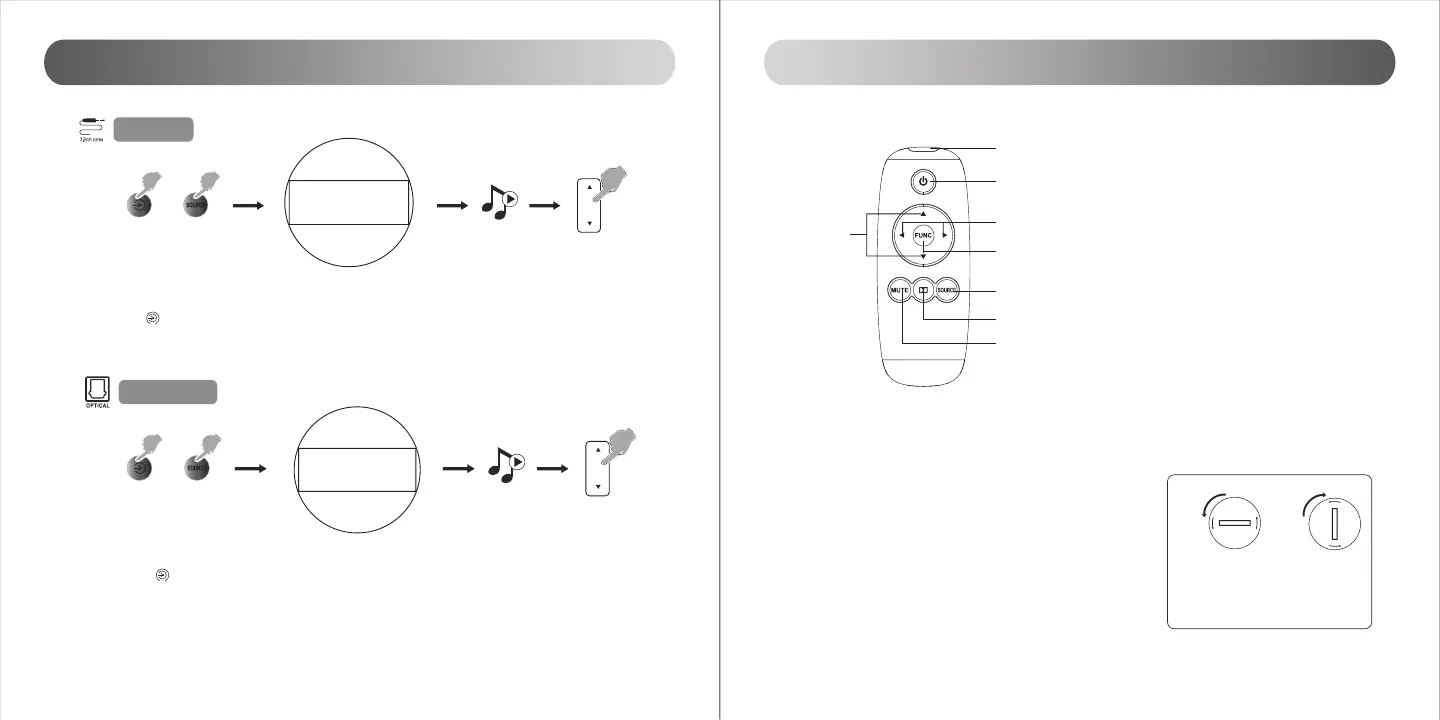
① Connect the “AUX” input on center speaker to your audio source (phone, mp3, mp4, PC etc) using a 3.5mm audio cable
supplied.
② Press the “ ” power display on center speaker or press “SOURCE” key on the remote control to navigate to source; the
audio source indicator on the display will show “AUX”.
③ Play music on the connected device and adjust settings to a comfortable level.
① Connect the “OPT” connector port to your audio source (DVD, etc) using the optical fiber cable supplied.
② Press the “ ” power display on center speaker or press “SOURCE” key on the remote control to navigate to
source; the audio source indicator on the display will show “OPT X”, where “X” coordinates to the input index.
③ Play music on the connected device and adjust settings to a comfortable level.
Note:
1. Only the standard PCM audio signals (44.1/48KHz) function is in optical mode.
Optical input
Operational guide for remote control
① IR Window
② On / Standby
③ Function key
④ Function adjustment
Step 1: press “FUNC” repetitively to navigate
through setting menus
Step 2: press
◄
/
►
to adjust the value of each setting
⑤ Master volume adjustment
⑥ Audio source selector(OPT1-OPT2-OPT3-AUX-OPT1 )
⑦ Dolby Pro Logic II ON/OFF
⑧ Mute
How to load battery:
Insert a coin into the slot and rotate anti-clockwise to open the battery
compartment, install the new CR 2025 battery (+ electrode upturned) and
rotate the cover clockwise to close the compartment.
Note:
1. Do not expose the remote control to extreme heat or humidity.
2. Do not charge the batteries.
3. Remove the batteries when not in use for an extended period of time.
4. Do not expose the battery to excessive heat such as direct sun, fire, etc.
open
close
Installing the battery for the Remote Control:
Insert a coin into the slot and rotate counter-clockwise to open the
battery compartment, install the new CR 2025 battery (+ electrode
upturned) and rotate the cover clockwise to close the compartment.


 To Next Page