2
English
■ Product Description and Accessories
■ User Guide
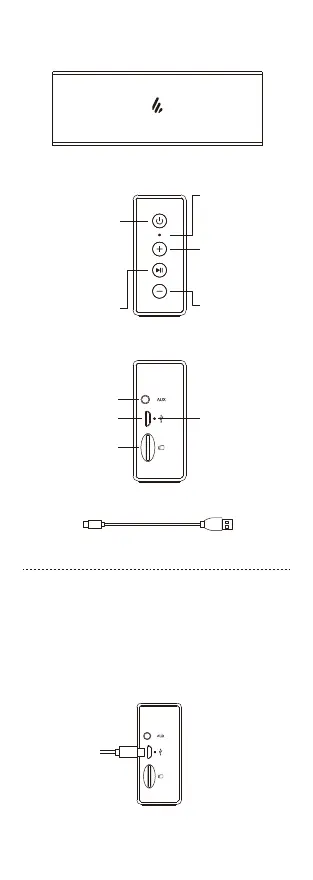
Press: input mode selector
Press and hold:
power on/standby
Double press:
check battery level
Press and hold for 8 seconds:
force a shutdown
Press: play/pause
(Bluetooth / microSD
card mode)
Mute/unmute (AUX mode)
Press and hold:
disconnect Bluetooth
Press: volume up
Press and hold: next track
(Bluetooth/microSD card
mode)
Indicator light
Blue: Bluetooth mode
Green: AUX mode
Red: microSD card mode
AUX input
Charging port
microSD card slot
Press: volume down
Press and hold: previous
track
(Bluetooth/microSD card
mode)
Charging indicator
USB charging cable
● Charge
• You may hear a warning tone when at low battery level, please charge the
speaker.
• If the product with lithium battery has not been used for long periods of time,
please charge the product at least once per 3 months.
Red light steady lit = charging Red light off = fully charged


 To Next Page