Power output: 4W+4W
Peak power: 8W+8W
Frequency response: 100Hz-15KHz
Rated input: 5V 2A
Declaration for EU
Frequency Band: 2.402GHz ~ 2.480GHz
RF Power output: ≤20 dBm (EIRP)
There is no restriction of use.
■ Specifications
EDIFIER MP120
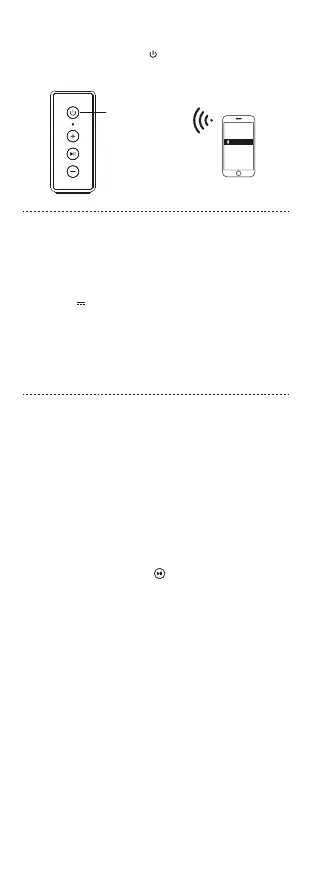
Turn the speaker on
or press to switch to
Bluetooth mode
● Bluetooth Connection
• Turn the speaker on or press the " " button to switch to Bluetooth input;
• Set your mobile phone to search for and connect to "EDIFIER MP120", after
pairing is successful, the blue light will be steady lit.
■ Troubleshooting
No sound
• Check if the speaker is ON.
• Try to turn the volume up using the volume control.
• Ensure the audio cables are firmly connected and the input is set correctly
on the speaker.
• Check if there is a signal output from the audio source.
Cannot connect via Bluetooth
• Make sure the speaker is switched to Bluetooth input. If it is in other audio
input modes, Bluetooth will not connect. Disconnect from any Bluetooth
device by pressing and holding the " " button, then try again.
• Effective Bluetooth transmission range is 10 meters; please ensure that
operation is within the range.
• Try another Bluetooth device for connection.
The MP120 does not turn on
• Check if main power is connected and that the power outlet is working.
Noise coming from speakers
• EDIFIER speakers generate little noise, while the background noise of some
audio devices are too high. Please unplug audio cables and turn the volume
up, if no sound can be heard at 1 meter away from the speaker, then there is
no problem with the product.
To learn more about EDIFIER, please visit www.edifier.com
For Edifier warranty queries, please visit the relevant country page on
www.edifier.com and review the section titled Warranty Terms.
USA and Canada: service@edifier.ca
South America: Please visit www.edifier.com (English) or
www.edifierla.com (Spanish/Portuguese) for local contact information.
3
English


 To Next Page
 Loading...