EasyManua.ls Logo

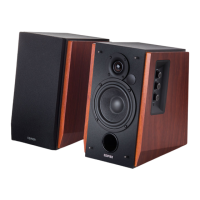
EDIFIER R1280T - User Manual

EDIFIER R1280T
47 pages
Print Icon
To Next Page IconTo Next Page
Loading...
R1280T
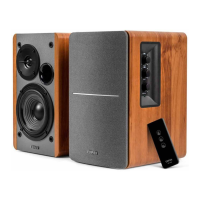
Multimedia Speaker
User manual | Manuel d’utilisateur | Manual de usuario | Bedienungsanleitung | Manuale dell’utente

Questions and Answers

  • A
    Amy TorresJul 27, 2025
    What to do if my EDIFIER R1280T have no sound?
    • M
      Michele FrenchJul 27, 2025
      If your EDIFIER Speakers are not producing any sound, first, verify that the power indicator light is on. Then, increase the volume using the master volume control or the remote. Also, make sure the audio cables are securely connected and the input is correctly set on the speakers. Finally, check that the audio source is outputting a signal.
  • J
    Jennifer CruzAug 10, 2025
    What to do if my EDIFIER R1280T Speakers do not turn on?
    • J
      jonesjacquelineAug 10, 2025
      If your EDIFIER R1280T Speakers won't turn on, make sure that the main power is connected and that the wall outlet is switched on.

Summary

Important Safety Instructions

General Safety Precautions

Detailed safety guidelines for product usage, installation, and handling to prevent common hazards.

Hearing and Environmental Safety

Guidance on safe listening volumes, responsible product disposal, and operational safety precautions.

Power and Electrical Safety

Power Warnings and Symbol Explanations

Details power-related warnings, electrical shock risks, and interpretation of safety symbols.

Unpacking and Box Contents

Included Accessories

Lists the components and cables provided in the product packaging for setup.

Product Illustrations and Components

Speaker Views and Labeling

Diagrams illustrating the front, side, and rear views of the speakers with numbered components.

Remote Control Description

Illustrates the remote control layout and provides instructions for battery installation.

Connectivity and Operation Guide

Connecting the Speakers

Instructions on how to connect the active and passive speakers using the provided cables.

Connecting to Power Outlet

Guidance on connecting the product's AC power plug to a suitable voltage outlet.

Audio Adjustment

Instructions on adjusting volume, bass, and treble levels for desired audio output.

Product Specifications

Technical Details

Provides key technical specifications including power output, frequency response, and dimensions.

Troubleshooting Common Issues

No Sound and Power Issues

Solutions for common problems like no sound output or the unit not turning on.

EDIFIER R1280T Specifications

General IconGeneral
Frequency Response75Hz - 18kHz
Signal to Noise Ratio≥85dBA
Input TypeRCA
Tweeter13mm silk dome
Input Impedance10KΩ
ControlsVolume, Bass, Treble
Input Sensitivity750mV ± 50mV
Bass Driver4 inch
Dimensions146 x 234 x 196 mm (WxHxD)
Speaker TypeActive bookshelf speaker
Weight4.9 kg
FinishWood grain

Related product manuals