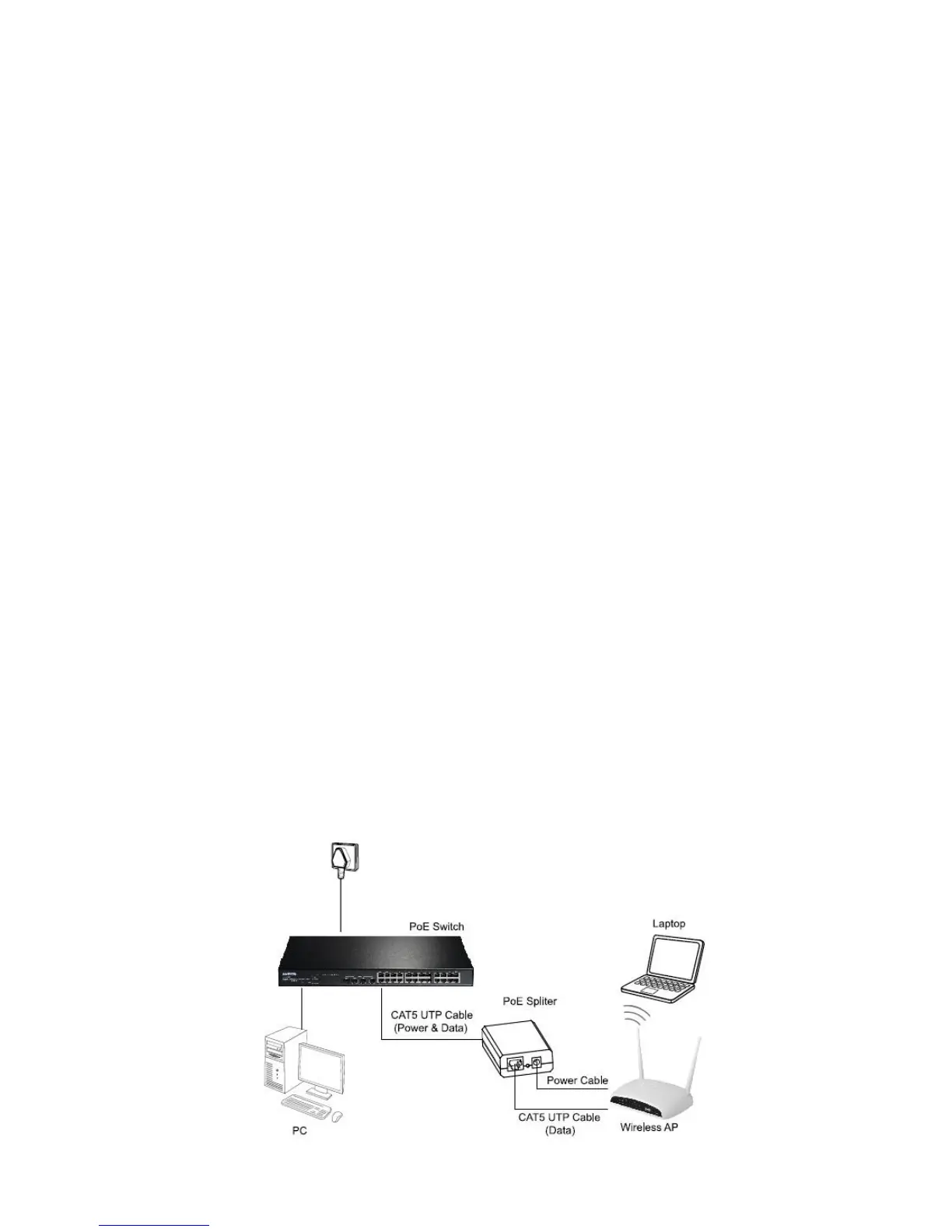
Connecting the PoE Splitter
You can use GP-101SF PoE Splitter with PSE or PoE Injector to expand your
network to where there are no power lines or outlets, where you wish to fix
devices such as APs, IP Cameras or IP Phones, etc. The following steps will tell you
how to connect the PoE Splitter correctly.
1. Use a CAT5 UTP cable to connect a PoE port of the PSE (ex.PoE Switch) to the
POWER+DATA IN port.
2. Choose the appropriate DC output by the Power-mode switch.
N
N
o
o
t
t
e
e
:
:
P
P
l
l
e
e
a
a
s
s
e
e
m
m
a
a
k
k
e
e
s
s
u
u
r
r
e
e
t
t
h
h
a
a
t
t
t
t
h
h
e
e
o
o
u
u
t
t
p
p
u
u
t
t
i
i
s
s
c
c
o
o
r
r
r
r
e
e
c
c
t
t
,
,
a
a
d
d
i
i
f
f
f
f
e
e
r
r
e
e
n
n
t
t
v
v
o
o
l
l
t
t
a
a
g
g
e
e
m
m
a
a
y
y
d
d
e
e
s
s
t
t
r
r
o
o
y
y
t
t
h
h
e
e
d
d
e
e
v
v
i
i
c
c
e
e
.
.
3. Connect the LAN OUT port to the Ethernet device with CAT5 UTP cable for
data transmitting.
4. Connect the DC OUT port to the power port of the same Ethernet device with
the provided power cable.
N
N
o
o
t
t
e
e
:
:
T
T
h
h
e
e
p
p
o
o
w
w
e
e
r
r
o
o
f
f
E
E
t
t
h
h
e
e
r
r
n
n
e
e
t
t
d
d
e
e
v
v
i
i
c
c
e
e
i
i
s
s
s
s
u
u
g
g
g
g
e
e
s
s
t
t
e
e
d
d
t
t
o
o
b
b
e
e
u
u
n
n
d
d
e
e
r
r
1
1
0
0
W
W
.
.
N
N
o
o
w
w
,
,
t
t
h
h
e
e
E
E
t
t
h
h
e
e
r
r
n
n
e
e
t
t
d
d
e
e
v
v
i
i
c
c
e
e
c
c
a
a
n
n
w
w
o
o
r
r
k
k
n
n
o
o
r
r
m
m
a
a
l
l
l
l
y
y
w
w
i
i
t
t
h
h
d
d
a
a
t
t
a
a
a
a
n
n
d
d
p
p
o
o
w
w
e
e
r
r
.
.
T
T
h
h
e
e
t
t
o
o
p
p
o
o
l
l
o
o
g
g
y
y
o
o
f
f
t
t
h
h
i
i
s
s
n
n
e
e
t
t
w
w
o
o
r
r
k
k
i
i
s
s
a
a
s
s
f
f
o
o
l
l
l
l
o
o
w
w
s
s
.
.



 To Next Page