5
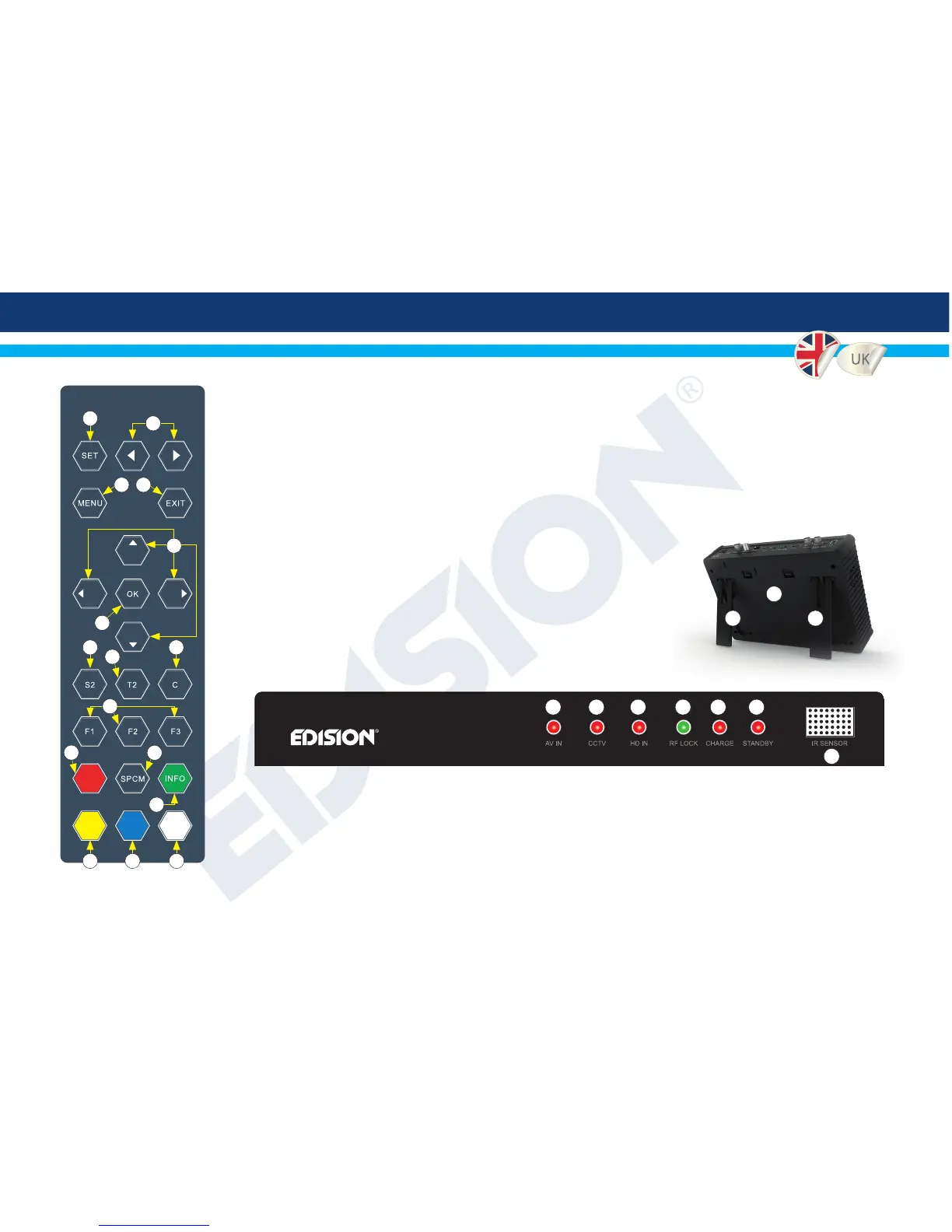
►FRONT PANEL KEYS
►FRONT PANEL LED INDICATIONS
1. Enter monitor OSD menu
2. Monitor OSD menu adjustment keys
3. Enter the main menu
4. Exit or back
5. Navigation, CH & VOLUME keys
6. Enter or submit
7. Start sattellite installation
8. Start terrestrial installation
9. Start cable installation
10. User programmable function keys
F1 default: CVBS Video input
F2 default: Camera Video Input
F3 default: HDMI input
11. Audio menu or other function
12. Start spectrum analyzer
13. Subtitle or user dened
14. Teletext or user dened
15. Change output video resolution
or user dened
16. TV / Radio or user dened
1. Indicates that AV input is in operation
2. Indicates that CCTV input is in operation
3. Indicates that HDΜΙ input is in operation
4. Indicates locking of selected RF channel
5. Indication for charging status
6. Indication for device status
7. IR sensor window
CH+
VOL- VOL+
CH-
1
3 4
2
5
6
7
14 15 16
9
8
10
12
13
11
1 2 3 4 5 6
7
►BACK PANEL
1. Detachable
battery
2. Flat surface stand
2 2
1


 To Next Page