REF. 33968
INSTRUCCIONES IMPORTANTES DE SEGURIDAD
INSTRUÇÕES IMPORTANTES DE SEGURANÇA / IMPORTANT SAFETY INSTRUCTIONS
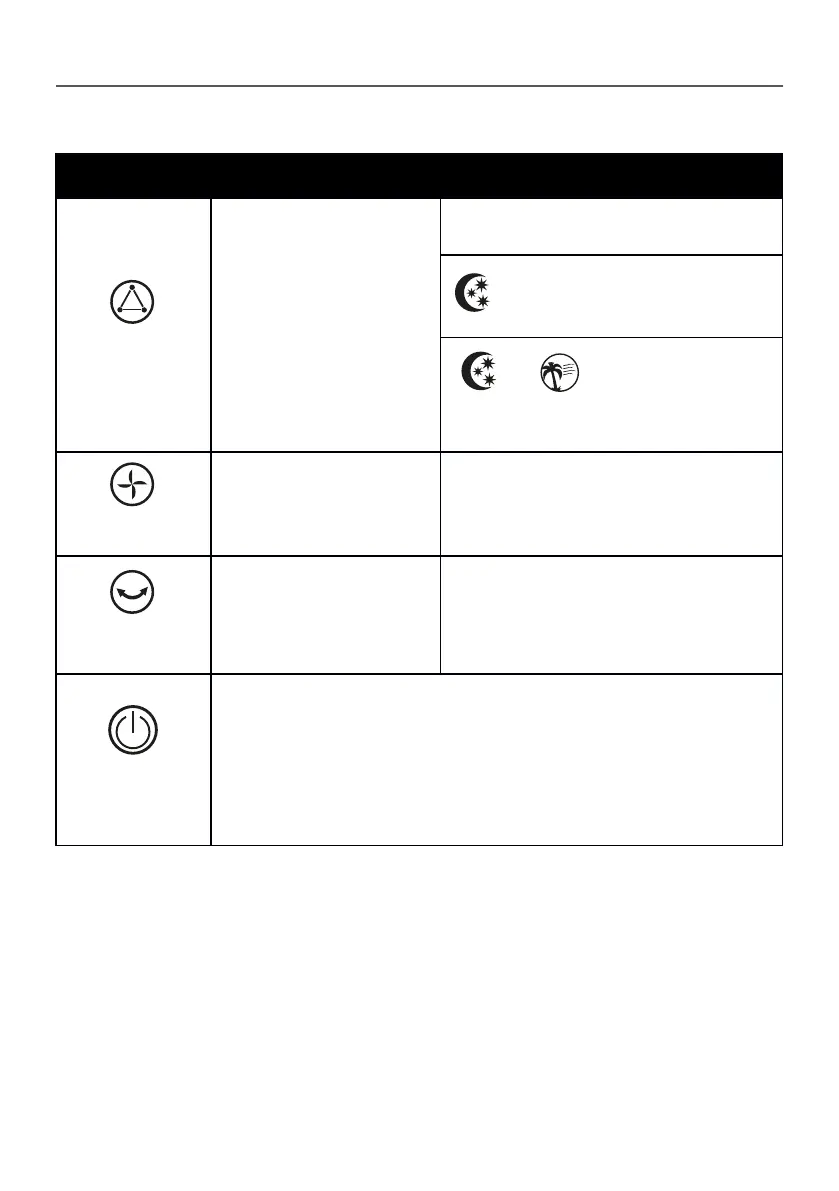
OPERATING INSTRUCTIONS
MODE
SPEED
OSCILLATION
ON / OFF
Pressing this button will cycle
the fan through different
patterns of breeze modes.
Pressing this button will cycle
the fan through 3 comfort
speeds (High/Medium/Low).
This button can be used with
any MODE.
To activate the oscillation
function for widespread
breeze distribution, press this
oscillation button once.
Use this button to turn the fan ON and OFF.
The light at this icon indicates the fan
simulating a NATURAL breeze mode by
cycling through all the speeds.
The light at this icon indicates the fan is
simulating a softer
breeze mode (SLEEP MODE) by cycling one
speed higher and lower, ideal for resting.
and lights are OFF
If both of the above lights are not
illuminated the fan is operating on the
NORMAL mode.
These icons indicate the selected speed
low, medium, high.
The oscillation light on the fan will be
illuminated when activated. Press
button again to turn off the oscillation
function. Oscillation can be controlled
while the fan is operating.


 To Next Page