Quext Smart Thermostat and Lock 5 Installation Guide
Indicators
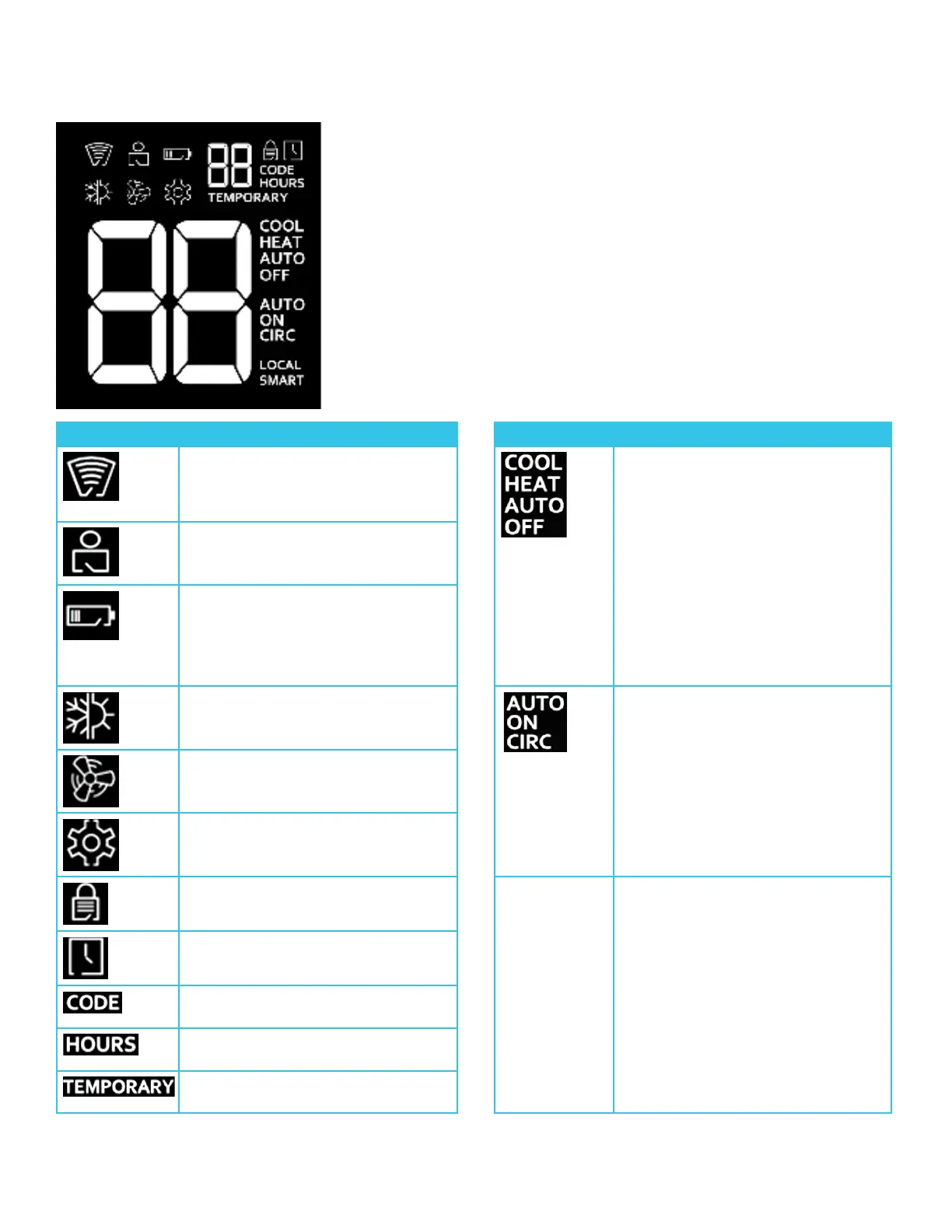
The table below describes each indicator on the thermostat display.
Indicator Description Indicator Description
▪ Solid: Connected to the network
▪ Flashing: Attempting to connect
▪ Dark: No network connection
Thermostat mode
▪ COOL: The system cools to the set
temperature
▪ HEAT: The system heats to the set
temperature
▪ AUTO: The system maintains the
temperature between the upper
and lower set points
▪ OFF: The system is turned off
Property control mode; contact
Property Management
Power issue; contact Property
Management
▪ Solid: AA batteries low
▪ Flashing: 24V power not present
System mode Fan mode
▪ AUTO: The fan operates only while
the system is cooling or heating
▪ CIRC: The fan operates for a set
amount of time every hour to keep
air circulating
▪ ON: The fan operates continuously
Fan active; also menu option to
change fan mode
To set the control method (Smart/
Local)
Operation not allowed
Delay in progress
System error; contact Property
Management
The number displayed is the duration
in hours of the temporary override
The current setting is a temporary
override of the scheduled operation



 To Next Page