8 9
Scrambled Eggs mode, I hear a buzzer sound. What’s wrong?”
1. One of the slide switches may be out of position. Check the position of the
slide switch for each egg to be sure the slide switch is not in between positions.
2. You may have more than one slide switch in the right position. Only ONE
switch can be in the RIGHT POSITION (SELECT), preselecting that egg to be lit
and that player to answer a question.
3. You may have ve or more slide switches turned OFF in the LEFT position.
Check the position of the slide switches to make sure at least two eggs are
active (both set to the MIDDLE (ON) position or one set to the MIDDLE (ON)
and the other set to the RIGHT (SELECT)).
“My students don’t have enough time to answer questions before they
are timed out. Can I give them more time?”
Yes! Set Wireless Eggspert’s TIMER on the Teacher Remote to give students 5, 10,
20, or 30 seconds to answer questions in either “Quiz” or “Scrambled Eggs” modes.
Or, turn the timer OFF and allow them as much time as they need.
OPERATING WIRELESS EGGSPERT
WITH BATTERIES
For the best operation, always use fresh alkaline batteries. Other battery types will
have a shorter life.
Battery Requirements:
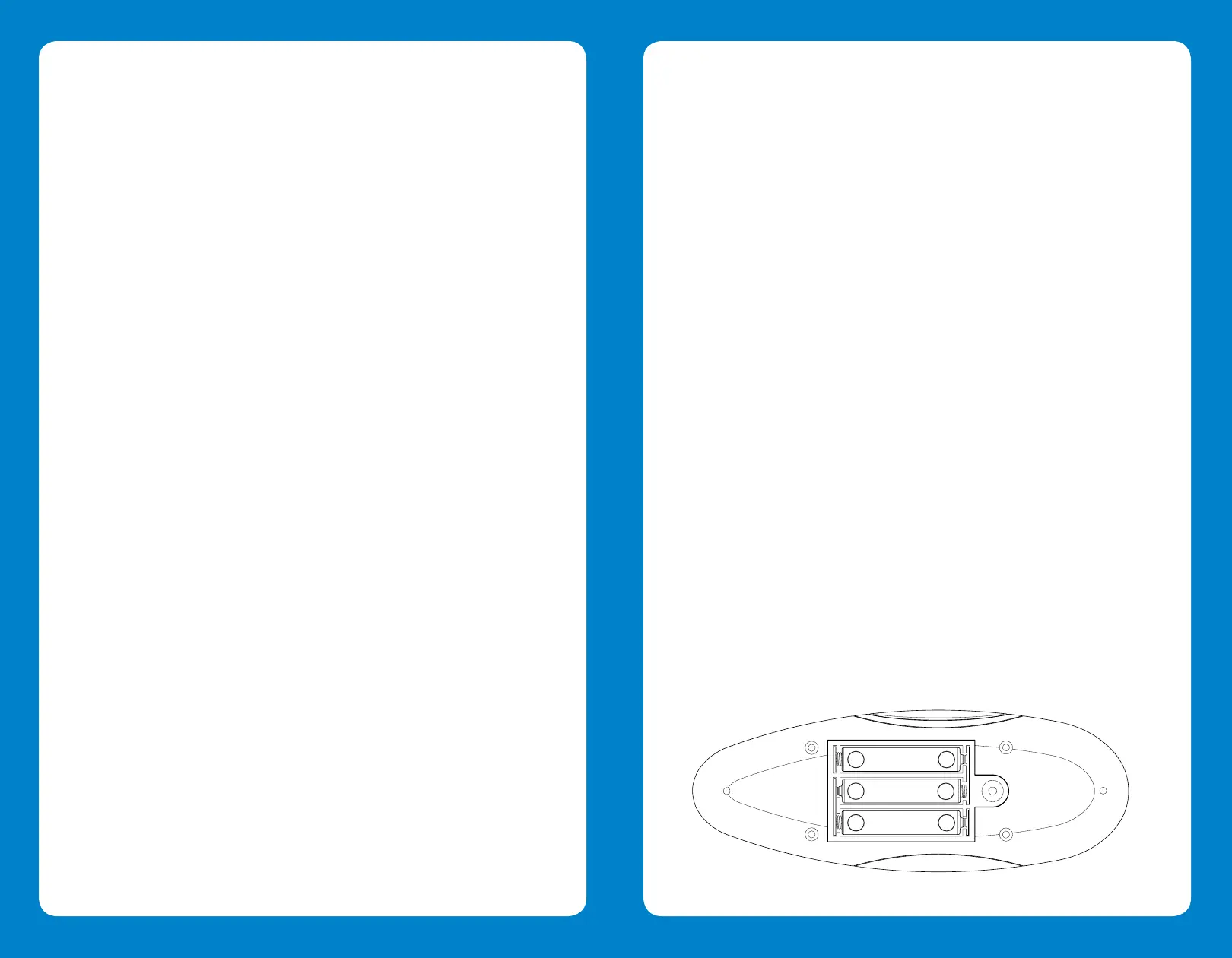
• The Teacher Remote requires 3 AAA batteries.
• Wireless Eggspert requires 4 AA batteries.
• Each Student Answer Button requires 2 AAA batteries (12 AAA batteries are
needed altogether).
1. Carefully open each battery compartment door (located on the bottom of
Teacher Remote, Wireless Eggspert, and each Answer Button) by loosening
the screw holding it in place.
2. Install the required fresh batteries in the battery compartment, carefully
blinking, the participant must throw a tennis ball through the yellow hole before the
timer runs out.
Spin and Throw:
This activity is similar to Spin and Toss. Just substitute balloons and darts or colored
cups oating in a swimming pool pond for the backdrop and ball.
“Teacher, May I?”:
Assign each participant a Wireless Eggspert color and have them line up, shoulder to
shoulder. Set the eggs in motion. If the green egg remains lit, all “green” participants
must follow the teacher’s directions (“Take one giant step forward”). Play continues
until the rst person crosses the line.
TROUBLESHOOTING
“When I turn on the Teacher Remote and Wireless Eggspert, the eggs
light up and remain steady. Wireless Eggspert does not work when an
Answer Button or the Control button on the Teacher Remote is pressed.
What’s wrong?”
You may have turned on the Teacher Remote before Wireless Eggspert (Wireless
Eggspert should always be turned on before the Teacher Remote). Press the Teacher
Remote’s POWER BUTTON to turn it OFF then ON to retransmit the settings to
Wireless Eggspert.
“One (or more) of the eggs on Wireless Eggspert doesn’t light up.
What’s wrong?”
One of the slide switches may be in the wrong position on the Teacher Remote.
Check the position of the slide switch of that egg. Make sure it is in the
MIDDLE POSITION (ON). If you position the slide switch to the left, it turns off the
egg during game play so that it will not light or beep.
“Why is the same egg always chosen to answer in Scrambled Eggs
mode?”
The slide switch for that egg may be in the wrong position on the Teacher Remote.
Check the position of the slide switch for that egg. Make sure it is in the MIDDLE
POSITION (ON). If you position the slide switch to the right, Wireless Eggspert
preselects that egg to be the last egg lit.
“The eggs light up, but there’s no sound.”
You may have the volume set to Mute. Slide the VOLUME switch on the Teacher
Remote to increase the volume so that it is loud enough for everyone to hear.
“When I press the CONTROL BUTTON on the Teacher Remote to start the
8 9
Teacher Remote
+
+
-
-
+
-






 To Next Page