2 / 2 P/N 3100897-EN • REV 05 • ISS 10DEC14
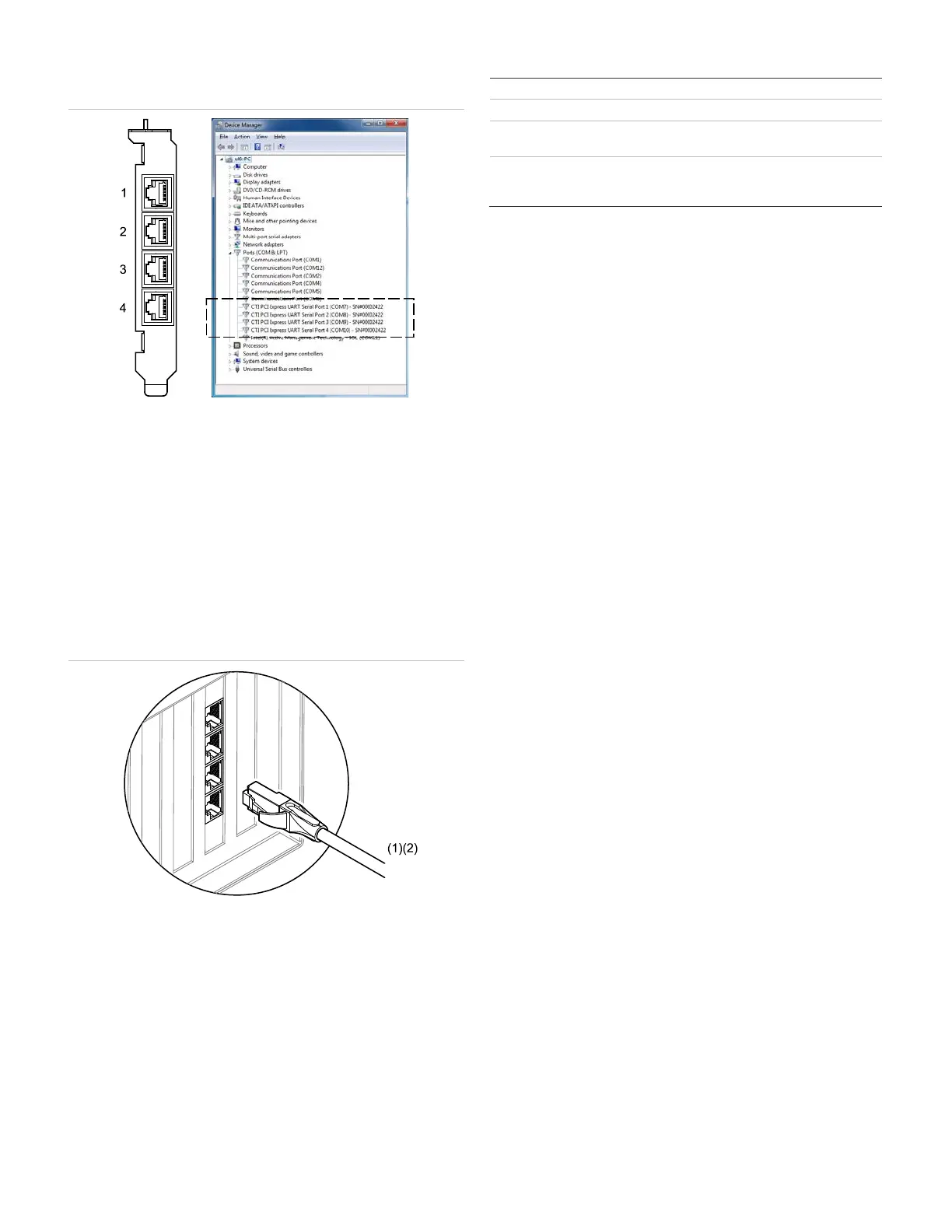
Windows automatically assigns COM ports to the FW-SP4I card serial
ports. See Figure 3.
Figure 3: FW-SP4I COM port assignments
To view the FW-SP4I COM port assignments:
1. Open Windows Device Manager.
2. Double-click Ports (COM & LPT).
3. Look for the devices labeled CTI PCI Express UART Serial Port 1
through 4.
The Windows COM port numbers are in brackets. The FW-SP4I
card serial number is in brackets (SN#0000xxxx).
Cable connections
Connect the RJ-45 to DB9 cable adapters to the FW-SP4I card. See
Figure 4.
Figure 4: RS-232 COM port connections
(1) Communication Security Level 0.
(2) RJ-45 to DB-9 adapter cable supplied with the FW-SP4I card. Limit
connection to the same room, within 20 ft. (6.1 m), and enclose in
conduit or equivalent protection against mechanical injury.
Specifications
One PCI expansion slot
-232 COM ports Four
Each port individually isolated up to 3 kVAC
peak to peak
Temperature
Relative humidity
32 to 120°F (0 to 49°C)
0 to 93% noncondensing
Contact information
For contact information, see www.edwardsutcfs.com
© 2014 UTC Fire & Security Americas Corporation, Inc.
All rights reserved.


 To Previous Page
 Loading...