HOW TO SET THE OVEN CONTROLS
This is a 12- or 24-hour clock according to different specifications. To check the time
while the oven is operating, press the CLOCK button, then the time will be displayed
for 4 seconds in the display.
FOR EXAMPLE: Suppose you want to set the oven clock time to 8:30.
1. Press CLOCK once or twice to select 12 or 24 hour display.
2. Turn MENU/TIME to set 8 o’clock.
3. Press CLOCK button.
4. Turn MENU/TIME to set 30 min.
5. Press CLOCK to confirm the setting.
For microwave cooking, just press the POWER button a number of times to select a
cooking power level, and then use the MENU/TIME dial to set a desired cooking
time. The longest cooking time is 90 minutes.
Select power level by pressing the POWER button.
For example, suppose you want to cook for 1 minute at 450W of microwave power.
1. Press POWER button 3 times.
2. Turn MENU/TIME to 1:00.
3. Press START/QUICK START button.
SETTING CLOCK TIME
MICROWAVE COOKING
Page 14
PRESS POWER
BUTTON
COOKING
POWER
once 900W
twice 750W
3 times 450W
4 times 300W
5 times 150W
6 times
80W
(continued)
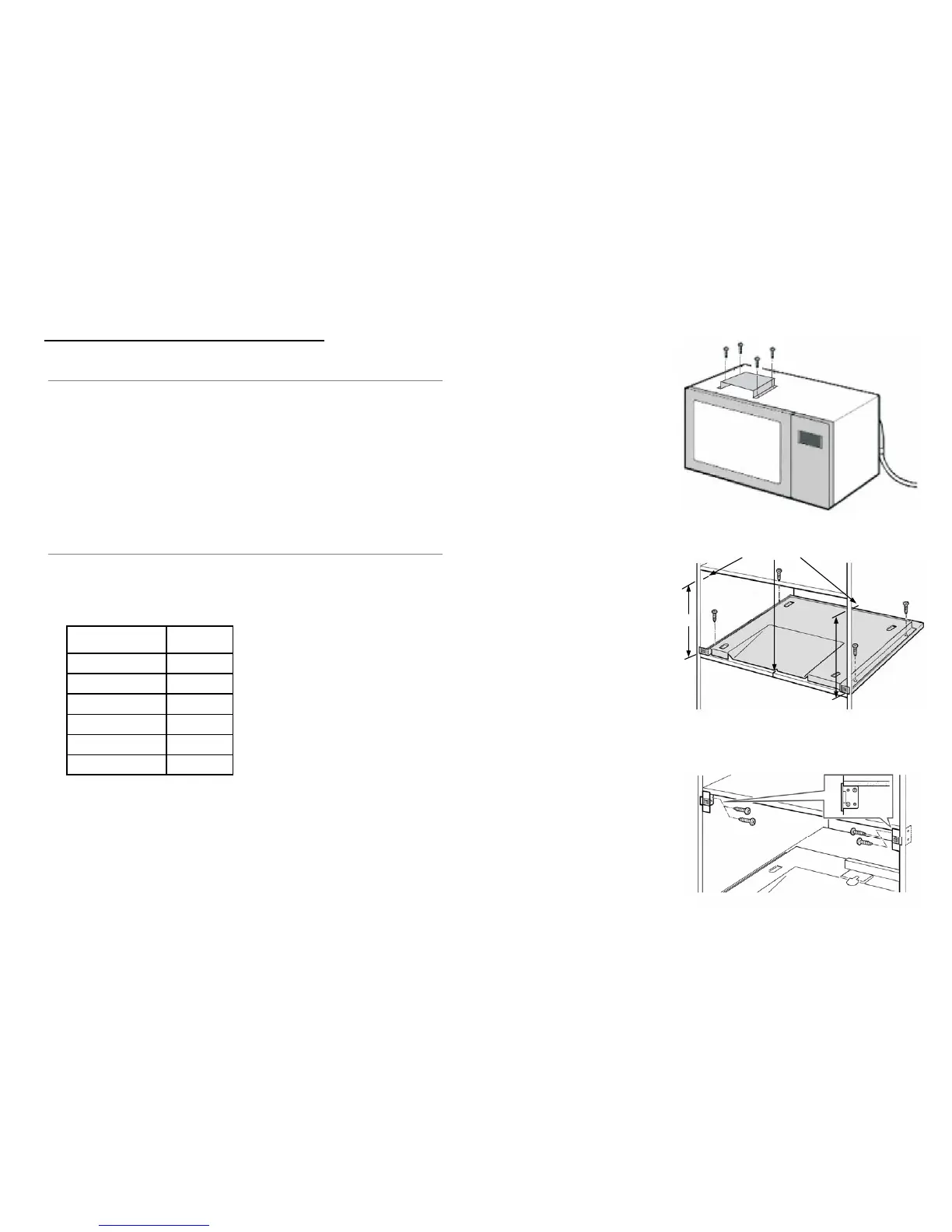
Step 1:
Screw the air duct onto the
microwave according to the
screw holes in place.
Step 2:
Mark the left & right side of
the cabinet. With the ‘Top
mark’ 345mm
±
above the base.
Then mark the center of the
cabinet & match it with the
base panel “V” cut. Once
done, screw the base panel
onto the cabinet.
Step 3:
Screw the left & right clips
onto the cabinet. With the
lowest part of the clip located
above the ‘Top mark’ or
345mm
± above the base.
Page 7
345mm ±
Place Marking



 To Next Page