37
2. PROGRAMS
2.1 Schedule Day
Press
or to navigate between week days. Press OK to select or
to go back.
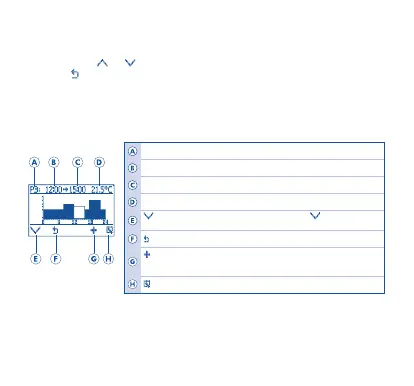
Once the day has been select, the following screen will appear:
Note: By default, every day is programmed for one period (00:00 to 24:00), with
default temperature set to 20°C. Programmed days are signalled.
Schedule Day
Period starting time
Period ending time
Temperature set for period
Navigate
t
hrough periods (P1 to P7). Press to navigate
through sch
ed
ules
G
o
back
Add
period
Note: 7 time periods (programs) can be individually programmed for each day, with
different temperatur
es.
Edit
period


 To Next Page