38
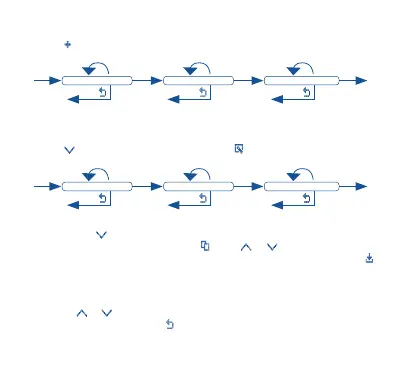
Add Period:
Press to add a program/period for the day:
< or >
OK OK OK
< or > < or >
Start Time for Period End Time for Period Temperature for Period
Save
ExitExit Exit
Note: 7 time periods (programs) can be individually programmed for each day, with different
temperature values.
Edit Period:
Press to select period and edit, and press to enter editing mode.
< or >
OK OK OK
< or > < or >
Start Time for Period End Time for Period Temperature for Period
Save
ExitExit Exit
2.2 Copy Program
Press to navigate between days and select the day you want to copy
the schedule from and press . Press or navigate between days
and select the day you want to paste the copied schedule. Press to
paste.
3. ADVANCED SETTINGS (For installation only)
Insert security code to proceed
Press or to select security code numbers. Press OK to accept and move
on to the next number, or to go back.
The default security code to access the settings is “1234”.
Note: In the event that a wrong code is entered, an error message will appear.


 To Next Page