Need help?
Do you have a question about the effegibi Touch & Steam 30 and is the answer not in the manual?
Provides a guide to the proper use and maintenance of the steam generator.
Details for identifying the generator, including type, model, and markings.
Provides contact information and address for EFFEGIBI S.R.L.
Explains hazard, caution, and important information symbols used in the manual.
Specifies intended use and warns against unauthorized modifications or improper operations.
Recommends medical advice, outlines age restrictions, and specifies conditions for use.
Details prohibited uses, supervision requirements, and electrical appliance restrictions.
Details actions to avoid, such as removing labels, using unauthorized equipment, or blocking outlets.
Provides instructions for the proper disposal and recycling of the equipment according to EU directives.
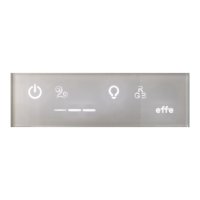
Explains how to use buttons, including switching on/off and holding for functions.
Describes the generator's standby mode, display indications, and how to activate it.
Explains how to use the ON/OFF button to switch on all control panel functions.
Details how to start steam generation, automatic cleaning, and interrupt steam emission.
Explains the aromatherapy feature and the use of essential oils with the generator.
Explains the warm air function and how to set the desired temperature for dry heat.
Details how to switch the bright white light on and off.
Details how to select fixed colours and tonal variation programmes for the light.
Specifies that colour-therapy operation is from the generator panel if an external panel is fitted.
Details the initial steps for the start-up sequence involving temperature controls and ON/OFF button.
Continues the start-up sequence involving the Hammam/Turkish bath button.
Details how to activate the ECC function by holding the ON/OFF button.
Explains how to deactivate ECC and mentions limitations for cable-operated remote activation.
Explains how to programme the Hammam to switch on at a specific time via the app.
Describes the automatic internal boiler cleaning process and its signal.
Emphasizes that maintenance must be performed by qualified personnel and safety precautions.
Explains the internal system for signalling scheduled maintenance based on usage and water hardness.
Describes critical errors that prevent normal operation and how to handle them, including start-up sequence.
Lists non-critical errors that can occur during operation and provides troubleshooting steps.

 To Next Page
 General