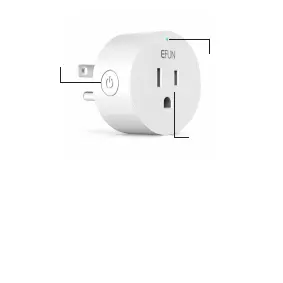
Power
Button
Smart
Outlet
LED
3
See the explanation below:
Through Short press the power button, the blue LED
light up and the plug can work. If the blue led turns
off, the plug can't work.
Configuring device:
When you press and hold the power button for about
5 seconds.The blue indicator light flashes.After the
link to WiFi is successful, the blue indicator is always
on, you can use Smart Life APP is remotely operated


 To Next Page