1
4
1
2
1
2
2
1
2
1
2
3
27
Programming, settings and user manual
SETTINGS
VOL MUSIC
VOL PAGING
CHIME
EQUALIZER
AUTOSCAN
BACKLIGHT
VOL PAGING
ZONE 1
ZONE 2
ALL
VOL PAGING
ZONE 1
ZONE 2
ALL
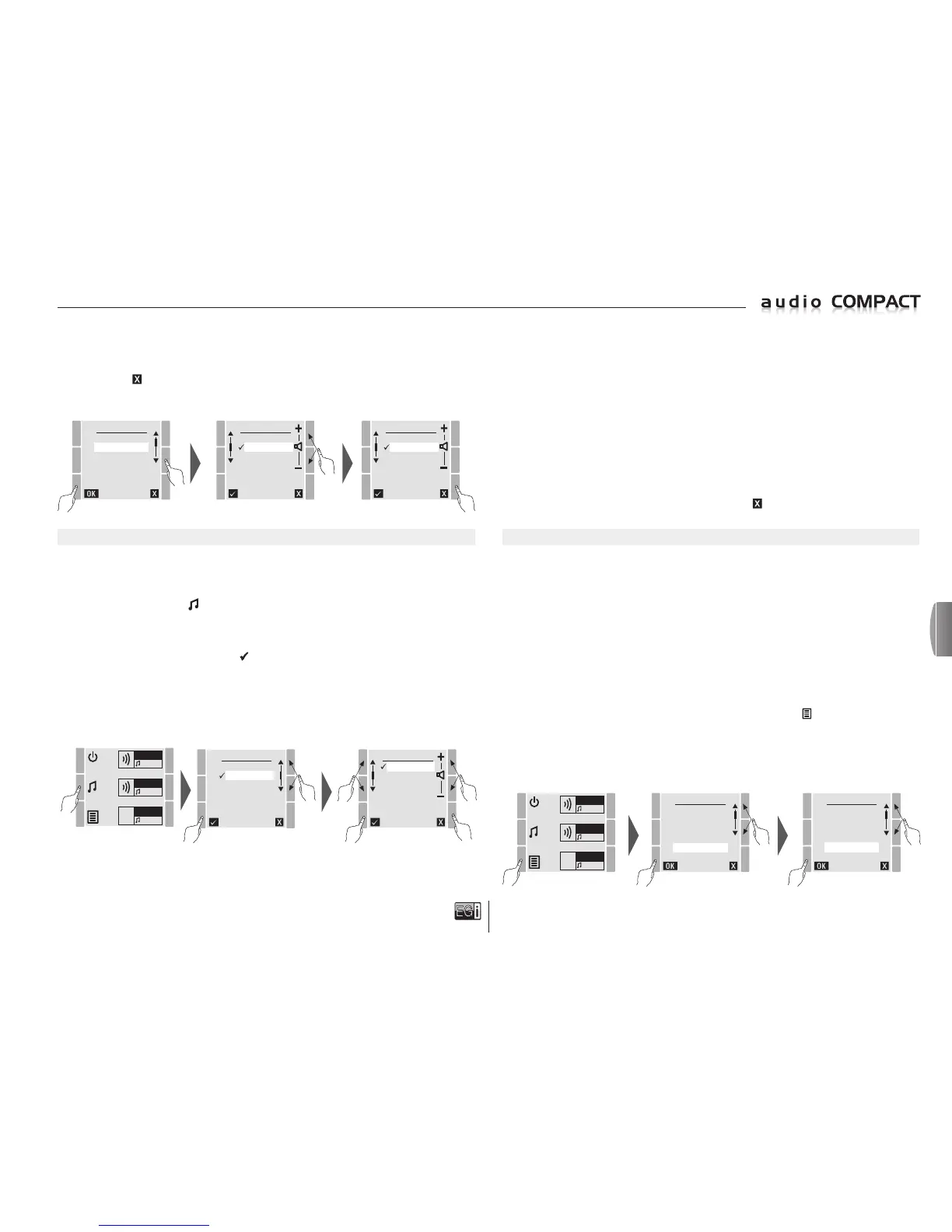
CONTROLLING AND SWITCHING OFF MUSIC BY ZONES
The 10401 console allows one music source per zone to be activated/deactivated and selected. This
means that the same music source can be chosen for all the zones or one music source per zone and
the volume of the music can be changed for each ZONE or for ALL zones.
Press the quick access key to control these options.
On the zones screen, select the ZONE to be modified or press ALL for the changes to be applied
to all the zones at the same time.
When the zone has been selected press to access the zone options.
Once in the ZONE, select the sound source to be played in that zone, either Radio FM, MP3, AUX
or choose the NONE option and change the music volume by zones.
RADIO FM: If you select RADIO FM, music will be played from the built-in FM/ RDS tuner
.
Select the radio station from the FM LIST or in the MANUAL FM mode on the main menu,
to choose the desired preset station.
ZONE 1
FM
ZONE 2
MP3
ZONE 3
AUX
SELECT
ZONE 1
ZONE 2
ZONE 3
ALL
ZONE 2
RADIO FM
MP3
AUX.
NONE
AUX: Selecting AUX, the zone plays music from the rear 3.5 mm female ST jack.
Any sound source can be connected at the AUX jack: CD, DVD, mixer tables PC, laptop PC,
tablet, MP3 player or mobile phone.
NONE: Selecting NONE, there will be no sound for the zone and the unit will remain on
stand-by to broadcast messages.
NOTE: Microphone announcements or messages will take priority over music or OFF status in
all zones.
Remember that you cannot change music volume or equalization in zone 3 as it has a
MILLENNIUM output with fixed outputs that can only be changed via the 1204 or 1205
control units.
After selecting the audio sources and volume, press the
key to exit the MENU.
CONTROLLING SOUND SOURCES
The 10401 console, has some built-in sound sources that allow you to place it anywhere. This way
it is not necessary to add external devices auxiliaries. To choose music between the sound sources,
follow the next instructions:
FM/RDS RADIO TUNER: The unit has an FM tuner with an RDS scanner to display the names
of the radio stations.
Up to 30 radio stations can be memorized, and there is the option of editing or deleting
them by means of scanning and automatic memorization (AUTOSCAN) or scanning and
manual memorization (MANUAL FM).
NOTE: AUTOSCAN automatic memorization has already been carried out during the initial SETUP.
T
o perform AUTOSCAN memorization agai,n follow the steps indicated below:
To automatically memorize radio stations press the MENU key , select SETTINGS and
press OK.
In SETTINGS select AUTOSCAN and press OK.
NOTE: This operation may take 1 or 2 minutes since once the unit has memorized the stations it
will scan for their names by RDS. If there is no name, the unit will save the radio frequency
.
ZONE 1
FM
ZONE 2
FM
ZONE 3
FM
MENU
FM LIST
USB MP3
MESSAGE
MANUAL FM
SETTINGS
VERSION
SETTINGS
VOL MUSIC
VOL PAGING
CHIME
EQUALIZER
AUTOSCAN
BACKLIGHT
In the SETTINGS MENU, select the MESSAGE VOL option and press OK.
In MESSAGE VOL, select the zone for which you want to change the message volume.
Once you have modified the volume you can go to another zone to change the volume or
press the
key to exit.
NOTE: Remember that you cannot change music volume or equalization in zone 3 as it has a
MILLENNIUM output with fixed outputs that can only be changed via the 1204 or 1205 control units.
MP3: Selecting MP3, the zone plays music from the side USB flash drive. Select USB MP3 on the
main menu to select the songs to be played.
en


 To Next Page
 Loading...