2
1
2
1
2
1
2
1
2
1
3
28
Programming, settings and user manual
The unit will automatically select the 30 radio stations that have the best reception.
AUTOSCAN
NEW
FM LIST
27/30
KISS FM
SETTINGS
VOL MUSIC
VOL PAGING
CHIME
EQUALIZER
AUTOSCAN
BACKLIGHT
ZONE 1
FM
ZONE 2
FM
ZONE 3
FM
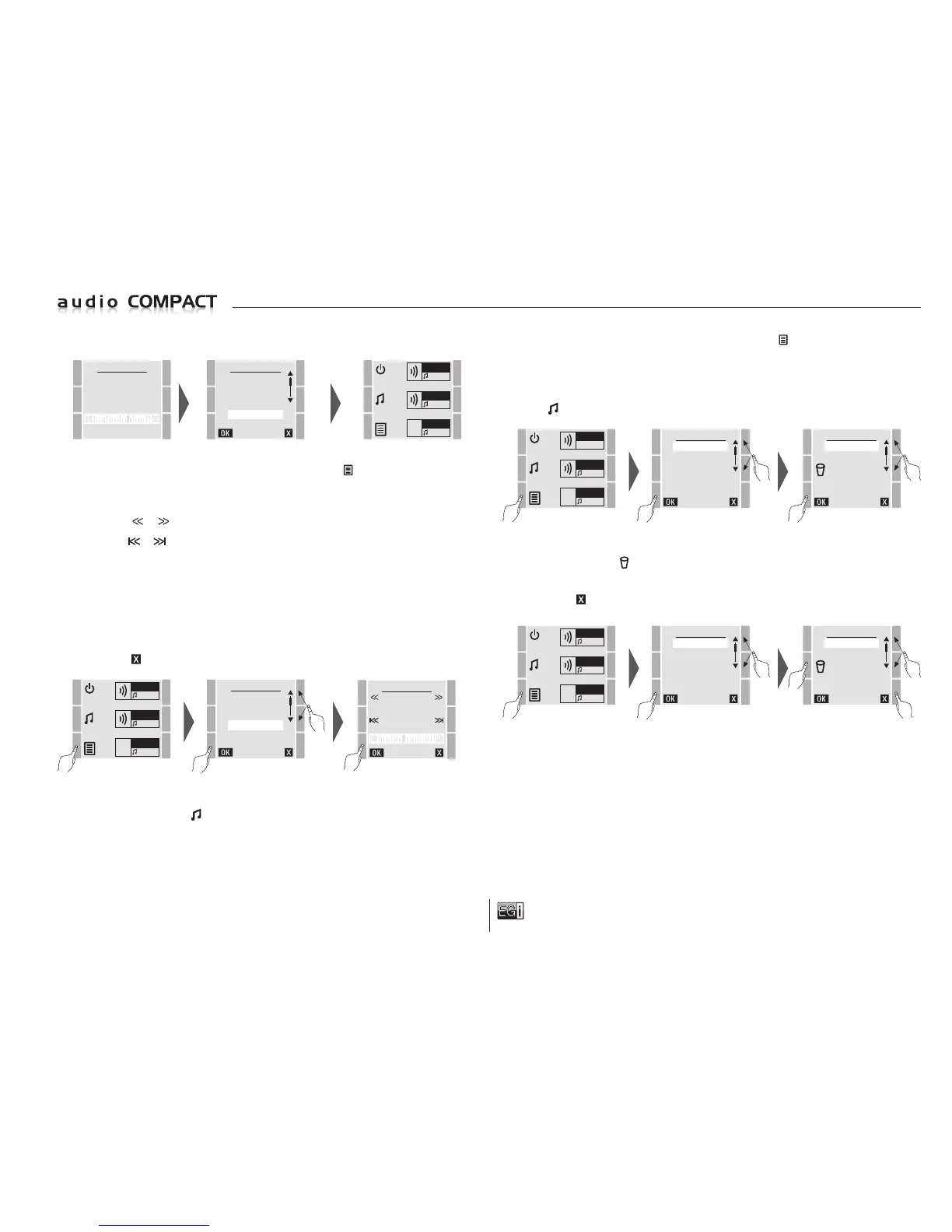
To memorize radio stations manually, press the MENU key , select MANUAL FM and
press OK.
On the MANUAL FM screen you can scan for a radio station in two ways:
Using the or keys to manually move backwards or forwards on the dial 0.1 by 0.1 MHz.
Using the or keys to automatically move backwards or forwards until a radio station with
a minimum level of reception is found.
Once the required radio station has been located, the dial will display it in MHz and a few moments
later the RDS name of the radio station will appear at the top (provided that the radio station
broadcasts on RDS or it is properly tuned in).
When the name is displayed, memorize it by pressing the OK key.
Once the radio station has been memorized it can be displayed or chosen on the FM LIST menu.
To exit press
.
ZONE 1
FM
ZONE 2
FM
ZONE 3
FM
MENU
FM LIST
USB MP3
MESSAGE
MANUAL FM
SETTINGS
VERSION
MANUAL FM
ONDA CERO
99.4
ZONE 1
FM
ZONE 2
MP3
ZONE 3
FM
MENU
FM LIST
USB MP3
MESSAGE
MANUAL FM
SETTINGS
VERSION
To select and listen to a radio station, press the MENU key and select the FM LIST
option and press OK.
In the FM LIST option, select the required radio station and press OK.
When a radio station has been selected from the FM LIST it will be played in all of the zones
where
FM is selected.
FM LIST
HIT FM
MAXIMA FM
RNE 3
ONDA CERO
CAD-100
KISS FM
To delete any of the 30 preset stations, enter the FM LIST menu, select the station to be
deleted and press the key.
Each time a station is deleted, another can be recorded in the memory.
To exit press .
ZONE 1
FM
ZONE 2
MP3
ZONE 3
FM
MENU
FM LIST
USB MP3
MESSAGE
MANUAL FM
SETTINGS
VERSION
FM LIST
HIT FM
MAXIMA FM
RNE 3
ONDA CERO
CAD-100
KISS FM
MP3 MUSIC PLAYER: This unit includes a music player via a USB flash drive input that allows
MP3 or WAV file formats or extensions to be played.
There are different types of storage memory: solid-state or hard disk drives.
Remember that the output is 150 mA maximum so solid-state memories are recommended.
To play and select music from this USB input, follow the steps indicated below.
T
o select and listen to the 30 preset stations, select the required radio station as follows. It will be
available in the zones for which
FM has been selected.


 To Next Page
 Loading...