2
1
29
Programming, settings and user manual
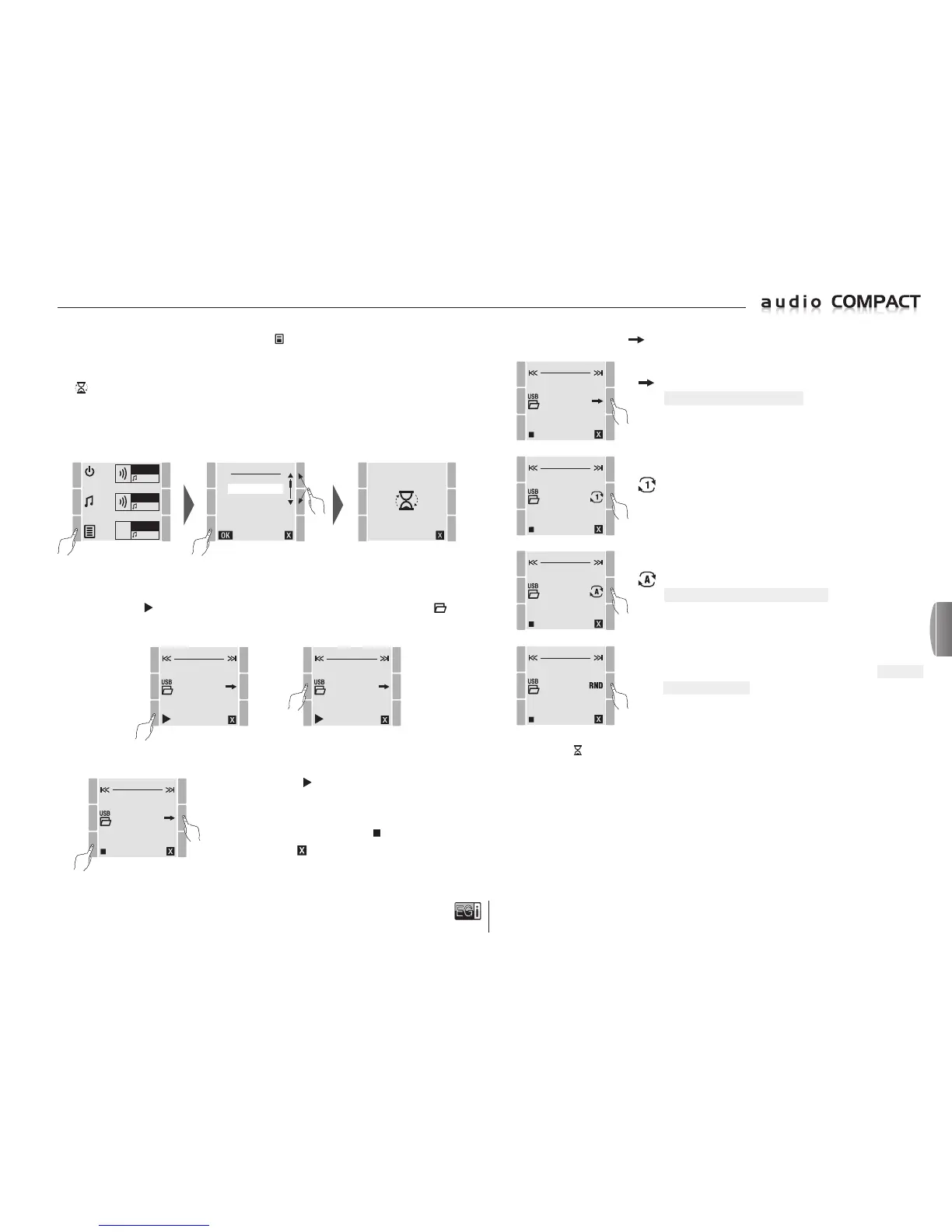
To activate the USB player, press the MENU
key and select the USB MP3 option, then
press OK.
While the system is updating folders, sub-folders and files in the memory, a moving hourglass
is displayed on the screen.
Wait a few seconds until updating is completed.
Check that you have connected a flash drive in the USB input otherwise an error message will
be displayed.
ZONE 1
FM
ZONE 2
MP3
ZONE 3
FM
MENU
FM LIST
USB MP3
MESSAGE
MANUAL FM
SETTINGS
VERSION
USB:\
COLD PLAY MAGIC
Once inside the player there are two options.
Press the PLAY key to play music from the first accessible file, or press the USB key to
access the folder menus.
USB:\
COLD PLAY MAGIC
USB:\
COLD PLAY MAGIC
00:03
If you press PLAY the system begins to play music in the
zones for which the MP3 has been selected. The timer starts
and several options are available.
To stop the music, press the STOP key.
To exit press the key.
Normal mode. All the songs in the memory are played from
all the folders and sub-folders, until it returns to the first
song and stops.
USB:\
COLD PLAY MAGIC
00:03
Another option is to press the key to change the playing mode.
1 song repetition mode. Plays the song selected over and over.
USB:\
COLD PLAY MAGIC
00:03
Repetition of all songs mode. Plays all the songs from the
currently selected directory or folder over and over.
USB:\
COLD PLAY MAGIC
00:03
NOTE: When the symbol is displayed, the unit is searching for "MP3" or "WAV" type files.
RND RANDOM or SHUFFLE. Random repetition of all the songs
in the USB memor
y regardless of the directory (folder) where
they are located.
USB:\
COLD PLAY MAGIC
00:03
or
en


 To Next Page
 Loading...