2
2
1
1
2
1
3
1
2 2
1
2
1
2
1
31
Programming, settings and user manual
SOFTWARE VERSION
T
o view the software version of your console, follow the instructions indicated below:
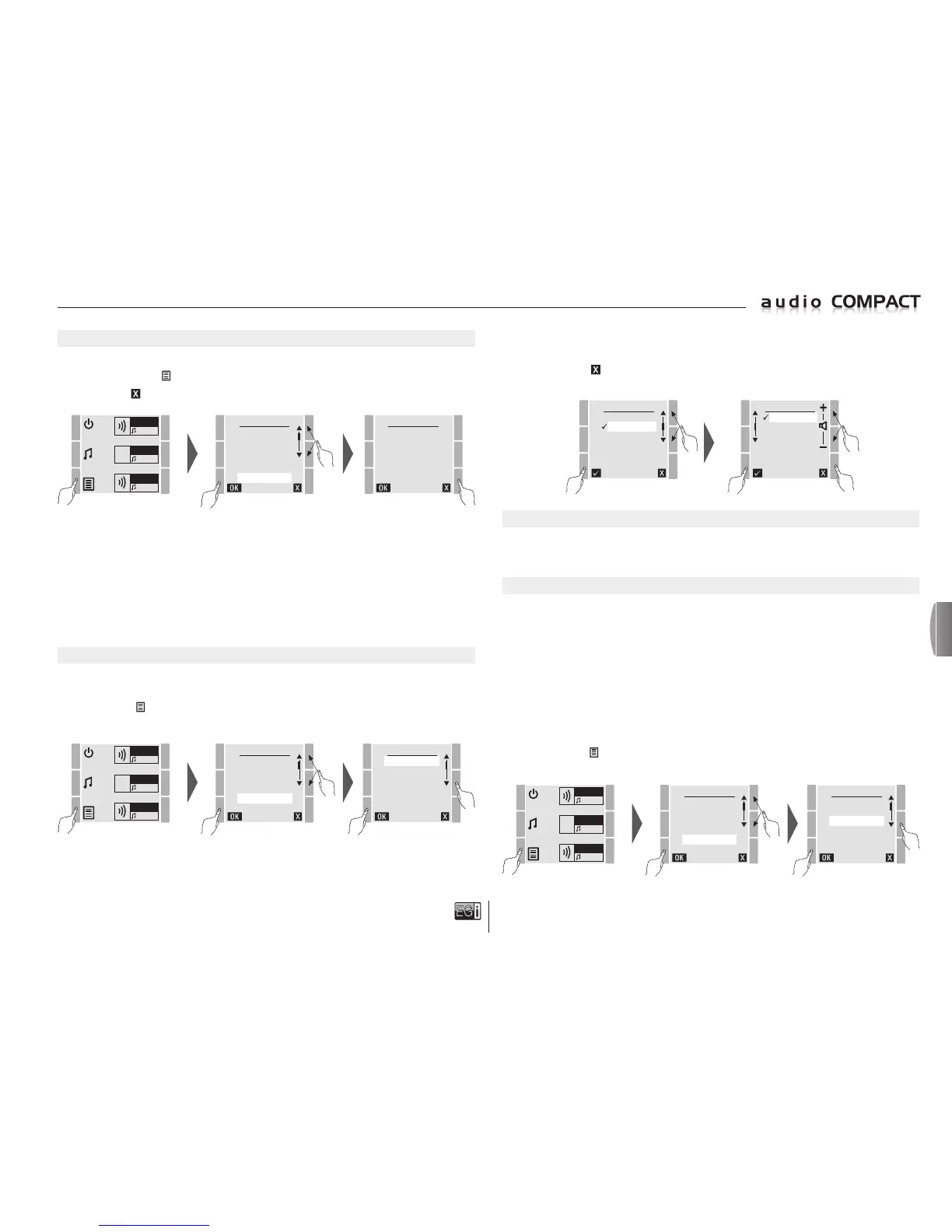
Press the MENU key
and select the VERSION option. Press OK to confirm.
To exit press .
MENU
FM LIST
USB MP3
MESSAGE
MANUAL FM
SETTINGS
VERSION
FW: 1 (console software version)
HW: 2 (console hardware version)
SN: XXXXXXX (console serial number)
RSSI: 02 (level of reception of console FM tuner)
Dat: Jun 15 2014 (console date of manufacture)
Settings
MUSIC VOLUME
There are two ways to change the volume of the music in each zone:
Read the "CONTROLLING AND SWITCHING OFF MUSIC BY ZONES" section on page 27.
Or enter MENU
and select SETTINGS. Press OK to confirm.
In SETTINGS select VOL MUSIC. Press OK to confirm.
VERSION
FW: 1 HW: 2
SN:XXXXXXX
RSSI: 02
Dat: Jun 15 2014
ZONE 1
FM
ZONE 2
FM
ZONE 3
FM
MENU
FM LIST
USB MP3
MESSAGE
MANUAL FM
SETTINGS
VERSION
ZONE 1
FM
ZONE 2
FM
ZONE 3
FM
SETTINGS
VOL MUSIC
VOL PAGING
CHIME
EQUALIZER
AUTOSCAN
BACKLIGHT
The zone selection screen is displayed and one zone can be chosen to change the volume or ALL of
the zones can be selected to apply the change to all of the zones at the same time.
To change the volume for one or all of the zones, select the zone and press OK.
In the ZONE screen, change the volume using the 2 keys at the top right.
To exit press the
key.
When you exit the screen the volume will be memorized.
SELECT
ZONE 1
ZONE 2
ZONE 3
ALL
ZONE 2
RADIO FM
MP3
AUX.
NONE
MESSAGE VOLUME (VOL PAGING)
To modify the volume of the messages in each zone:
Read the "SELECT MESSAGE VOLUME" section on page 26.
CHIME
The COMPACT 10401 console allows you to modify and manage the type of DIN-DON that preceeds
messages.
DIN-DONS are short fragments of musical notes that alert listeners so that they pay attention to the announcement
or spoken message that is about to be broadcast.
Via the console you can select whether or not you want a DIN-DON and the type of DIN-DON.
The default DIN-DON is called STANDARD and it consists of 2 short, easily recognizable xylophone-type notes.
However, this console allows users to access and change the DIN-DON for a preferred one via the SD
micro card. This function is ideal for establishments that want to have the same DIN-DON notes.
Proceed as follows to modify the type of DIN-DON:
Press the
MENU
and select SETTINGS. Press OK to confirm.
Within SETTINGS select CHIME. Press OK to confirm.
MENU
FM LIST
USB MP3
MESSAGE
MANUAL FM
SETTINGS
VERSION
ZONE 1
FM
ZONE 2
FM
ZONE 3
FM
SETTINGS
VOL MUSIC
VOL PAGING
CHIME
EQUALIZER
AUTOSCAN
BACKLIGHT
en


 To Next Page
 Loading...