1
2
1
2
1
2
2
1
2
1
1
2
1
3
2
32
Programming, settings and user manual
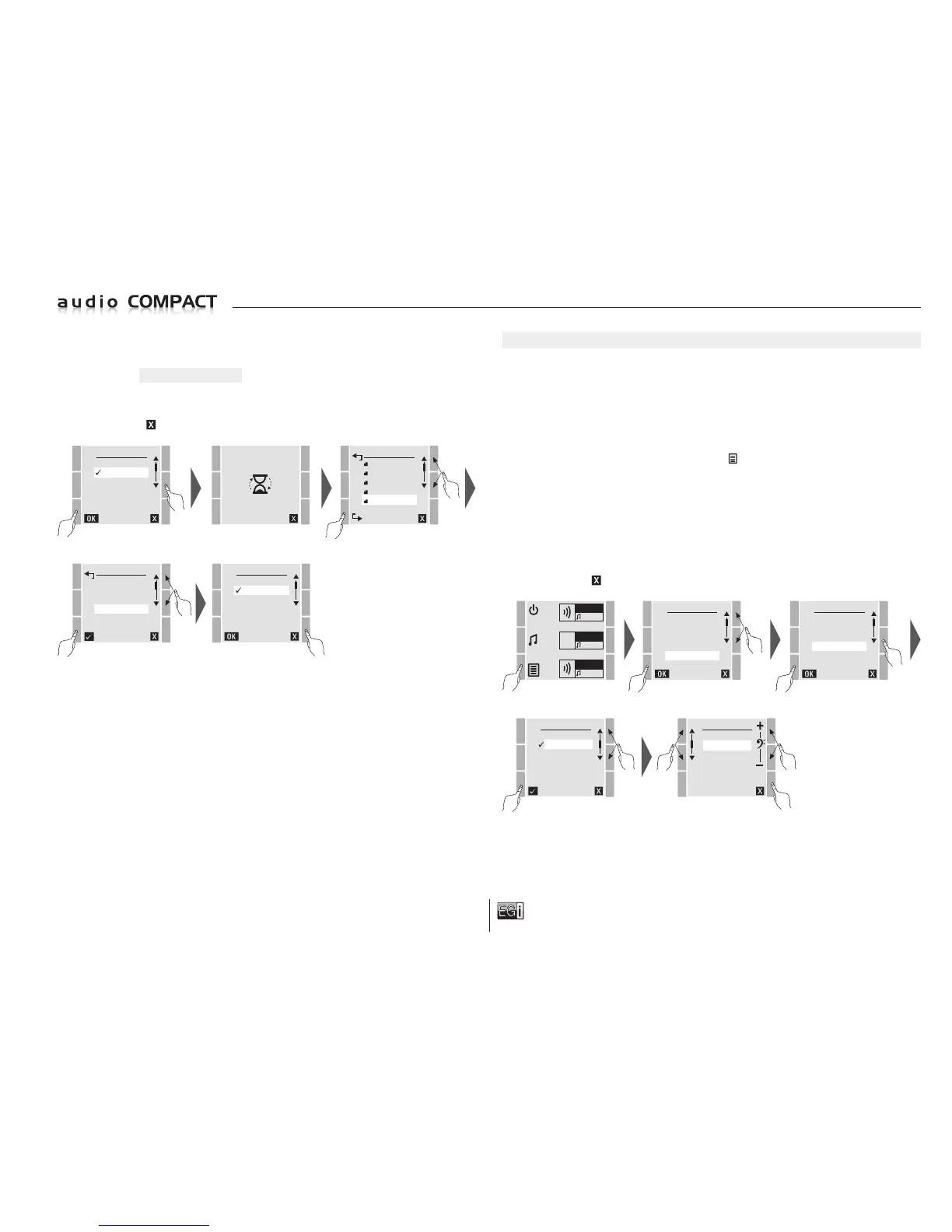
Inside the CHIME settings there are 3 options:
Select the ST
ANDARD option to keep the standard DIN-DON setting (2 xylophone notes).
Select NONE for no DIN-DON to be played.
Select the SD DIN-DON option to access the root folder of the micro SD card and to select the
DIN-DON you have predefined.
To exit press the
key.
SD:/
OFFERS
NOVELTIES
CLOSING TIME
OPENING
DIN-DON
CHIME
STANDARD
SD DIN-DON
NONE
CHIME
STANDARD
SD DIN-DON
NONE
FLUTES
CHIME
BELLS
VIOLINS
DRUMS
FLUTES
NOTE: If a predefined DIN-DON from the SD micro card is selected, every time that a microphone
message is generated and the SD DIN-DON is played, the MP3 player will stop to play this DING
DONG in the zones selected for the message and when it is over, it will play music again in MP3
USB.
Once the predefined DING DONG has been selected it will be visible at the bottom right of the
screen; in this example FLUTES will be displayed.
Remember that if a predefined long-play DIN-DON is selected, each time that there is a message
to be broadcast the console will play the whole of the selected file time.
EQUALIZING
One of the great features of the 10401 console is the possibility of adjusting treble and bass tones
separately for each zone.
Apart from being able to carry out equalization by zones, the software allows you to equalize 2 zones
together.
NOTE: Remember that you cannot change music volume or equalization in zone 3 as it has a
MILLENNIUM output with fixed outputs that can only be changed via the 1204 or 1205 control units.
To enter equalization setting, press the MENU key
and select the SETTINGS option. Press OK
to confirm.
Within SETTINGS select the EQUALIZER option and press OK to confirm.
On the screen displayed you can select the ZONE to be individually equalized or select ALL to
equalize the 2 zones at the same time.
Within the ZONE or ALL, the unit allows ±12 dB settings for trebles and basses. The treble setting
is ±12 dB at 10 KHz, and bass setting ±12 dB at 100 Hz .
To exit press the key.
MENU
FM LIST
USB MP3
MESSAGE
MANUAL FM
SETTINGS
VERSION
ZONE 1
FM
ZONE 2
FM
ZONE 3
FM
SETTINGS
VOL MUSIC
VOL PAGING
CHIME
EQUALIZER
AUTOSCAN
BACKLIGHT
SELECT
ZONE 1
ZONE 2
ALL
EQUALIZER
TREBLE
BASS
04
ZONE 2


 To Next Page
 Loading...