2 2
1
2 2
1
1
1
1
33
Programming, settings and user manual
AUTOSCAN
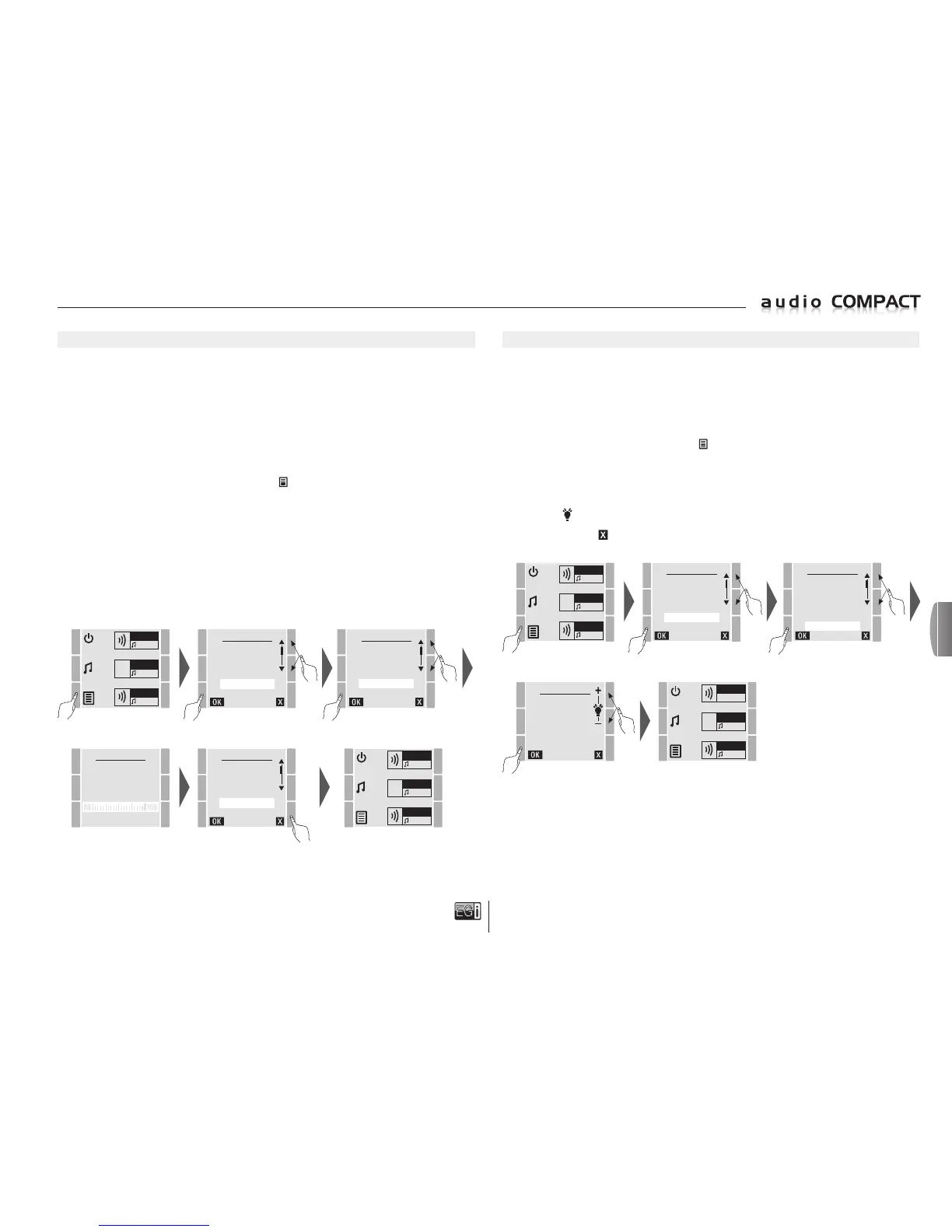
The AUTOSCAN process consists of automatically selecting the best 30 radio stations, located by the
tuner according to the quality of signal reception.
When AUTOSCAN is activated the tuner scans between 87.5 MHz and 108.0 MHz memorizing the
best 30 radio stations, adding the names of the stations via RDS.
NOTE: T
o correctly carry out AUTOSCAN, insert an antenna in the back FM input.
Remember that when the console is switched on for the first time it carries out an initial AUTOSCAN
but with this process you can rescan and memorize radio stations again.
To perform an AUTOSCAN press the MENU key
and select the SETTINGS option. Press OK
to confirm.
In SETTINGS select the AUTOSCAN option and press OK to confirm.
The tuner will automatically begin to scan for the best radio stations and will then search for their
names by RDS.
NOTE: This process may take several minutes since not all radio stations use RDS to provide
a name. When no name is provided the tuner memorizes the dial frequency.
AUTOSCAN
NEW
FM LIST
27/30
KISS FM
MENU
FM LIST
USB MP3
MESSAGE
MANUAL FM
SETTINGS
VERSION
ZONE 1
FM
ZONE 2
FM
ZONE 3
FM
SETTINGS
VOL MUSIC
VOL PAGING
CHIME
EQUALIZER
AUTOSCAN
BACKLIGHT
ZONE 1
FM
ZONE 2
FM
ZONE 3
FM
SETTINGS
VOL MUSIC
VOL PAGING
CHIME
EQUALIZER
AUTOSCAN
BACKLIGHT
BACKLIGHT
The 10401 consoles LCD screen backlight can be regulated to allow adjustable lighting when it is
on. When the screen is off it dims to save electricity.
NOTE: Regardless of the backlight selected, when the console goes to stand-by the screen always
dims after 12 seconds and will light up again when any key is pressed so that the user can find
the ON key.
To adjust the backlight, press the MENU
key and select the SETTINGS option. Press OK
to confirm.
In SETTINGS, select the BACKLIGHT option and press OK to confirm.
On the BACKLIGHT display screen you can change the intensity of the backlight using the top
right keys + / .
Press either OK or to exit and save the new setting.
MENU
FM LIST
USB MP3
MESSAGE
MANUAL FM
SETTINGS
VERSION
ZONE 1
FM
ZONE 2
FM
ZONE 3
FM
SETTINGS
VOL MUSIC
VOL PAGING
CHIME
EQUALIZER
AUTOSCAN
BACKLIGHT
BACKLIGHT
ZONE 1
FM
ZONE 2
FM
ZONE 3
FM
en


 To Next Page
 Loading...