2 2
1
1
1
2
2 2
1
1
34
Programming, settings and user manual
LANGUAGE
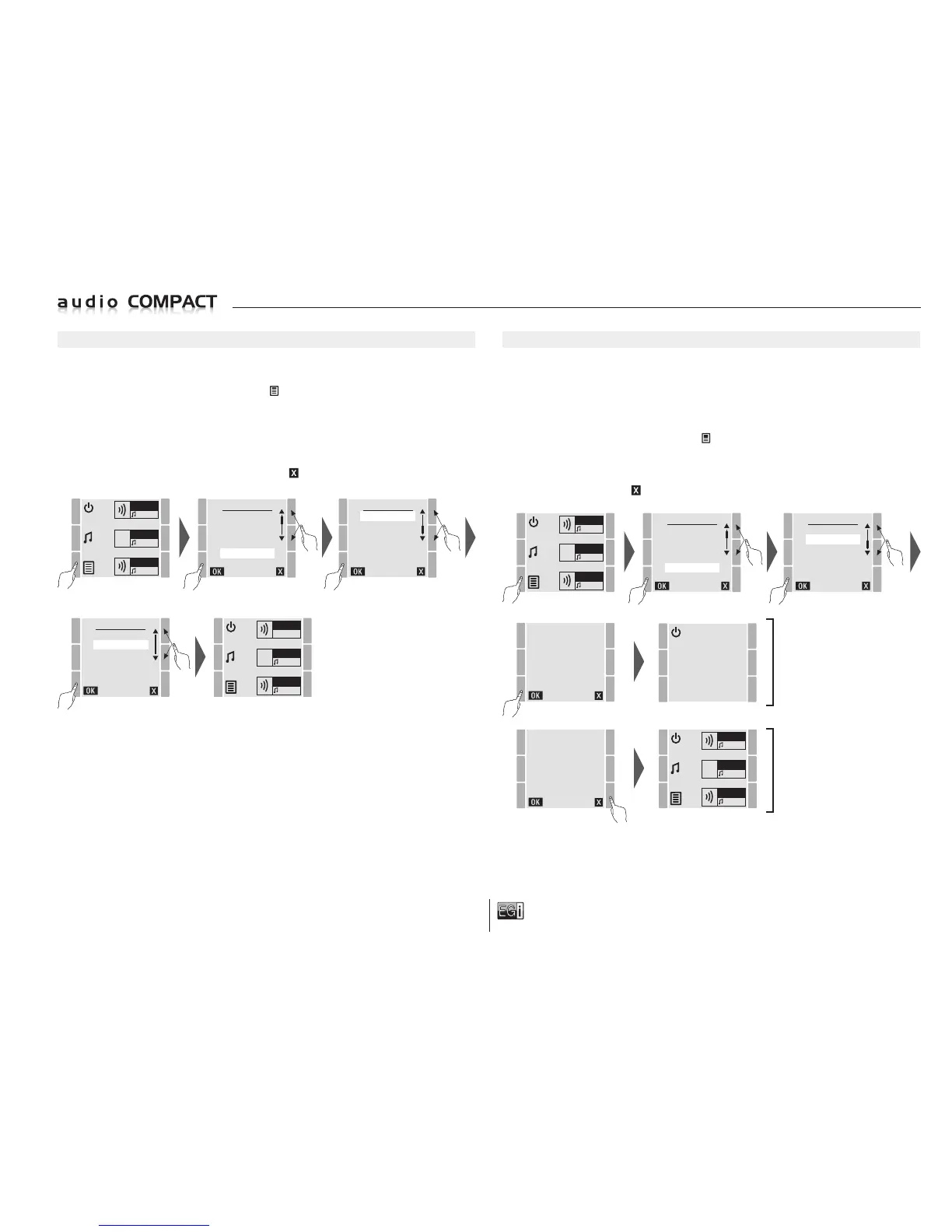
At any given time you can change the language of the 10401 console. The languages available are:
German, English, Spanish, French, Italian and Portuguese.
T
o select the language press the MENU key
and select the SETTINGS option. Press OK
to confirm.
In SETTINGS select the LANGUAGE option and press OK to confirm.
On entering the LANGUAGE screen you can choose between DEUTSCH, ENGLISH, ESPAÑOL,
FRANÇAIS, ITALIANO and PORTUGUES.
Press OK to change the language selected or press to exit without changing the language.
MENU
FM LIST
USB MP3
MESSAGE
MANUAL FM
SETTINGS
VERSION
ZONE 1
FM
ZONE 2
FM
ZONE 3
FM
SETTINGS
LANGUAGE
RESET
ZONE 1
FM
ZONE 2
FM
ZONE 3
FM
LANGUAGE
DEUTSCH
ENGLISH
ESPAÑOL
FRANÇAIS
ITALIANO
PORTUGUES
RESET
The 10401 console allows you to delete all of the data entered and the changes made to return it to
its initial factory settings.
VERY IMPORTANT: When it returns to its initial settings, the console deletes all of the preset radio
stations, the registered zones, music volumes, message volumes, selected DIN-DON, equalization,
language and backlight settings.
To select the reset process, press the MENU key
and select the SETTINGS option. Press OK to confirm.
In SETTINGS, select the RESET option and press OK to confirm.
On entering the RESET screen the console asks if you are sure that you want to reset.
Press OK to reset or press to exit without resetting.
MENU
FM LIST
USB MP3
MESSAGE
MANUAL FM
SETTINGS
VERSION
ZONE 1
FM
ZONE 2
FM
ZONE 3
FM
SETTINGS
LANGUAGE
RESET
RESET
TO SETTINGS
OF FACTORY
ZONE 1
FM
ZONE 2
FM
ZONE 3
FM
RESET
TO SETTINGS
OF FACTORY
NOTE: Once all of the changes have been carried out on the console MENU, we recommend
switching it off and on again (stand-by). This saves the changes in the EPROM memory so that
they are not be lost if there is a power failure.
RESET
FACTORY SET-UP
(see page 25)
DO NOT
RESET


 To Next Page
 Loading...