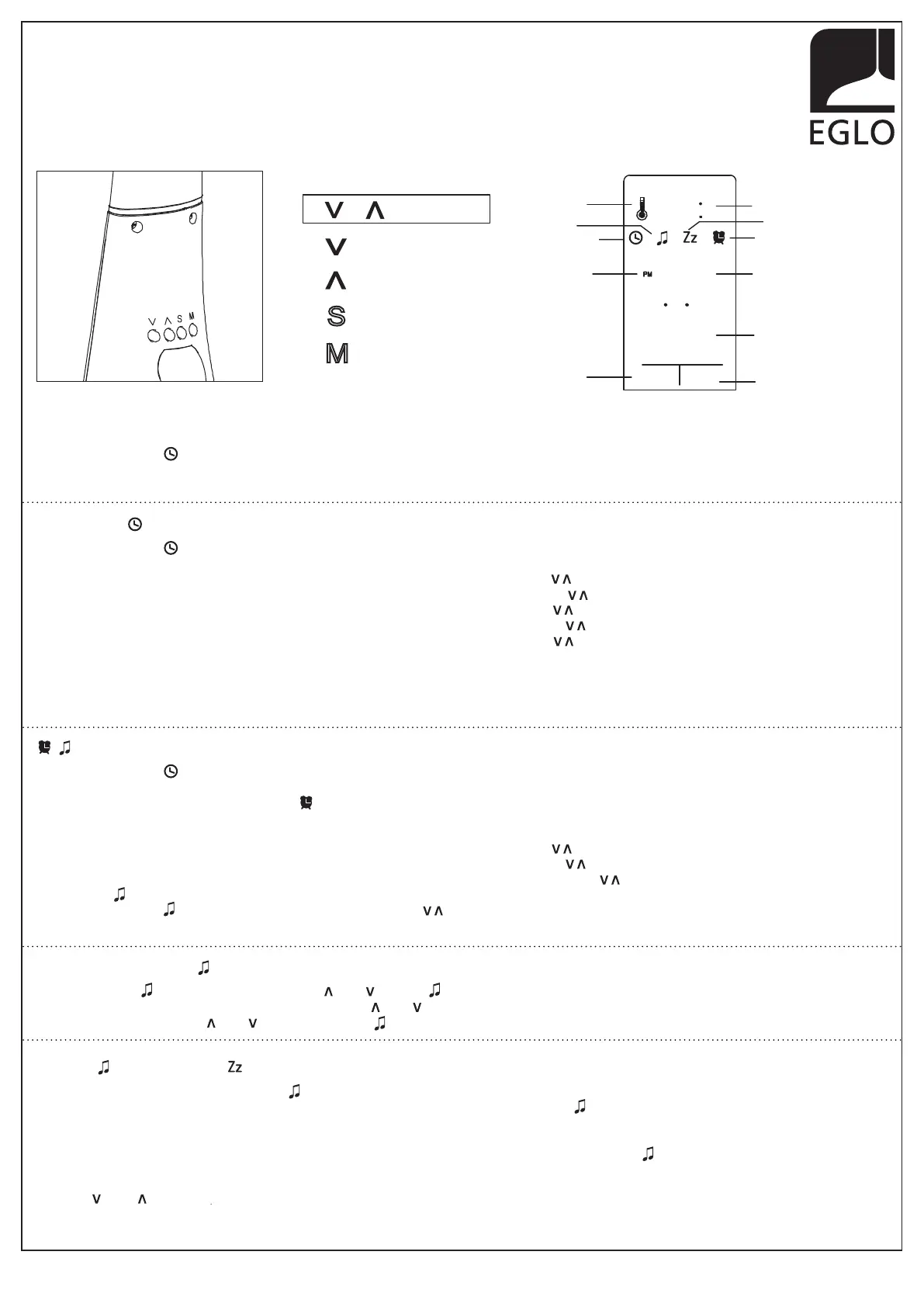
Increase (Up)
Decrease (Down)
Settings
Mode-Selection
97914A / 97915A - COGNOLI
Imported by /Importé par /Importado por:
Eglo Canada Inc./Eglo USA Inc./Eglo Mexico Iluminaction s De Rl De Cv. .
www.eglo.com
INSTRUCTIONS
INSTRUCCIONES
Display Screen
T
emperature
Alarm On
Month/Date
Snooze On
Alarm mode
Hour
Minute
Day
Degree Celsius/Fahrenheit
Clock Mode
TUE
1/16
MONTH DATE DAY
10
15
24
C
8
12hrs/24hrs
Display Mode
S M
S
M
GENERAL setting mode: (C° to F°,12hrs to 24hrs)
In "Clock Time Mode" when both middle dots • • are flashing:
* Press (V) button to change the temperature unit between C° to F°.
* Press (V) button to change hour setting 12hrs AM/PM to 24hrs formats.
CLOCK setting
In "Clock Time Mode" when both middle dots • • are flashing:
* To change the "Hour", press "S" button to activate the selections. When flashing, use the ( ) to adjust.
* To change the "Minute", press "S" button to activate the selections. When flashing, use the ( ) to adjust.
* To change the "Year", press "S" button to activate the selections. When flashing, use the ( ) to adjust.
* To change the "Month", press "S" button to activate the selections. When flashing, use the ( ) to adjust.
* To change the "Date", press "S" button to activate the selections. When flashing, use the ( ) to adjust.
N.B.: The day of the week will be automatically set when date is chosen.
* Press "S" to confirm selections made and close the time setting.
N.B.: When both middle dots • • are flashing, it means that the clock is in function.
To activate / disactivate " " ALARM and/or "Zz" SNOOZE functions
* To activate the " " Alarm, press once on either " " or " " . Icon " " will apprear on the display screen. Waking alarm is in function.
* To activate the " Zz" Snooze, press once again on either " " or " ". Icon " Zz" will apprear on the display screen. Sleeping mode is in function.
* Press once again on either " " or " " to disactivate the " " Alarm and/or " Zz" Snooze function.
ALARM / Zz SNOOZE setting
In "Clock Time Mode" when both middle dots • • are flashing:
* Press "M" to activate the Alame mode. Icon " " will appear on the right side of the display screen and start flashing.
N.B.: Both middle dots • • will stop flashing
* To change the "Hour", press "S" button to activate the selections. When flashing, use the ( ) to adjust.
* To change the "Minute", press "S" button to activate the selections. When flashing, use the ( ) to adjust.
* To set the " Zz" Snooze feature, press "S" button to activate the selections. When flashing, use the ( ) to adjust minutes desired (0 - 60 min.).
* To set the " " Alarm sound feature, press "S" button to activate the selections. At the bottom of the display screen, number "1" will
appear but no Icon " " on the screen yet. When flashing, use the ( ) to choose between 8 different tones. When desired alarm tone
is selected, press "S" again to confirm selection. Music tonality will automatically stop.
To stop " " ALARM and / or " " SNOOZE from ringing.
When Alarm will start ringing, both icons " " and " Zz" will start flashing on display screen and continue ringing untill you cancel it.
* Press "S" button to stop music tonality from ringing. Music tonality will stop ringing and icon " " will stop flashing.
N.B: The music alarm will continue to ring for one minute until you turn it off.
* Once the first alarm rang and has been manually stopped, If " Zz" Snooze function was selected, the icon " " will stop flashing but the " Zz" icon
will continue flashing on display screen. It mean that the sleeping mode got activated. Snooze tonality will start ringing after the time range that has
been pre-selected is passed (0 - 60 min.).
* Press " " or " " button to continue another Snooze session.
* Press "S" button to cancel "Snooze" function and stop music tonality from ringing. The icons " Zz" will stop flashing.
N.B.: Snooze mode will be repetitive until you disactivate it by pressing on "S" button.


 To Next Page
 Loading...