EasyManua.ls Logo

EHX POG 2 - User Manual

EHX POG 2
4 pages
Print Icon
To Next Page IconTo Next Page
Loading...
- WARRANTY INFORMATION -
Please register online at http://www.ehx.com/product-registration or complete and return the enclosed
warranty card within 10 days of purchase. Electro-Harmonix will repair or replace, at its discretion, a product
that fails to operate due to defects in materials or workmanship for a period of one year from date of
purchase. This applies only to original purchasers who have bought their product from an authorized Electro-
Harmonix retailer. Repaired or replaced units will then be warranted for the unexpired portion of the original
warranty term.
If you should need to return your unit for service within the warranty period, please contact the appropriate
office listed below. Customers outside the regions listed below, please contact EHX Customer Service for
information on warranty repairs at info@ehx.com or +1-718-937-8300. USA and Canadian customers: please
obtain a Return Authorization Number (RA#) from EHX Customer Service before returning your product.
Include with your returned unit: a written description of the problem as well as your name, address,
telephone number, e-mail address, and RA#; and a copy of your receipt clearly showing the purchase date.
United States & Canada
EHX CUSTOMER SERVICE
ELECTRO-HARMONIX
c/o NEW SENSOR CORP.
47-50 33RD STREET
LONG ISLAND CITY, NY 11101
Tel: 718-937-8300
Email: info@ehx.com
Europe
JOHN WILLIAMS
ELECTRO-HARMONIX UK
13 CWMDONKIN TERRACE
SWANSEA SA2 0RQ
UNITED KINGDOM
Tel: +44 179 247 3258
Email: electroharmonixuk@virginmedia.com
This warranty gives a purchaser specific legal rights. A purchaser may have even greater rights depending
upon the laws of the jurisdiction within which the product was purchased.
To hear demos on all EHX pedals visit us on the web at www.ehx.com
Email us at info@ehx.com
FCC COMPLIANCE
Note:
This equipment has been tested and found to comply with the limits for a Class B digital device,
pursuant to part 15 of the FCC Rules. These limits are designed to provide reasonable protection against
harmful interference in a residential installation. This equipment generates, uses and can radiate radio
frequency energy and, if not installed and used in accordance with the instructions, may cause harmful
interference to radio communications. However, there is no guarantee that interference will not occur in a
particular installation. If this equipment does cause harmful interference to radio or television reception, which
can be determined by turning the equipment off and on, the user is encouraged to try to correct the
interference by one or more of the following measures:
Reorient or relocate the receiving antenna.
Increase the separation between the equipment and receiver.
Connect the equipment into an outlet on a circuit different from that to which the receiver is
connected.
Consult the dealer or an experienced radio/TV technician for help.
Modifications not expressly approved by the manufacturer could void the user's authority to operate the
equipment under FCC rule
POG 2
Polyphonic Octave Generator
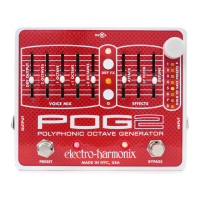
Congratulations on your purchase of the POG 2! The POG 2 is a Polyphonic Octave Generator that draws
its heritage from the now legendary POG, originally released in 2005 to worldwide acclaim. The POG 2 can
simultaneously generate multiple octaves from your input signal. Whether you play single notes, arpeggios
or full chords, the POG 2 will perfectly track every note you play. With the POG 2, you can mix together
your original "dry signal" with four different octaves: one octave above the original note, two octaves
above the original note, one octave below your original note and two octaves below the original note.
Additionally you can detune the two upper octaves, slow the attack on all voices including the dry signal
and process the overall tone through a low pass resonant filter with adjustable filter cutoff and selectable
Q. The POG 2 is fully programmable allowing you to store and load presets for performance and recording.
-CONTROLS-
DRY OUTPUT Slider
Controls the output volume of your original DRY signal before it exits the POG 2.
The DRY OUTPUT volume will increase as its slider is pushed upward.
-2 OCTAVES Slider
Controls the output volume of the signal 2 octaves below the input signal, which is
one quarter of the frequency of the input signal. As this slider is pushed upward, the volume of the -2
OCTAVE below the original pitch will increase. If you play a middle C note, this slider will control the
volume of the C note two octaves
below
middle C.
-1 OCTAVE Slider -
Controls the output volume of the signal 1 octave below the input signal, which is
half the frequency of the input signal. As this slider is pushed upward, the volume of the -1 OCTAVE below
the original pitch will increase. If you play a middle C note, this slider will control the volume of the C note
one octave
below
middle C.
+1 OCTAVE Slider
Controls the output volume of the +1 octave signal. True to its name, the +1
OCTAVE signal is one octave above the original input signal. The +1 octave signal is twice the frequency of
the original input signal. The volume of the +1 OCTAVE will increase as this slider is pushed upward. If you
play a middle C note, this slider will control the volume of the C note one octave
above
middle C.
+2 OCTAVE Slider
Controls the output volume of the +2 octave signal. The +2 octave signal is two
octaves above the original input signal or four times the frequency of the original input signal. As this slider
WARNING:
Use only the 9.6 VDC 200mA adapter the POG 2 comes supplied with. Do not
use any other adapters. Using other adapters, even those made by Electro-Harmonix, could
cause harm to the unit, the adapter or you. The POG 2 does not use batteries.
Question and Answer IconNeed help?

Do you have a question about the EHX POG 2 and is the answer not in the manual?

Summary

POG 2 Polyphonic Octave Generator Overview

Product Introduction

Introduction to the POG 2, its heritage, and core functionality of generating multiple octaves from input signals.

Important Adapter Warning

Crucial warning regarding the use of only the supplied 9.6 VDC 200mA adapter to prevent unit damage.

POG 2 Controls and Features

Octave and Dry Output Sliders

Controls for adjusting the volume of the DRY signal, -2 OCTAVE, -1 OCTAVE, +1 OCTAVE, and +2 OCTAVE signals.

Attack and Filter Controls

Controls for the attack envelope of octave voices and the cutoff frequency of the Low Pass Filter.

Detune and Dry FX Modes

Controls for detuning octave signals and managing DRY signal effects via push-button and LED.

Q Resonance and Preset Management

Controls for Low Pass Filter resonance (Q) and management of presets via knob and footswitch.

Bypass and Connectivity

Features for true bypass mode, preset cycling, and audio input/output jacks.

Power Input

Details on connecting the required 9V DC power adapter with a center negative plug.

Preset Save, Load, and Unload Procedures

Save Preset Procedure

Step-by-step guide on how to save current slider and button settings into one of the 8 available presets.

Load Preset Procedure

Instructions for loading saved presets using either the PRESET knob or the PRESET Footswitch.

Unload Preset Procedure

Methods to unload a preset and restore current knob positions to reflect the audio output.

Warranty and Regulatory Information

Warranty Information

Details on the one-year limited warranty, registration, and return procedures for service.

FCC Compliance Statement

Information regarding FCC rules compliance for digital devices and potential radio frequency interference.

Overview

The Electro-Harmonix POG 2 is a sophisticated polyphonic octave generator, building upon the legacy of the original POG. This device allows musicians to enrich their sound by simultaneously generating multiple octaves from an input signal, whether playing single notes, arpeggios, or full chords. The POG 2 boasts excellent tracking capabilities, ensuring that every note played is accurately processed.

At its core, the POG 2 enables the user to blend their original "dry signal" with four distinct octave voices: one octave above the original note, two octaves above, one octave below, and two octaves below the original note. This extensive range provides a wide palette for sonic exploration. Beyond simple octave generation, the POG 2 offers advanced sound-sculpting features. Users can detune the two upper octaves, introduce a slow attack envelope to all voices (including the dry signal), and refine the overall tone using a low-pass resonant filter with adjustable cutoff frequency and selectable Q. A key feature of the POG 2 is its full programmability, allowing users to store and recall up to eight presets for live performance or studio recording.

Usage Features:

The POG 2 is controlled through a combination of sliders, push-buttons, and a knob, each offering precise control over various parameters.

Sliders:

  • DRY OUTPUT Slider: This slider adjusts the output volume of the original dry signal. Pushing it upward increases the volume.
  • -2 OCTAVES Slider: Controls the volume of the signal two octaves below the input. This signal has one-quarter of the input frequency. Moving the slider up increases its volume. For example, if a middle C is played, this slider controls the volume of the C note two octaves below middle C.
  • -1 OCTAVE Slider: Manages the volume of the signal one octave below the input, which is half the input frequency. Pushing it upward increases the volume. If a middle C is played, this slider controls the volume of the C note one octave below middle C.
  • +1 OCTAVE Slider: Adjusts the volume of the signal one octave above the input, which is twice the input frequency. Moving the slider up increases its volume. If a middle C is played, this slider controls the volume of the C note one octave above middle C.
  • +2 OCTAVE Slider: Controls the volume of the signal two octaves above the input, which is four times the input frequency. Pushing it upward increases the volume. If a middle C is played, this slider controls the volume of the C note two octaves above middle C.
  • ATTACK Slider: This slider controls the attack envelope for all octave voices. Moving it upward increases the attack time, creating a swell or reverse effect. Pushing the slider to its minimum position disables the attack effect. The attack effect also applies to the DRY signal when the DRY FX LED is lit, regardless of its color.
  • LP FILTER Slider: This slider controls the cutoff frequency of the Low Pass Filter. Moving it upward raises the cutoff frequency. This filter shapes the tone of the POG 2, affecting all generated octave signals. The dry signal bypasses the LP Filter when the DRY FX LED is off or red, but passes through it when the LED is green or amber.
  • DETUNE Slider: This slider controls the amount of detune applied to the +1 and +2 OCTAVE signals. Pushing it upward increases both the depth and rate of the detune effect. When the slider is at its minimum position, the detune function is off. The DETUNE slider also affects the DRY signal when the DRY FX LED is amber.

Push-Buttons and LEDs:

  • DRY FX Push-Button and LED: This button cycles through four modes, determining how the DRY signal interacts with the Attack, LP Filter, and Detune effects.
    • LED Off: DRY bypasses all effects.
    • RED LED: DRY goes through Attack control, but bypasses LP Filter and Detune.
    • GREEN LED: DRY goes through Attack and LP Filter, but bypasses Detune.
    • AMBER LED: DRY goes through all three effects: Attack, LP Filter, and Detune.
  • Q Push-Button and LED: This button cycles through four levels of resonance (Q) for the Low Pass Filter. The Q LED's brightness indicates the Q level; off signifies the least Q, and the brightest signifies the highest Q.

Knobs and Footswitches:

  • PRESET KNOB: This white knob is used to select, load, and save the 8 available presets. To load a selected preset, press and release the knob. To save a setting, first configure the POG 2 to the desired sound, then turn the PRESET knob to the desired preset number. Press and hold the PRESET knob for 3 seconds until all Preset LEDs stop blinking, then release.
  • BYPASS FSW and LED: This footswitch toggles the POG 2 between effect mode and true bypass mode. When the LED is lit, the POG 2 is in effect mode; when off, it's in true bypass.
  • PRESET FSW and LED: This footswitch cycles through and loads the 8 available presets. When a preset is loaded, the PRESET LED near the footswitch lights up solid. If a slider is moved or a push-button is pressed after loading a preset, the PRESET LED blinks rapidly, indicating a parameter change. Returning the control to its original saved position stops the blinking. If the LED is blinking rapidly, pressing the PRESET Footswitch will reload the current selected preset.

Preset Management:

The POG 2 can store and recall up to 8 presets, saving all slider positions and push-button settings. The state of the BYPASS FSW is not saved. All presets are retained even after power is removed.

  • Preset Save Procedure:
    1. Press and hold the white PRESET knob.
    2. Hold for 3 seconds; after 2 seconds, all preset LEDs will blink for 1 second.
    3. Release the knob after the LEDs stop blinking. The PRESET LED near the PRESET Footswitch will light up solid, confirming the save to the currently lit preset number.
  • Preset Load Procedure (Using PRESET Knob):
    1. Turn the PRESET knob to the desired preset number.
    2. Press and release the PRESET knob. The PRESET LED will light up, indicating the preset has loaded. Note that current slider positions are no longer valid as the preset's settings take precedence.
  • Preset Load Procedure (Using PRESET Footswitch):
    1. Press and release the PRESET Footswitch. The PRESET LED will light up, indicating the preset has loaded for the currently selected preset number.
    2. If a preset is already loaded, pressing and releasing the PRESET Footswitch will advance to and load the next preset (e.g., from Preset 3 to Preset 4).
  • Preset Unload Procedure: To restore the current knob positions to reflect what is heard, a preset can be unloaded by pressing and releasing the PRESET knob or by turning the PRESET knob to select a different preset number.

Maintenance Features:

  • Warranty: Electro-Harmonix offers a one-year warranty from the purchase date, covering defects in materials or workmanship. This applies to original purchasers who bought from an authorized retailer. Repaired or replaced units are warranted for the unexpired portion of the original term.
  • Service Returns: For service within the warranty period, customers should contact EHX Customer Service to obtain a Return Authorization Number (RA#). The returned unit must include a written description of the problem, contact information, the RA#, and a copy of the purchase receipt.
  • Product Registration: Users are encouraged to register their product online or by returning the enclosed warranty card within 10 days of purchase.

EHX POG 2 Specifications

General IconGeneral
TypePolyphonic Octave Generator
True BypassYes
Presets8
Attack ControlYes
Detune ControlYes
Effects LoopYes
ControlsDry, Sub Octave, Octave Up, Attack
Inputs1 x Instrument
MIDIIn/Out
Octave Range+1 Octave, -1 Octave

Related product manuals