SWITCHING THE COOKING TOP ON
• Connect the stovetops to the mains
CD
B E EA B
BB
F F
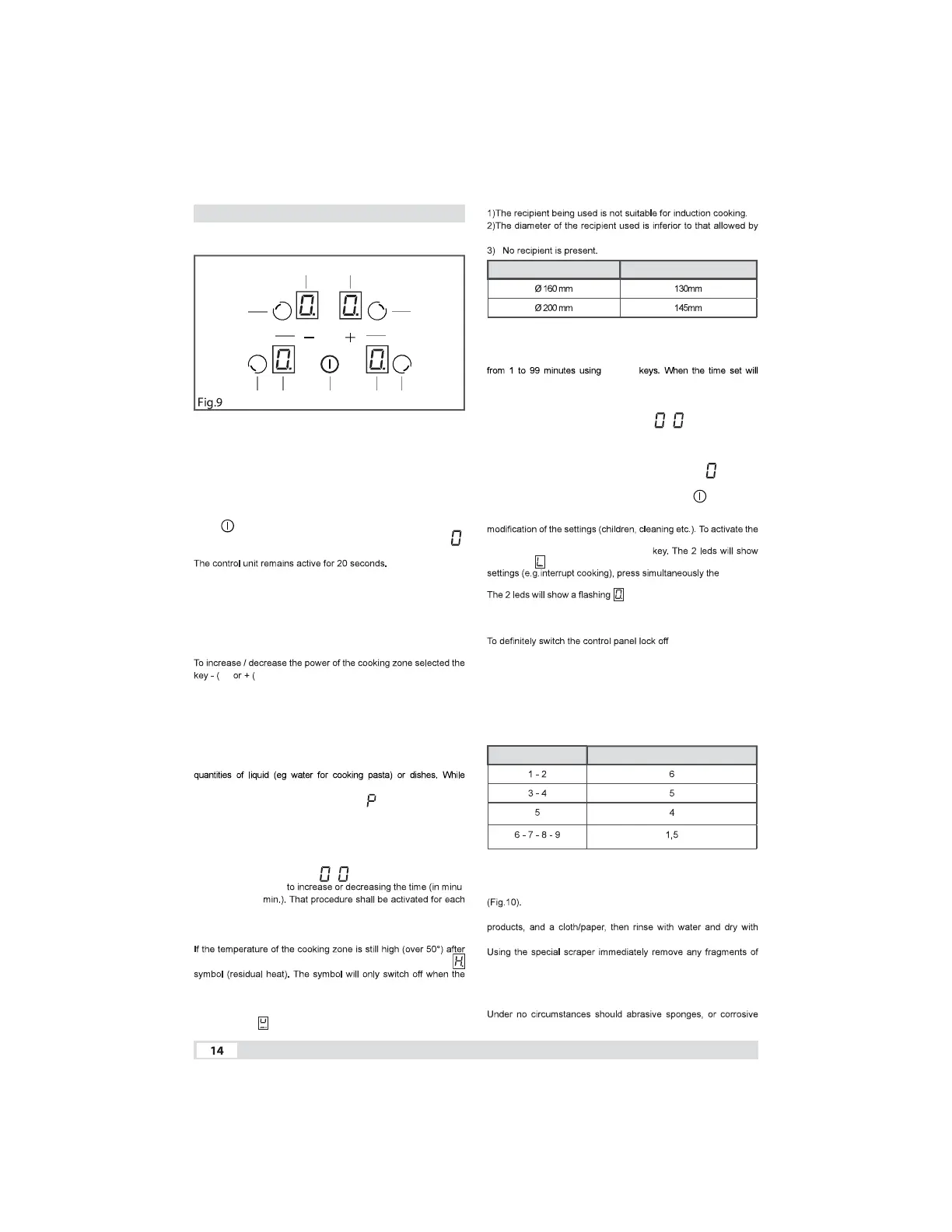
A. - On / Off
B. - Cooking zone
C. - “+”
D. - “-”
E. - Cooking zone display
• SWITCHING THE COOKING TOP ON
Press key to switch the top on.
All the displays relative to the cooking zones switch on in the
standby position.
If no cooking zone is selected within this time, the cooking top
switches off automatically
• SELECTING THE COOKING ZONE
To select the required cooking zone, you have to press of B keys.
• ADJUST THE POWER OF COOKING
C) D). The power can be set from 0 to 9.
• QUICK / BOOSTER HEATING
This function further reduces cooking time in a given area taking
the temperature to the maximum power for a 10 minute interval.
At the end of this interval, the cooking area power automatically
returns to level 9.
The use of this function is indicated for the short time heating of large
adjusting power level of the selected cooking zone after level 9 you
get into the mode indicated by BOOSTER
The function is available only in cooking zones upper right and lower
left.
• TIMER USE
After selecting the cooking zone, press simultaneosly the keys C
and D, the displays will show .
Press the keys C or D -
tes: 00 min. 99
cooking zone.
• RESIDUAL HEAT
it has been switched off, the relative display will indicate the
burn risk in no longer present.
• POT DETECTION
If the symbol should appear on one of the cooking area
displays, it means that:
the appliance.
COOKING ZONE DIAMETER MINIMUM PAN DIAMETER
• EGG TIMER / REMINDER
Is it possible to set a reminder tone.
Press simultaneosly the keys C and D, to set a time for the reminder
C or D
sound an audible alarm that can be turned off by pressing any of the
commands. The cooking areas on previously will remain active. The
EGG TIMER function remains active even after the unit is turned off.
To disable this function, you must state the timer display
with D key.
• SWITCHING THE COOKING AREA OFF
To switch off a cooking zone, select the zone, press simultaneosly
the keys C e D or press D key until the desplay show .
• SWITCHING THE COOKING TOP OFF
To turn off the cooking top entirely hold down the key.
• CHILD LOCK
It is possible to block the controls to prevent the risk of unintentional
control panel lock press simultaneously the B key at the lower right
and the D key, then press again the B
the symbol . To temporarily release the controls and change the
B key at
the lower right and the D key.
, then it will be possible to modify
the settings. The cooking top can however be switched off even
when the controls block is activated. In this case the controls block
remains active when the top is
switched on again.
press simultaneously
the B key at the lower right and the D key, then press again the
D key. The cooking top switches off. The control panel lock is not
active when
the top is switched on again.
• SAFETY SWITCH
The appliance has a safety switch that automatically switches off
the cooking zones when they have been operating for a certain
amount of time at a given power level.
POWER LEVEL OPERATING TIME LIMIT (hours)
• MAINTENANCE
Remove any residues of food and drops of grease from the
cooking surface by using the special scraper supplied on request
Clean the heated area as thoroughly as possible using suitable
a clean cloth.
aluminium and plastic material that have unintentionally melted on
the heated cooking area, or residues of sugar or food with a high
sugar content.
In this way, any damage to the cooktop surface can be prevented.
chemical detergents, such as oven sprays or stain removers, be



 To Next Page
 Loading...