EasyManua.ls Logo

Eico HF-20 - Page 12

Eico HF-20
29 pages
Print Icon
To Next Page IconTo Next Page
To Previous Page IconTo Previous Page
Loading...
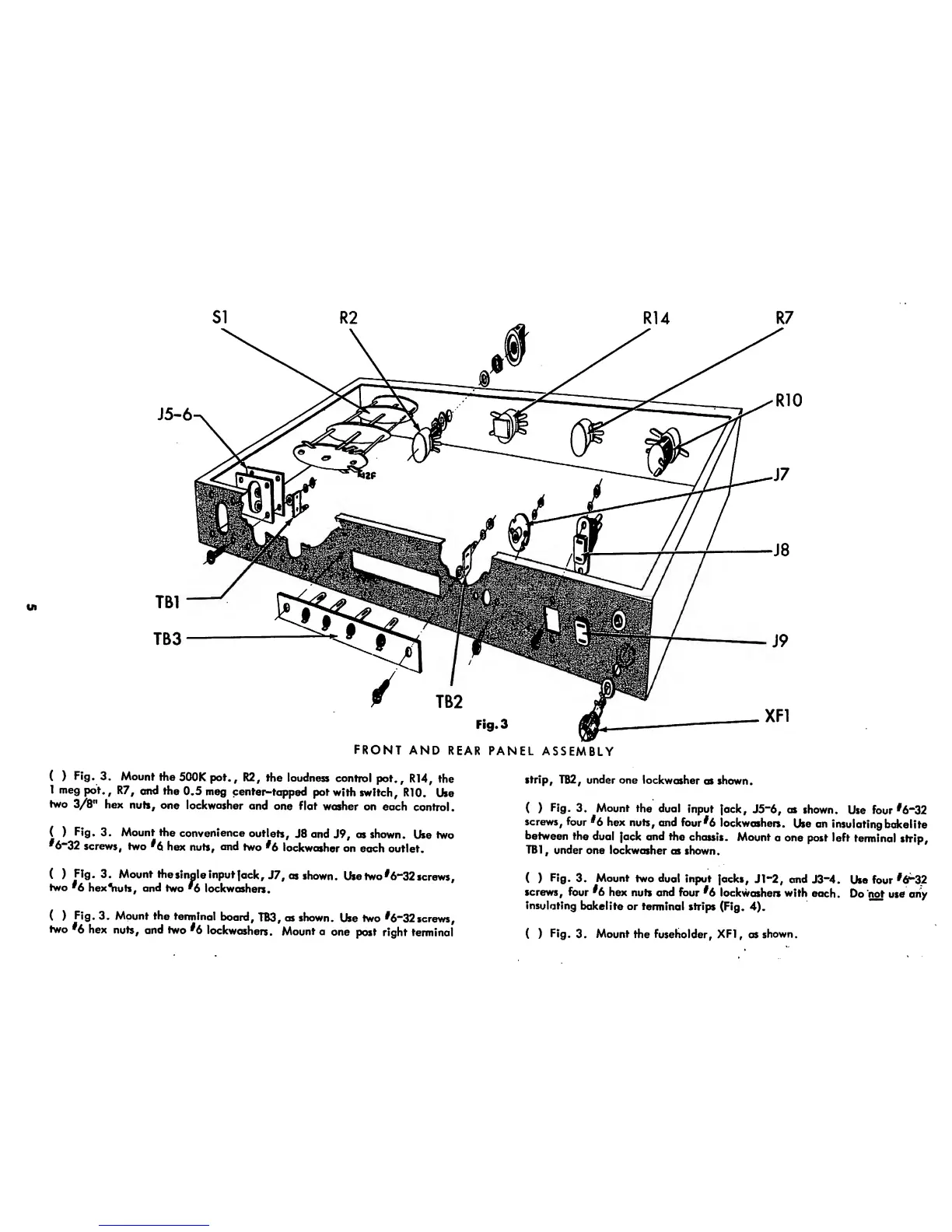
FRONT
AND
REAR
PANEL
ASSEMBLY
(
)
Fig.
3.
Mount
the
500K pot.,
R2,
the
loudness
control
pot.,
R14,
the
1 meg
pot.,
R7,
and the
0.5
meg
center-tapped
pot
with
switch,
RIO.
Use
two
3/8"
hex
nuts,
one
lockwasher
and
one flat
washer
on
each
control.
(
)
Fig.
3. Mount
the
convenience
outlets,
J8
and
J9,
as shown.
Use two
*6“32
screws,
two
*6
hex
nuts,
and
two
*6
lockwasher
on
each
outlet.
(
)
Fig.
3. Mount
the
sinale
input
Jack,
J7,
as
shown.
Use
two
*6-32
screws,
two
^6
hex^wts, and
two
'6
lock
washers.
(
)
Fig.
3.
Mount
the
terminal
board,
TB3,
as shown.
Use
two
^6~32
screws,
two
*6
hex
nuts,
and
two
^6
lockwashers.
Mount
a
one
post
right
terminal
strip,
TB2, under one
lockwasher
as
shown.
( )
Fig.
3.
Mount
the dual
input
jack,
J5“6, as
shown.
Use
four
*6“32
screws,
four
*6
hex
nuts, and
four
*6
lockwashers.
Use
an
insulating
bakeI
ite
between
the
dual
jack
and
the
chassis.
Mount
a
one post left
terminal
strip,
TB1
,
under
one
lockwasher
as
shown.
(
)
Fig.
3.
Mount
two
dual input
jacks,
Jl~2, and
J3~4.
Use four 32
screws,
four
^6
hex
nuts and
four
*6
lockwashers with
each.
Do
not use
any
insulating
bake!
ite
or terminal
strips
(Fig.
4).
( )
Fig.
3.
Mount
the fuseholder,
XF1,
as
shown.

Related product manuals