Need help?
Do you have a question about the eKids Marvel SPIDER-MAN SM-212 and is the answer not in the manual?
Details FCC compliance for radio exposure limits and co-location restrictions for transmitters.
Instructions for adults to install AAA batteries correctly in the Walkie Talkies.
Guide on how to switch the Walkie Talkies on and off using the power switch.
Steps to speak into the microphone and listen through the speaker for clear transmission.
Suggestions for games like Hide and Seek and Mystery Sounds using the Walkie Talkies.
Guidelines on cleaning the Walkie Talkies cabinet and avoiding damage from chemicals.
Addresses common problems like weak signals, static, and non-working units, suggesting solutions.
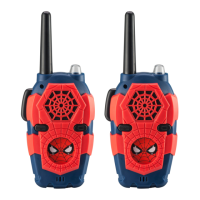
This document describes the Marvel Spider-Man Lights and Sounds Walkie Talkies, a pair of electronic communication devices designed for children. The walkie-talkies allow users to send and receive voice messages, play sound effects, and engage in interactive games.
The primary function of these walkie-talkies is two-way voice communication. Users can speak into the microphone of one unit, and their voice will be transmitted to the other unit, allowing for interactive play and communication over a short distance. Each walkie-talkie is equipped with a "Talk Button" that must be pressed and held while speaking and released to listen. This push-to-talk functionality is standard for walkie-talkies, ensuring clear communication by preventing simultaneous speaking and listening.
In addition to voice communication, the walkie-talkies feature "Lights and Sounds." They include an "SFX Button" to play speech and sound effects, adding an extra layer of entertainment. A "Repeat Button" allows users to replay the last sound effect, enhancing the interactive experience. These sound effects can also be transmitted to the other walkie-talkie by holding down the Talk Button while pressing either the SFX or Repeat Button. This feature allows for creative play scenarios, such as sending mystery sounds or character phrases between units.
The device operates on batteries, with each walkie-talkie requiring three AAA (R03) batteries for full functionality. A "Power LED" indicates when the unit is turned on, providing a visual cue for operation. The "ON/OFF/DEMO Switch" controls the power and can also activate a demonstration mode, which is useful for showcasing the device's features.
Getting Started: To begin using the walkie-talkies, batteries must be installed. This process involves using a Phillips screwdriver to open the battery compartment door on the back of each unit, inserting three AAA (R03) batteries with correct polarity (+ and - terminals), and then re-securing the compartment door. It is important to note that any pre-installed LR44 button cell batteries, which are included for in-store demonstration purposes, should be removed before regular use. The manual emphasizes that battery installation should always be performed by an adult.
Battery Recommendations: For optimal performance and extended battery life, the use of alkaline batteries is recommended. Users are advised against mixing old and new batteries, or different types of batteries (alkaline, standard carbon-zinc, or rechargeable nickel-cadmium). Batteries must always be inserted with the correct polarity. Exhausted batteries should be removed promptly from the unit, and non-rechargeable batteries should not be recharged. If rechargeable batteries are used, they must be removed from the unit for charging, and charging should be supervised by an adult. The supply terminals should not be short-circuited. For prolonged periods of non-use (e.g., a month or longer), batteries should be removed to prevent leakage or damage. Only batteries of the same or equivalent type as recommended should be used.
Turning Power On/Off: To turn the unit on, the "ON/OFF/DEMO Switch" should be slid to the "ON" position. The Power LED will illuminate, indicating that the unit is active. Both walkie-talkies must be turned on to enable sending and receiving messages. To turn off the unit, the switch should be slid to the "OFF" position, and the Power LED will extinguish.
Speaking: To transmit a message, the user must press and hold the "Talk Button" while speaking into the "Microphone." Once the message is complete, the Talk Button should be released to switch to listening mode. For clear transmission, it is important to keep the antenna pointing upwards and the microphone approximately two inches from the user's mouth.
Listening: Both walkie-talkies must be turned on, and their antennas must be pointing upwards to ensure proper sending and receiving of messages. Messages cannot be received while the Talk Button is being pressed; it must be released to listen. Received messages will be heard through the "Speaker."
Playing Walkie Talkie Games: The walkie-talkies are designed to facilitate various fun games and activities. Two specific suggestions are provided:
Sound Effects: The "SFX Button" plays speech and sound effects. The "Repeat Button" replays the last sound effect. To send these sound effects to the other walkie-talkie, the user must hold down the Talk Button while simultaneously pressing either the SFX Button or the Repeat Button.
General Care: To ensure the longevity and proper functioning of the walkie-talkies, it is crucial to keep them as dry and clean as possible. The cabinet can be cleaned with a cloth or sponge lightly moistened with mild soap and water. Users are advised against using strong cleansers or solvents, as these can cause damage to the device.
Troubleshooting: If problems arise, such as one or both walkie-talkies not working or a noticeable decrease in signal range, the first troubleshooting step is to replace the batteries in each unit with three fresh AAA (R03) batteries. Weak batteries are a common cause of these issues.
It is important to understand that the product's transmission effectiveness can be hindered by obstacles such as trees, buildings, and metal structures. If there is a significant increase in static, it may be due to the proximity of electrical interference sources like electric motors, fluorescent lights, or power lines. In such cases, changing the user's location may resolve the issue.
Repair Policy: Users are explicitly warned not to attempt to repair the unit if problems persist. Instead, they should refer to the warranty for factory service. This ensures that any necessary repairs are performed by authorized personnel, preventing further damage or voiding the warranty.
Customer Support: For any questions or comments regarding the product, customers can contact customer service via a toll-free number (1-888-TOP-TOYS) or visit the manufacturer's website (www.ekids.com). This support system is in place to assist users with any issues they may encounter and to provide guidance on product usage and maintenance.
 General
| Brand | eKids |
|---|---|
| Model | SPIDER-MAN SM-212 |
| Type | Two-Way Radio |
| Character | Spider-Man |
| Theme | Marvel Spider-Man |
| Battery Type | AAA |
| Age Range | 3+ years |
| Features | Flashlight |

 To Next Page