7
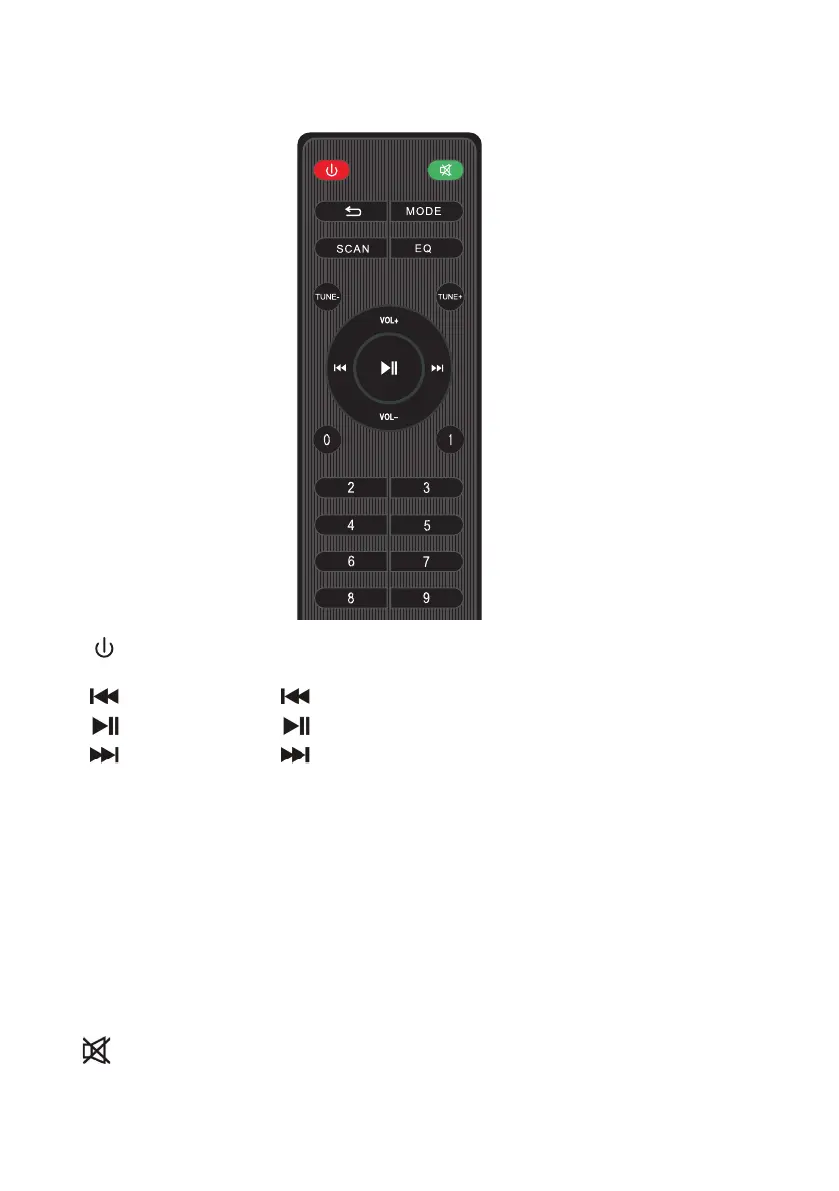
PRODUCT OVERVIEW - Remote Control
1. Power Button: Short press it to enter standby mode; short press it again
to resume. If no device is connected, the system goes to “BT”.
2. : Functions as “ ” on the device.
3. : Functions as “ ” on the device.
4. : Functions as “ ” on the device.
5. Mode: Functions as “Mode” on the device.
6. Cycle key: In USB/TF card reading status, short press it to toggle among
four playback sequencing modes (All - play all tracks in sequence;
RAND - play in random; ONE - repeat one track; FOL - repeat all tracks in
a folder).
7. SCAN: In FM receiving status, long press it to execute a full search (it is
recommended to execute at least one full search before using radio
receiving function. All founded stations will be saved even in power-o).
8. EQ: In USB/TF/AUX/Bluetooth reading status short press it to select an
environment mode (from NOR, POP,ROC,JAZ,CLA,CUT).
9. : In USB/TF/FM/AUX/Bluetooth mode, short press it to mute the device.
10. When there is no radio station, press this key to adjust the Previous
frequency point, and when there is a radio station, press this key to adjust
the Previous radio station.


 To Next Page