43
At a Glance
How to use?
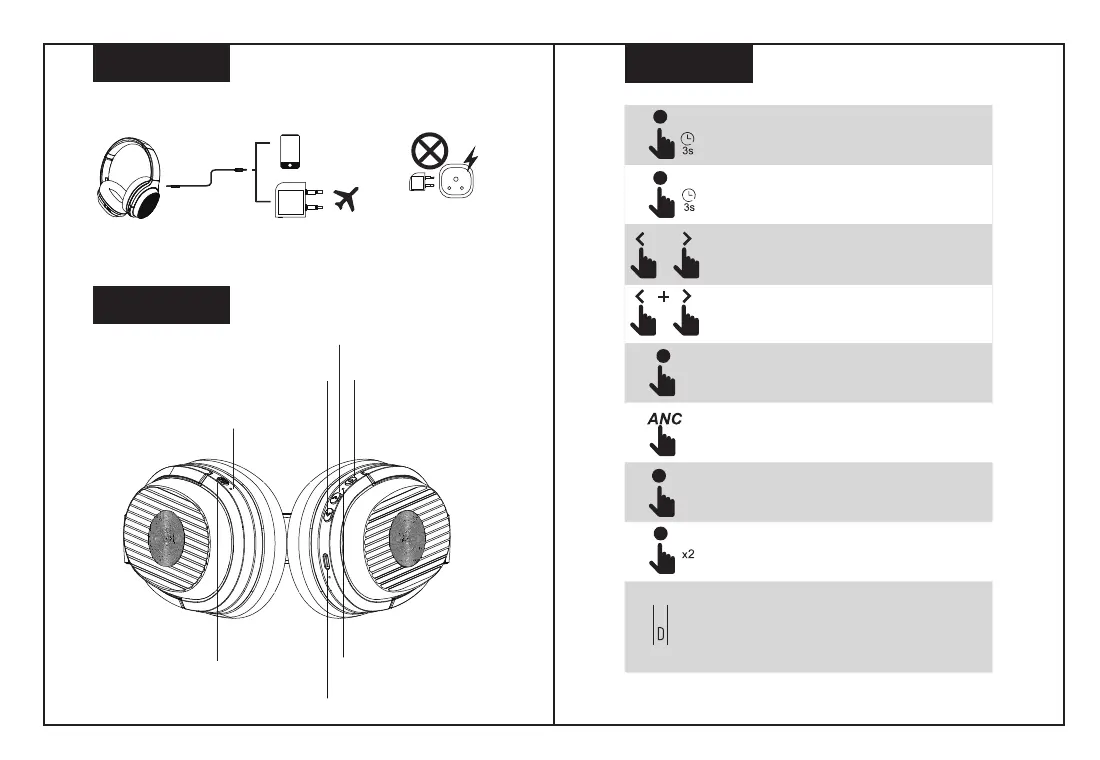
Hold Multi-function Button for 3 seconds to turn on the
headphones, and then the device enters the paring mode.
(Indication light turns blue)
Hold Multi-function Button for 3 seconds to turn off the
headphones.
Press to adjust volume. Long press to skip to
next/previous song.
Press and hold the volume up and down buttons
simultaneously for 5 second to clear the Bluetooth pairing
record.
Press Multi-function Button to play/pause music.
Hold the ANC button for one second to turn on/off Active
Noising cancelling(Indication light turns green)
Press Multi-function Button to answer/end call.
Double press Multi-function Button to reject coming call /
activate the Siri voice control function.
Charging cable: please use the included USB-C charging cable
to charge the battery, another charging cable may damage the
headphones.
Note: This product supports charging voltage of 5-9V, and it
will start charging protection once over 9V. The battery will not
be charged if over 9V, please use the correct charger.
ANC Button
ANC Indicator
LED Indicator
Multi-function Button
Volume Down/Previouse Song
Volume Up/Next Song
USB-C Charging/AUX Port
WARNING
The in-flight plug adaptor lets you enjoy balanced sound from the in-flight entertainment
system while travelling in a plane.
The In-flight adaptor is NOT MEANT to charge your device. Plugging the in-flight adaptor into
a AC Power Socket to charge the headphones will cause severe damage to the device.


 To Next Page