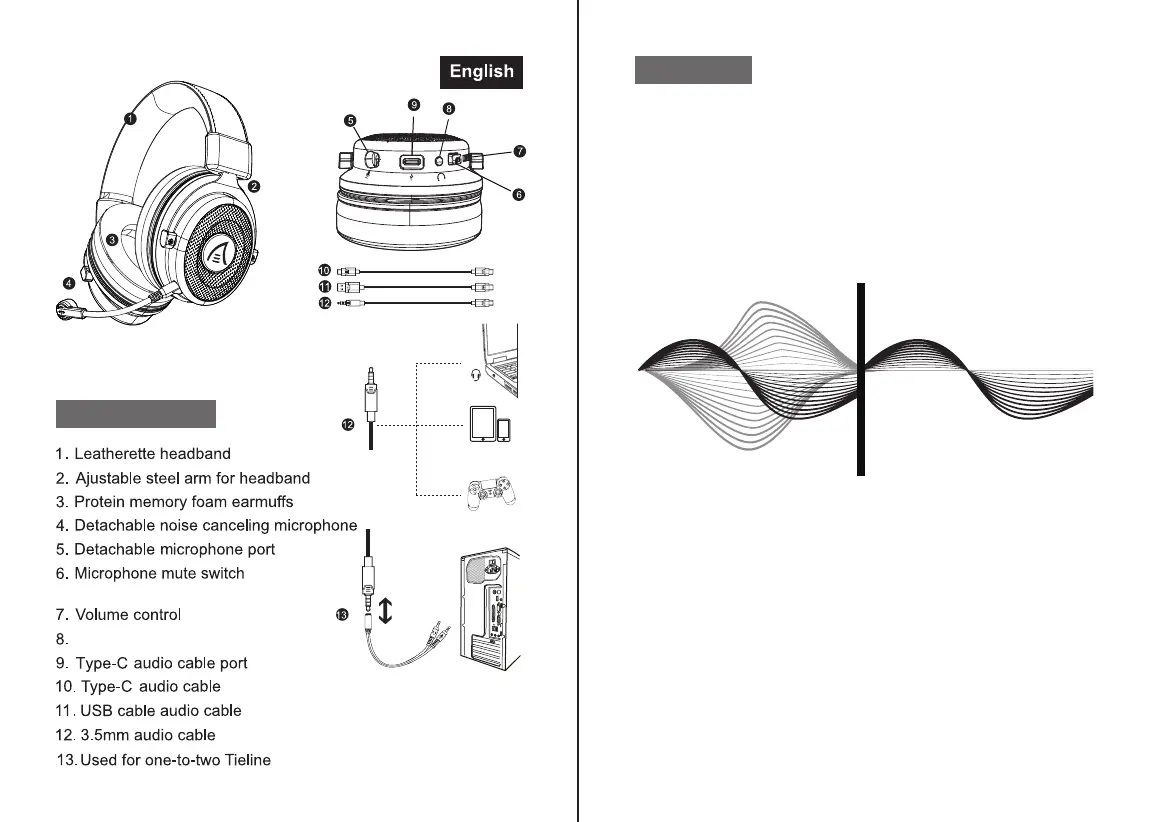
(Factory default mute state)
Sound effect switch button
At a Glance
1
2
1. Environmental Noise Cancellation
Effectively suppress 90% of the reverse environmental noise,
thereby reducing the environmental noise by up to 35dB, allowing
gamers to communicate more freely. Accurate calculate the
direction of the caller's speech, while protecting the target voice in
the main direction, remove all kinds of interference noises in the
environment.
2. Immersive 7.1 Surround Sound
The built-in powerful 50mm magnetic neodymium driver and
7.1 surround sound chip provide an immersive gaming
experience. Insert the USB cable in default 7.1 mode, you
can download the driver from our Official website
(https://www.eksa.net/download) to adjust the 7.1 sound
effect.
Note: EKSA Surround Sound 7.1 Driver only supports
windows system.
Features



 To Next Page