This document is a user manual for the EKSA GT1 earbuds.
Function Description
The EKSA GT1 earbuds are wireless in-ear headphones designed for audio playback and phone calls. They feature a low-latency mode, making them suitable for gaming. The earbuds come with a charging case that not only protects them but also recharges them, and the case itself can be charged via a USB Type-C cable or wirelessly.
Important Technical Specifications
- Product Name: EKSA GT1
- Bluetooth Version: V5.0
- Low Latency: 38ms
- Speaker Size: Φ10mm
- Operation Range: ≥10m
- Impedance: 32Ω ±10%
- Sensitivity: 101 ±3dB
- Frequency: 20Hz - 20kHz
- Earphones Battery: 50mAh 3.7V
- Charging Case Battery: 500mAh 3.7V
- Playing Time: 6hrs
- Charging Time: 1.5hrs
- Charging Case Output: DC 5V
Usage Features
Package Contents:
The package includes:
- EKSA GT1 Earbuds
- Charging Case
- USB Type-C Charging Cable
- Eartips: Size S x1 pair
- Eartips: Size L x1 pair
- User Manual
Overview of Components:
- Charging Case LED Indicator: Displays the charging status of the case.
- Type-C Charging Port: For wired charging of the case.
- EKSA GT1 LED Indicator: Shows the status of the earbuds.
- Multi-function Touch Button: Used for various controls on the earbuds.
- Microphone: For making calls and voice commands.
- Wireless Charging Pins: For charging the earbuds inside the case.
How to Pair:
- Place the EKSA GT1 earbuds into the charging case.
- Close the charging case.
- Open the charging case and take the earbuds out; they will automatically enter pairing mode.
- Turn on Bluetooth on your device and select "EKSA GT1" to pair.
- Once connected, the EKSA GT1 earbuds are ready for use.
How to Wear:
- Choose the appropriate size of eartips (S, M, or L) for a comfortable fit.
- Insert the EKSA GT1 earbuds into your ears.
- Adjust the earbuds to a comfortable and secure position.
Control - On/Off & Pairing:
- Power On Automatically: Open the charging case and take out the earbuds.
- Power Off Automatically: Place the earbuds back into the charging case and close the lid.
- Power On Manually: Touch the multi-function button for 5 seconds.
- Power Off Manually: Touch the multi-function button for 3 seconds (pauses music playback).
- Clear Pairing: In shutdown mode, touch the multi-function button for 10 seconds.
Control - Music Playback:
- Voice Assistant: Tap the multi-function button 3 times.
- Music Switch (Previous/Next Song): Tap the multi-function button 2 times (left earbud for previous song, right earbud for next song).
- Play/Pause: Tap the multi-function button 1 time.
- Music/Game Mode Switch: Press the multi-function button for 2 seconds.
Control - Phone Calls:
- Answer Call: Tap the multi-function button 1 time.
- Reject Incoming Call: Tap the multi-function button 2 times.
- End Call: Tap the multi-function button 1 time.
Maintenance Features
Charging:
The charging case can be charged via the Type-C charging port.
The charging indication LEDs on the case show the battery level:
- All 5 LEDs lit: 100%-75%
- 4 LEDs lit: 75%-50%
- 3 LEDs lit: 50%-25%
- 2 LEDs lit: 25%-0%
Limited Warranty:
EKSA offers a one-year limited warranty for the product. Defective products will be repaired or replaced free of charge.
Contact Information for Support:
- Global:
- Phone: +852 6940 4955 (Mon to Fri 9:00 am-6:30 pm, UTC +8 HKT)
- Email: info@eksa.net
- Website: www.eksa.net/warranty
- India:
- Phone: +91 8929369620 (Mon to Fri 9:30 am-5:30 pm, IST)
- Email: support@eksa.co.in

 Need help?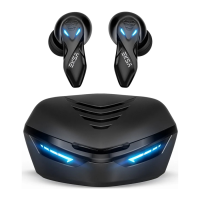

 To Next Page
 General