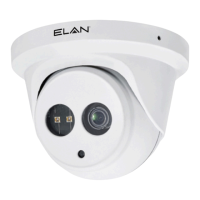
The ELAN EL-IP-OTF2-WH / EL-IP-OTF2-BK / EL-IP-OTA4-WH / EL-IP-OTA4-BK series are IP cameras designed for surveillance applications, offering both indoor and outdoor capabilities with various features to suit different installation needs. These cameras are part of the ELAN Surveillance ecosystem, providing integration with ELAN controllers for comprehensive home automation and security solutions.
Function Description:
These devices are IP cameras primarily used for video surveillance. They capture and transmit video footage over a network, allowing users to monitor designated areas. The cameras are designed to operate either as standalone units or as part of a larger ELAN automation system. They support both 2MP and 4MP resolutions, offering clear video quality for various monitoring requirements. The "OTF2" models are likely fixed lens cameras, while the "OTA4" models might indicate a different form factor or additional features, possibly related to auto-focus or turret functionality.
Important Technical Specifications:
- Model Numbers: EL-IP-OTF2-WH (White, Fixed, 2MP), EL-IP-OTF2-BK (Black, Fixed, 2MP), EL-IP-OTA4-WH (White, Turret/Auto-Focus, 4MP), EL-IP-OTA4-BK (Black, Turret/Auto-Focus, 4MP).
- Resolution: Available in 2MP and 4MP, providing high-definition video.
- Power: Supports DC12V ±10% power input and Power over Ethernet (PoE) for simplified installation.
- Connectivity: RJ-45 Ethernet connector for network connection, supporting PoE.
- Default IP Address: 192.168.0.200.
- Default Username/Password: ELAN / 3526.
- Dimensions: The camera body has a diameter of 115mm and a height of 91mm. The mounting template indicates a drill bit dimension of 6.3mm (1/4").
- Components:
- Upper cover
- Lens
- Infrared LED (IR LED) for night vision
- Light sensor
- RJ-45 Ethernet connector (supports PoE)
- Power jack (DC12V ±10%)
- Reset Wire
Usage Features:
- Auto Discover/Configure: When used with an ELAN controller, the cameras leverage ELAN's configurator for automatic discovery and configuration, simplifying setup.
- Outdoor/Indoor Use: Designed for versatile deployment in both outdoor and indoor environments.
- Turret/Fixed Options: The product line includes both fixed lens cameras (OTF2) and potentially turret-style cameras (OTA4) with auto-focus capabilities, offering flexibility in field of view and installation.
- Auto Focus: Select models (OTA4) feature auto-focus, ensuring clear images without manual adjustment.
- Infrared LED (IR LED): Equipped with IR LEDs for enhanced visibility in low-light or no-light conditions, providing night vision capabilities.
- Pan, Tilt, and Azimuth Adjustment: The camera's position can be adjusted for pan, tilt, and azimuth to achieve the desired viewing angle.
- Waterproof Connector: The RJ-45 Ethernet cable can be connected using a waterproof connector, crucial for outdoor installations to protect against environmental elements.
- Network Connection Options:
- DC12V Power Adapter and Non-PoE Switch: Connects to a network switch using an Ethernet cable and powered by a DC12V adapter.
- PoE Network Switch: Connects directly to a PoE-enabled network switch, receiving both power and data over a single Ethernet cable.
- PoE Power Injector and Non-PoE Switch: Uses a PoE power injector to provide power to the camera, which then connects to a non-PoE network switch.
- Internet Browser Access: The camera's live video and settings can be accessed via an Internet browser (e.g., Internet Explorer). This requires enabling "Download Signed ActiveX plug-in controls" and "Run ActiveX controls and plug-ins" in browser security settings.
- User Authentication: Supports two levels of user authentication:
- Administrator (ELAN / 3526): Can reset basic mode settings and view live video.
- Guest: Only allowed to view live video.
Maintenance Features:
- Factory Default Reset: The camera can be restored to factory default settings by shorting the "RESET wire" for 10 seconds. This process takes approximately 90 seconds, after which the camera reboots automatically.
- DHCP by Default: Cameras are configured to use DHCP by default. If a DHCP server is unavailable, they will revert to the default IP address of 192.168.0.200.
- FCC Compliance: The equipment complies with part 15 of the FCC Rules for Class B digital devices, designed to provide reasonable protection against harmful interference in a residential installation.
- Troubleshooting Interference: In case of radio or television interference, users are advised to reorient or relocate the receiving antenna, increase separation between equipment and receiver, connect the equipment to a different circuit, or consult a dealer/experienced radio/TV technician.
- Software Updates: The system relies on ActiveX plug-ins for browser-based viewing, which may require installation upon first access.
- Support: Technical support is available via email at techsupport@elanhomesystems.com.
The ELAN IP cameras are designed for ease of installation and integration, offering robust surveillance capabilities with options for different resolutions and focus types, making them suitable for a wide range of security applications within an ELAN smart home ecosystem or as standalone network cameras.

 Need help?

 To Next Page
 General