9-12
HOW TO USE YOUR MOTORHOME’S EQUIPMENT
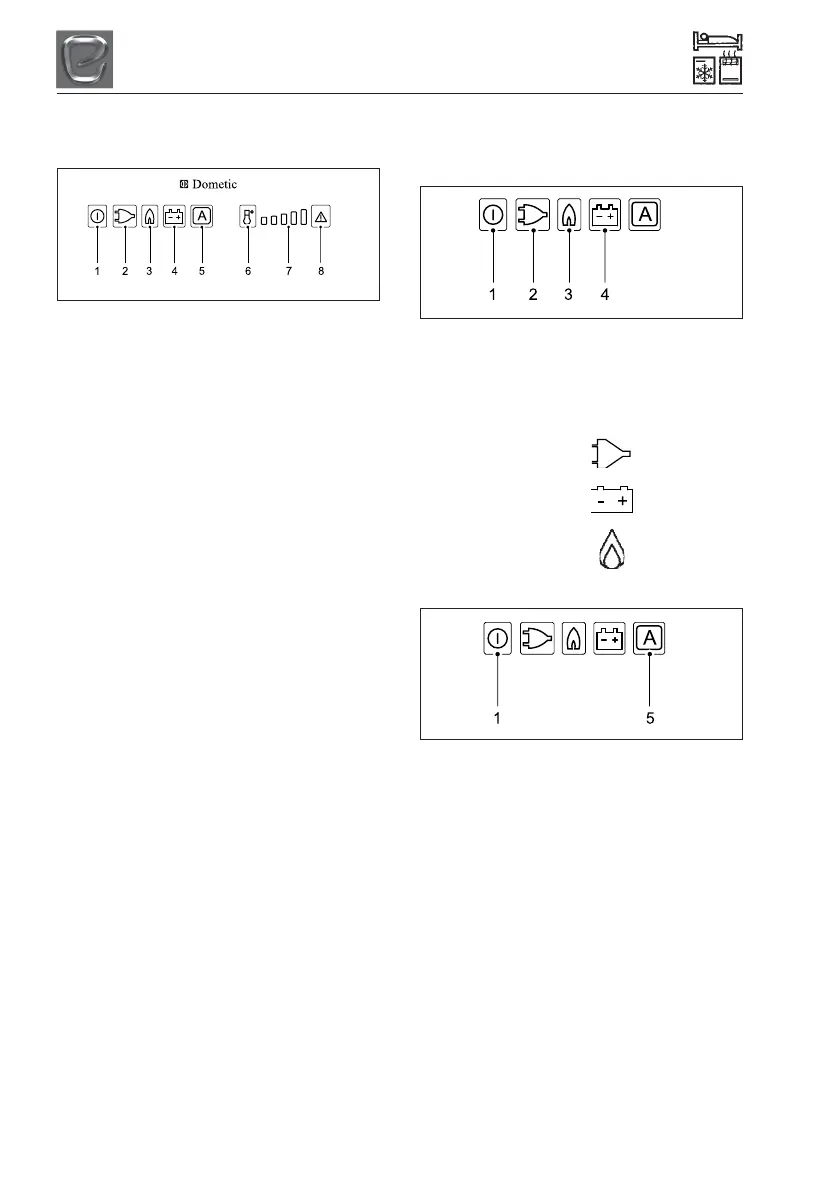
Automatic energy selection/
automatic ignition on AES:
1 = Power ON/OFF switch
2 = Energy selector button 230V ~
3 = Energy selector button GAS
4 = Energy selector button 12V =
5 = Selector button “AUTOMATIC”
6 = Temperature level selection
7 = Temperature level display
8 = Indicator LED failure / Reset button GAS
FAILURE
Switching ON/OFF
• Switch ON by pressing button (1), 2s
• Switch OFF by pressing button (1), > 2s
Manual operation
• Select energy source with buttons (2, 3,
4)
• Set temperature step by pressing button
(6)
Automatic operation
• Change to “Automatic” with button (5)
• Automated energy selection (if available)
Sequence of priority: 1) Solar (12V -)
2) 230V ~
3) 12V -
4) Liquid gas
• Set temperature step by pressing buttons
(6).
AES appliances (manual + automatic
energy selection)
Manual operation
To start the refrigerator, press button (1) for 2
seconds.
The refrigerator starts with the last selected
type of energy.
230V operaton:
Press button (2):
12V operation:
Press button (4):
Gas operation:
Press button (3):
Automatic operation
To start the refrigerator, press button (1) for 2
seconds.
The refrigerator starts with the last selected
type of energy.
Automatic operation:
Press button (5): A
Upon switching on, the electronics
automatically selects one of the three
possible energy types: 230V - 12V - liquid
gas. The control electronics automatically
ensures that the refrigerator is supplied with
the optimum source of energy in each
respective case.
Fig 1
Fig 2
Fig 3



 To Next Page