Configuring settings from smartphones and tablet PCs Configuring settings from smartphones and tablet PCs
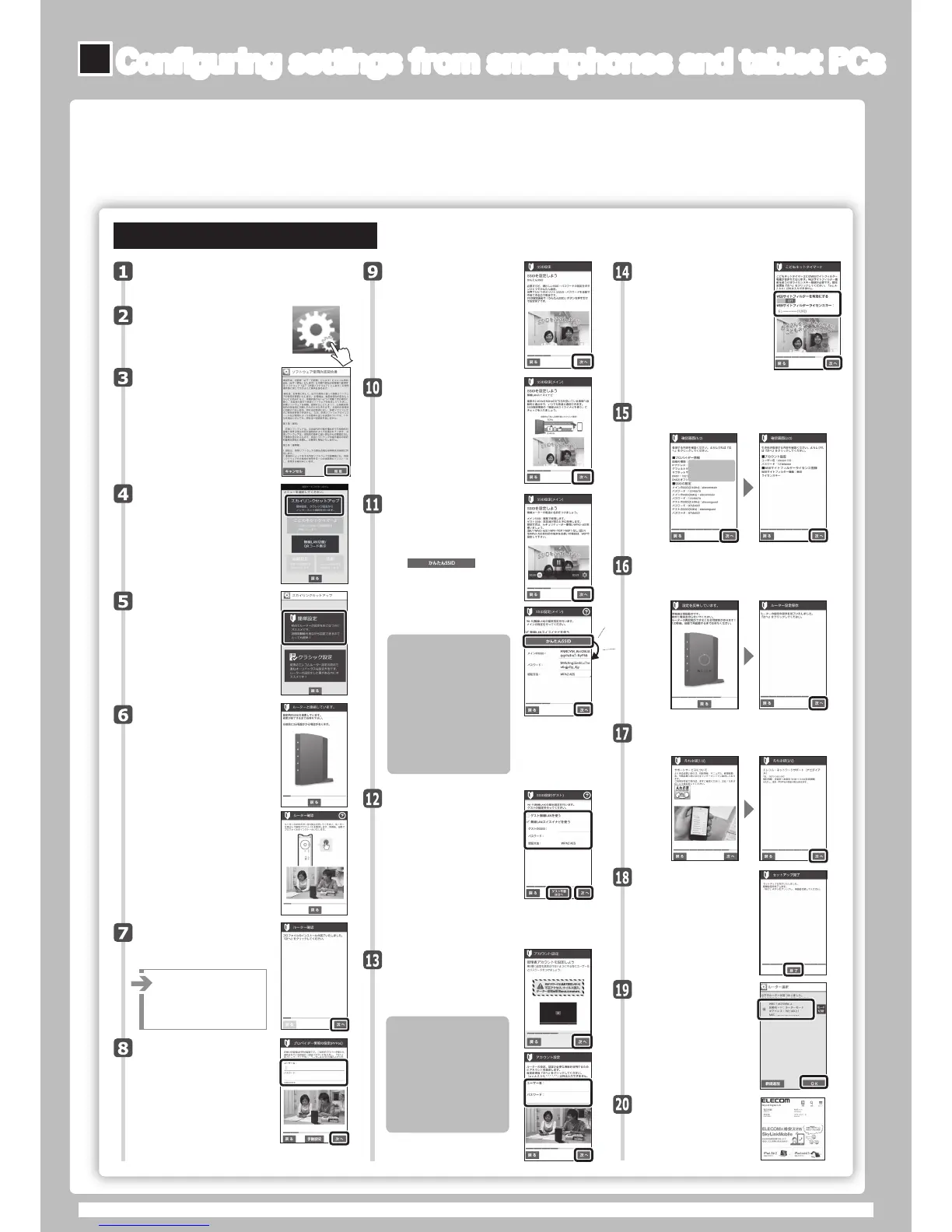
Readtheend-user
licenseagreement,and
thentap"同意"ifyou
havenoproblemswith
theagreement.
Tap"スカイリンクセットアップ"
onthemenu.
Onyourterminal'shome
screen,tapthe[SkyLink
Manager]icon.
Aftertheprofile
installationisfinished,
tap"次へ."
Ifthemessage"インター
ネットが検出されませんでし
た"isdisplayed,tap"手
動設定"toconfigurethe
settings.
BysettingSSIDsbyyourself,you
canpreventvirusinfectionsand
unauthorizeduseinadvance!
◆ThemainSSIDistheoneforthe
networknormallyusedbyyour
family!
◆TheguestSSIDistheoneforthe
networkusedbyyourfriendswhen
theycometovisit!
◆Fromtheviewpointofsecurity,we
recommendthatyouselect"WPA2"
fortheauthenticationmethod!
*Settheauthenticationmethodto"WEP"
whenyouareusingoldmodelsofthe
NintendoDSandthePlayStationPortable.
*WhenmanuallyenteringtheSSIDand
password,youcanenternumbers,alphabet
characters,"-"(hyphen),and""
(underscore).
Searchfor[SkyLinkManager]inthe
"GooglePlaystore,"andtheninstallthis
application.
Tap"簡単設定."
Setupwillstartafterthe
prologuemovie.
Openawebbrowser.
●Ifyoucanconnecttothe
Internet,thesettingsare
complete.
Thiscompletesthe
setupprocedure.
Tap"終了"
Thisscreenprovidesdetailsforthe
supportservices.Tap"次へ"
Ifyouareusingthe
websitefiltersofChild
NetTimer2,setthefilter
functionto"ON,"and
thenenterthelicense
key.Afteryouenterthe
settings,tap"次へ"
*Itmaytakeapproximately3
minutestosearchfortheSSID.
*Amodelnumberdifferingfromthat
ofthisproductmaybedisplayed.
*IftheSSIDisnotdetected,the
screenontherightwillbe
displayed.PresstheWPSbutton
forapproximately5seconds.The
applicationwilldetecttherouter
andretrievetheconnection
profile.Theprofilewillbeinstalled
automaticallyafteritisretrieved.
Theapplicationsearches
fortheSSIDforusein
configuringthesettings.
Waituntilthedetectionis
finished.
Entertheusernameand
passwordthatyouhave
receivedfromyourprovid-
er,andthentap"次へ"
*IfyouareusingaDHCPconnec-
tion,tap"次へ"withoutenteringthe
usernameandpassword.
Configuretheadministra-
toraccountsettings.
Entertheusername
andpassword,andthen
tap"次へ"
Ensurethattheadministrator
setsthe“ユーザー名(Username)”
and"パスワード(Password)"sothat
itisnotpossibleforan
unauthorizedindividualto
connecttoyournetworkand
changethesettings!
*Youcansettheusernameandpasswordto
anyvaluesthatyouwish.
*Youcanenternumbers,alphabet
characters,"-"(hyphen),and""
(underscore)fortheadministratoraccount's
usernameandpassword.
elecom123(入力例)
123elecom(入力例)
Checktheregistereddetails.Ifthere
arenoproblems,tap"次へ"
ネットワークの設定情報が
ここに表示されます。
Selectthenameofa
devicethathasbeen
set,andthentap
"OK."
xx:xx:xx:xx:xx:xx
自動的に
生 成!
Establishingaconnectionusingsimplesetup
"SimpleSetup"isamethodofconfiguringthesettingsthatenablestheusertodosoby
followingconfigurationmovies."SimpleSetup"iseasytouseevenforfirst-timeusers.
*Themovieswillnotbedisplayedonsmartphonesthatarenotreceivingradiowavesorifyouhavenotyet
signedacontractwithyoursmartphone'sserviceprovider.
*Youcanenternumbers,alphabet
characters,"-"(hyphen),and""
(underscore)fortheusernameand
passwordintheproviderinformation.
CheckthesimpleSSID
informationonthescreen,
viewthemovie,andthentap
"次へ."
CheckthewirelessLAN
smoothnavigationinforma-
tiononthescreen,view
themovie,andthen
tap"次へ."
SetthemainSSID.Ifyou
willsetwirelessLAN
smoothnavigation,
selectthecheckbox.To
setsimpleSSID,
tap .
Whenyoutapthis
button,theSSID,pass-
word,andauthentication
methodarecreated
automatically.
SettheguestSSID.Tousethe
guestwirelessLAN,selectthe"
ゲスト無線LANを使う"checkbox,
andthenconfigurethesettings.
ThesameasforthemainSSID,
ifyouwillsetwirelessLAN
smoothnavigation,selectthe
checkbox.Ifyoudonotrequire
aguestSSID,tap"ゲスト不要は次へ"
or"次へ."
*EvenifyouentertheguestSSIDandpassword,they
willbeclearedifyoutap"ゲスト不要は次へ."
•Afteryoufinishconfiguringthe
settingsinroutermode,see"
(12)Supplement:Usingthe
ChildNetTimer2Function."
Therouterrestartsinordertoapply
thesettings.Afterthesettingsare
savedontherouter,tap"次へ."
・ AndroidOS4.0orlater•iOS8.0orlater
・
WindowsXP(SP3orlater)/Vista(SP2orlater)/7(SP1orlater)/8/8.1/10/RT
・
ThisproductonlysupportsMacOSX10.9orlater(onlydevicesthatareequippedwithanIntelCPU).
■Operatingenvironment:
Settingthisproductinroutermode
ThisexplanationusesanAndroidterminal.
WRC-GHBKSeries/WRC-FEBK-ASeriesSetupGuideNovember16,2015,Version2©2015 ELECOMCO.,LTD.ALLRIGHTSRESERVED.
*WerecommendthatyouturntheBluetoothfunctionoffinordertopreventradiowaveinterference.
*Inordertoinstall[SkyLinkManager],yourequireanenvironmentinwhichyoucanconnecttotheInternet.
*PerformSkyLinksetupwithin10minutesofconnectingtheACadapter.



 To Previous Page
 Loading...