
 Need help?
Do you have a question about the ELECTRIC 88 PIANO and is the answer not in the manual?
Welcomes users and directs them to support resources for more information.
Credits the recording and production of the Electric 88 Piano sample library.
Describes the unmistakable sound of the electric piano and its availability from Waves.
Explains the technology behind the electric piano, invented by Harold Rhodes.
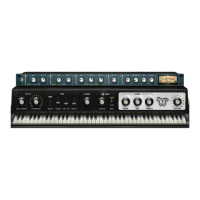
Details the plugin's component, Electric 88 Piano Stereo, and its standalone application.
Presents a diagram illustrating the signal flow and processing stages of the Electric 88 Piano.
Explains how to manage and scroll through presets using the WaveSystem Toolbar.
Describes the two main sections of the Electric 88 Piano interface: Piano module and Multi-Effect processor.
Details the virtual keyboard for previewing notes when a controller is unavailable.
Explains the Piano module controls: Keys (Vel Curve, Formant), Mix (Main, Tines, Key Up), Mechanics, Comp, Amp (Drive, Mic, Tone: Bass, Mid, Treble, Volume).
Details the controls for the Multi-Effect processor: FX In/Out, Tremolo, Autopan, Phaser, Chorus, Reverb, and Meters.
Lists the menu items: All Notes Off, Preferences, and Exit for the standalone application.
Explains the configuration options for Audio, MIDI, and User choices in the preferences dialog.
Details the functions of the WaveSystem toolbar, including About, Undo, Redo, Setup A/B, Load Filter, L/R Arrows, Copy, Load, and Help.
Covers managing presets, including loading, saving, deleting, and A/B comparison.
Explains control states, types (Toggle Buttons, Value Windows), and interaction methods (mouse, keyboard, sliders).
Outlines specific preferences available when launching Pro Tools with Waves plugins.
 General
| Brand | ELECTRIC 88 |
|---|---|
| Model | PIANO |
| Category | Musical Instrument |
| Language | English |

 To Next Page