Need help?
Do you have a question about the ElectrIQ eIQMOCBI25 and is the answer not in the manual?
Key safety measures to prevent harmful exposure to microwave energy during operation.
Essential safety guidelines for operating the microwave oven safely and preventing hazards.
Guidelines for proper grounding and safe use of power cords and extension cords.
Instructions for installing the oven in a cabinet, including dimensions and clearances.
Specific dimensions required for built-in furniture to accommodate the microwave oven.
Identification of oven parts, accessories, and turntable assembly installation.
Setting the clock, microwave, grill, combination, and convection cooking modes.
Using multi-stage, timer, speedy, and auto menu cooking functions.
Guide to defrosting, inquiring, and child lock features.
Technical specifications of the microwave oven.
Step-by-step guide on how to clean the microwave oven's interior and exterior.
Guidance on safe utensils for microwave use and how to test new ones.
Troubleshooting common problems like TV interference, dim light, or oven not starting.
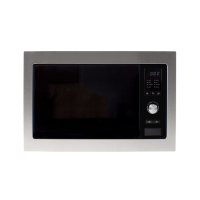
This document provides the instruction manual for an electrIQ Microwave Oven, model eIQMOCBI25. It covers important safety instructions, installation guidelines, operation procedures, and troubleshooting tips.
The electrIQ Microwave Oven is designed for domestic use, offering various cooking functions including microwave, grill, and convection cooking. It features electronic controls to adjust cooking parameters, allowing for precise and versatile meal preparation. The oven is intended for built-in installation and is not suitable for countertop use or placement inside a cupboard.
General Operation: The oven's operation is managed through a control panel, which includes a turntable shaft, turntable ring assembly, glass tray, observation window, and door assembly with a safety interlock system. All food and containers must be placed on the glass tray for cooking.
Clock Setting: The oven includes a 24-hour clock. To set the clock, users press the "CLOCK/KITCHEN TIMER" button, then use the rotary knob to adjust the hour and minute figures within the 0-23 and 0-59 ranges, respectively. Pressing "CLOCK/KITCHEN TIMER" again confirms the setting. If the clock is not set, the oven will not function.
Microwave Cooking: To initiate microwave cooking, press the "MICROWAVE/GRILL/COMBI./CONVE." key. The display will show "P100" (100% power). Users can then select the desired microwave power level (from 100% down to 10%) by repeatedly pressing the same key or turning the rotary knob. Power levels are indicated as "P100", "P80", "P50", "P30", "P10". After confirming the power, the cooking time can be set using the rotary knob (from 0:05 to 95:00 minutes). Finally, press "START/+30SEC./CONFIRM" to begin cooking.
Grill Cooking: Grill cooking is activated by pressing the "MICROWAVE/GRILL/COMBI./CONVE." key until "G-1" is displayed, indicating the grill function. The cooking time is then set using the rotary knob (0:05 to 95:00 minutes) and confirmed with "START/+30SEC./CONFIRM". For optimal grilling results, the oven will sound twice at half the grill time, prompting the user to turn the food over.
Combination Cooking: The oven offers combination cooking modes, which combine microwave and grill functions. These modes are selected by pressing the "MICROWAVE/GRILL/COMBI./CONVE." key until "C-1", "C-2", "C-3", or "C-4" is displayed. After confirming the combination function, the cooking time is set (0:05 to 95:00 minutes) and the cooking starts by pressing "START/+30SEC./CONFIRM".
Convection Cooking (with preheating): For convection cooking, press the "MICROWAVE/GRILL/COMBI./CONVE." key until the convection temperature is displayed. The temperature can be selected from 130 to 220 degrees Celsius. Confirm the temperature, then press "START/+30SEC./CONFIRM" to begin preheating. Once the preheating temperature is reached, the oven will sound twice, reminding the user to place the food inside. After placing the food and closing the door, set the cooking time (up to 95 minutes) and press "START/+30SEC./CONFIRM" to start cooking. If the door is not opened to input cooking time within 5 minutes after preheating, the oven will stop preheating.
Convection Cooking (without preheating): Similar to convection cooking with preheating, but without the preheating step. Select the convection function and temperature (130-220 degrees Celsius), confirm, set the cooking time (up to 95 minutes), and start cooking directly.
Multi-Stage Cooking: The oven supports up to two stages of cooking. If defrosting is part of the multi-stage process, it must be the first stage. The oven will beep once after each stage before proceeding to the next. Auto menu and preheating functions cannot be set as multi-stage.
Defrost by Weight (W.T.): Press "WEIGHT/TIME DEFROST" once. The display will show "dEF1". Use the rotary knob to select the food weight (100-2000g), and the "g" indicator will light up. Press "START/+30SEC./CONFIRM" to begin defrosting.
Defrost by Time: Press "WEIGHT/TIME DEFROST" twice. The display will show "dEF2". Use the rotary knob to select the defrosting time (up to 95 minutes). The defrosting power is fixed at P30. Press "START/+30SEC./CONFIRM" to start defrosting. For food weighing less than 200g, it is recommended to place it at the edge of the glass turntable, not the center.
Inquiring Function: During cooking, users can check the current power level by pressing "MICROWAVE/GRILL/COMBI./CONVE." or the current time by pressing "CLOCK/KITCHEN TIMER". The information will be displayed for 2-3 seconds.
Lock-out Function for Children: To activate the child lock, press and hold "STOP/CLEAR" for 3 seconds. A long beep will sound, and a lock indicator will light up. To deactivate, press and hold "STOP/CLEAR" again for 3 seconds.
Speedy Cooking: In waiting state, pressing "START/+30SEC./CONFIRM" will start cooking at 100% power for 30 seconds. Each subsequent press adds 30 seconds, up to a maximum of 95 minutes.
Speedy Microwave Cooking: In waiting state, turn the rotary knob left to directly choose the cooking time, then press "START/+30SEC./CONFIRM" to cook at 100% microwave power. This can be part of a multi-stage program.
Auto Menu: The oven features pre-set auto menus (A1-A10) for various foods. In waiting state, turn the rotary knob right to select the desired menu (e.g., "A1" for Reheat, "A2" for Potato). Confirm the menu with "START/+30SEC./CONFIRM", then use the rotary knob to select the weight of the food (indicated by "g"). Finally, press "START/+30SEC./CONFIRM" to start cooking. For the "Cake" menu (A8), preheating to 180°C is required, and the oven will prompt the user to add the cake after reaching the temperature.
Cleaning: Regular cleaning is essential for maintaining the appliance and preventing the degradation of its surface, which could affect its lifespan and lead to hazardous situations.
General Care:
Troubleshooting: The manual provides a troubleshooting guide for common issues:
WEEE Directive Compliance: The product must be collected and treated separately according to the Waste of Electrical and Electronic Equipment (WEEE) directive. It should not be disposed of with household waste but sent to designated WEEE collecting points.
 General
| Oven Capacity | 25 liters |
|---|---|
| Microwave Power | 900W |
| Grill Power | 1000W |
| Grill | Yes |
| Convection | Yes |
| Number of Power Levels | 5 |
| Turntable Diameter | 315 mm |
| Features | Child Lock |

 To Next Page