4. Note: once UNDO-REDO is enabled, this function is available until the loop is erased.
This is true even if returning to a loop from a previous selection, or even after power
cycling.
ERASING A LOOP
1. To erase a loop, play-back must be stopped. If a loop is playing, press the
Footswitch two times quickly.
2. Press and hold the Footswitch for 2 seconds. The MEM LED will blink six times then
remain off, indicating the loop is erased.
3. Note: the ERASE function is only enabled when the loop has recorded memory, as
indicated by the MEM LED remaining lit.
LOOP MEMORY
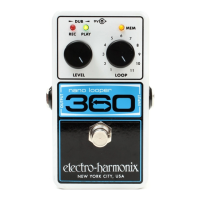
1. Any recorded audio is stored automatically to the Nano Looper 360’s internal memory.
2. All recorded loops will remain in memory until they are erased. Power cycling does not
erase loops unless power is cut while recording the loop. Any loop or overdub that
was being recorded at the time of power loss will not be saved by the 360.
3. After a loop is recorded, the length is subtracted from the total loop recording time.
For example, if a 60 second loop is recorded on Loop 1, there are 300 seconds still
available for Loops 2-11. Overdubbing on top of any given loop does not subtract
from total loop recording time.
4. When the full 360-seconds of loop recording time is depleted, recording a new loop
is inhibited. If an empty Loop is selected and recording is attempted, the MEM-LED
will blink twice. To free-up recording memory, select a loop with recorded memory
and erase it.
FACTORY RESTORE
1. To initialize a Factory Restore, unplug the power jack.
2. Set the Loop Knob to Loop 11.
3. Plug in the power jack while holding down the footswitch until all three LEDs begin to
flash, this takes about 2 seconds. Factory restore will not begin until all three LEDs
are blinking. If you change your mind before the three LEDs begin to blink, release
the footswitch or move the LOOP knob to another loop location other than 11.
4. Once all three LEDs start blinking you can release the footswitch. All three LEDs will
continue to flash until the Factory Restore process is complete (~4 seconds). After the
process is complete, the MEM LED will flash quickly and Loop 11 will be selected.
5. Note: All Loop audio is erased during Factory Restore, and the process cannot be
undone.
– CHANGING THE BATTERY –
To change the 9-volt battery, you must remove the 4 screws on the bottom of the Nano
Looper 360. Once the screws are removed, you can take off the bottom plate and change
the battery. Please do not touch the circuit board while the bottom plate is off or you risk
damaging a component.
Battery life is indicated by the three LEDs. These LEDs will fail to turn-on with a dead
battery. If the 360 fully discharges a battery during normal operation, all LEDs will turn-off
and prevent all functions. The battery must be changed immediately.







 To Next Page