EasyManua.ls Logo

Electro-Harmonix PLATFORM - User Manual

Electro-Harmonix PLATFORM
8 pages
Print Icon
To Next Page IconTo Next Page
Loading...
PLATFORM
Stereo Compressor/Limiter
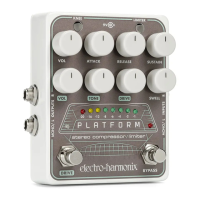
Congratulations on purchasing the Electro-Harmonix Platform Stereo
Compressor/Limiter. The Platform presents you with a versatile and powerful
studio-quality compressor enclosed in a stompbox-sized package. Use the
Platform’s compressor/limiter on any instrument—such as guitar, bass or
keyboards—for precise and powerful control of your signal’s volume. Engage the
Drive and Swell functions to further tailor and enhance your sound. Whether
you’re on stage, in the studio, putting together a podcast or creating your next
YouTube masterpiece, the Platform will help you get the job done.
WARNING: Your Platform comes equipped with an Electro-Harmonix 9.6DC-200BI
power supply (same as used by Boss
®
& Ibanez
®
: 9.6 Volts DC 200mA). The Platform
requires 125mA at 9VDC with a center negative plug. Use of the wrong adapter or a plug
with the wrong polarity may damage your Platform and void the warranty.
FEATURES
High-quality compressor/limiter
Selectable hard/soft knee function
8-segment LED gain reduction meter
Foot switchable overdrive with volume, tone, and gain controls
Volume swell function
True stereo input and output
Stereo buffered bypass
NOTES AND SPECIFICATIONS
Input impedance for each input: 1M
Output impedance for each output: 300
Current draw: 125mA
Maximum input signal level: +7.2 dBu
Question and Answer IconNeed help?

Do you have a question about the Electro-Harmonix PLATFORM and is the answer not in the manual?

Summary

FEATURES

NOTES AND SPECIFICATIONS

COMPRESSOR;LIMITER CONTROLS

SUSTAIN Knob

Adjusts compression ratio or threshold level for signal dynamics.

ATTACK Knob

Sets the time delay before compressor/limiter activation.

COMPRESSOR;LIMITER ADJUSTMENTS

RELEASE, VOL, and KNEE Controls

Manages release time, output level, and knee compression response.

LIMITER, BYPASS, AND INDICATORS

Limiter, Bypass, and LED Indicators

Details on limiter engagement, bypass toggle, and gain reduction metering.

DRIVE (OVERDRIVE) CONTROLS

Drive Section Controls

Adjusts overdrive saturation, tone, volume, and engagement via knobs and footswitch.

DRIVE Footswitch & LED

Engages or bypasses the overdrive section, indicated by a white LED.

SWELL CONTROL

SWELL Knob

Adjusts the fade-in time for the swell effect triggered by new notes.

SIGNAL PATH AND CONNECTIVITY

Input;Output Jacks and Power

Details on signal flow, stereo/mono connections, and power adapter requirements.

MONO;STEREO OPERATION

TIPS AND TRICKS

SUGGESTED STARTER SETTINGS

WARRANTY INFORMATION

FCC COMPLIANCE

Overview

The Electro-Harmonix Platform Stereo Compressor/Limiter is a versatile, studio-quality compressor/limiter housed in a stompbox-sized package. It's designed to provide precise and powerful control over signal volume for various instruments like guitar, bass, and keyboards. Beyond compression, it offers Drive and Swell functions to further tailor and enhance sound, making it suitable for stage, studio, podcasting, and content creation.

Function Description

The Platform operates as both a compressor and a limiter. In Compressor Mode, the SUSTAIN knob adjusts the compression ratio, determining how much a signal is squashed once it crosses a fixed threshold of -35dB. Higher ratios lead to more consistent output volume by reducing signal peaks and valleys. In Limiter Mode, the SUSTAIN knob adjusts the threshold level, forcing the limiter to act sooner on the signal with a constant, practically infinite compression ratio.

The ATTACK knob controls the time delay before the compressor/limiter activates once the input signal exceeds the threshold. Clockwise rotation increases attack time from fast to slow. Slow attack settings emphasize the initial attack, adding "pop" to notes, while fast attack settings provide more even compression.

The RELEASE knob sets the time it takes for the compressor/limiter to gradually stop working after the input signal drops below the threshold. Clockwise rotation increases release time. Slower release settings generally result in smoother, more transparent compression with fewer audible artifacts but can reduce overall output volume. Faster release settings allow for louder volumes but may produce noticeable "pumping" effects.

The VOL knob (Main Output Level) is the master volume for the entire pedal, used to balance levels between bypass and effect mode.

The KNEE button changes the compression/limiting curve. When lit, soft knee compression is enabled, offering a softer, subtler compression ideal for delicate instruments or passages like vocals, strings, and pads, where transparency is key. When unlit, hard knee compression is active, producing a more dramatic compression effect, recommended for instrumentation where a more obvious compression sound is desired, such as guitar, bass, drums, and keys.

The LIMITER button engages the limiter, indicated by a green light. A limiter is a compressor with an extremely high (practically infinite) ratio, preventing the signal level from exceeding the threshold. The ATTACK knob still functions to delay the limiter's attack. The states of the KNEE and LIMITER buttons, along with the DRIVE footswitch, are saved in flash memory and recalled upon power-up.

An 8-segment Bar Graph LED displays real-time gain reduction. Each LED represents 3dB of gain reduction. Green LEDs indicate light to medium compression, yellow LEDs suggest heavy compression, and the red LED signifies maximum compression.

The BYPASS Footswitch & LED toggles between buffered BYPASS and EFFECT mode. The status LED above the footswitch lights when in EFFECT mode. In bypass, the entire pedal, including the Drive section, is bypassed.

The DRIVE (OVERDRIVE) CONTROLS include the DRIVE Knob, which controls the input gain of the overdrive section. Clockwise rotation increases overdrive saturation for a more distorted sound, while lower settings can provide a clean volume boost. The TONE Knob adjusts the frequency response of the overdrive's hi-cut filter. The VOL Knob (Drive Level) controls the output volume of the Drive section, balancing volume between Drive on and off. The DRIVE Footswitch & LED engages or bypasses the overdrive section, with a white LED indicating engagement. The Drive section is only active when the Platform is in effect mode.

The SWELL CONTROL introduces a fade-in effect, replacing the normal attack of an instrument with a slowly fading-in sound. The SWELL Knob adjusts the fade-in time, increasing it with clockwise rotation. Setting SWELL to zero bypasses the effect. Swell works best on instruments with quick attacks and long sustains, such as guitar, bass, synthesizer, or organ.

Important Technical Specifications

  • Input Impedance (each input): 1MΩ
  • Output Impedance (each output): 300Ω
  • Current Draw: 125mA
  • Maximum Input Signal Level: +7.2 dBu
  • Power Supply: Electro-Harmonix 9.6DC-200BI (9.6 Volts DC 200mA), center negative plug. Accepts Boss® and Ibanez® style AC Adapters capable of delivering at least 150mA.
  • Compressor Threshold (Compressor Mode): Fixed at -35dB

Usage Features

  • True Stereo Input and Output: The Platform supports stereo operation, with separate left and right audio signals maintained through all effects blocks (Compressor/Limiter, Overdrive, Swell). The compressor's sidechain sums the left and right input signals to control gain equally on both channels, preserving stereo balance.
  • Stereo Buffered Bypass: Ensures signal integrity when the pedal is bypassed.
  • Signal Path: Input -> Compressor/Limiter -> Overdrive -> Swell -> Output.
  • Mono/L Input Jack: 1/4" unbalanced input for instrument/line level signals (max +7.2 dBu). Recommended for single input use.
  • R Input Jack: 1/4" unbalanced input for stereo use with the Mono/L Input jack (max +7.2 dBu). If not used, the Left input signal connects to the R Input jack.
  • Mono/L Output Jack: 1/4" unbalanced output for the Left output signal.
  • R Output Jack: 1/4" unbalanced output for the Right output signal. If no plug is inserted into the R Input jack, the Left signal is output on the R Output jack in both effect and bypass modes.
  • Tips for Use:
    • Compressors typically perform best early in an effects chain, before distortion pedals.
    • For more compression, engage the LIMITER when SUSTAIN is at maximum.
    • To reduce "pumping," increase RELEASE, decrease ATTACK, then decrease SUSTAIN.
    • To address clicking or "pop" at the beginning of notes, decrease ATTACK, increase RELEASE, then decrease SUSTAIN.
    • The Drive section can be used as a clean volume boost by setting DRIVE below 9 o'clock, Drive VOL at 2 o'clock or above, and TONE to taste.
    • Swell fade-ins are triggered independently for left and right inputs in stereo mode.

Maintenance Features

  • Warranty: One-year warranty for original purchasers from an authorized retailer, covering defects in materials or workmanship. Registration online or via warranty card within 10 days of purchase is required.
  • Return Authorization: For service within the warranty period, customers must obtain a Return Authorization Number (RA#) from EHX Customer Service.
  • FCC Compliance: The device complies with Class B digital device limits (part 15 of FCC Rules). Users are advised to reorient/relocate receiving antennas, increase separation between equipment and receiver, or connect equipment to a different circuit if interference occurs.
  • Power Supply Warning: Using the wrong adapter or a plug with incorrect polarity may damage the Platform and void the warranty.

Electro-Harmonix PLATFORM Specifications

General IconGeneral
BrandElectro-Harmonix
ModelPLATFORM
CategoryMusic Pedal
LanguageEnglish

Related product manuals