12VDC at the power jack. The battery may be left in or taken out when using an AC
Adapter.
OPERATION AND WARNINGS
CHANGING THE BATTERY
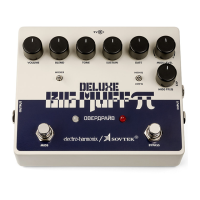
To change the 9-Volt battery, you must remove the 4 screws on the bottom of the Sovtek
Deluxe Big Muff Pi. Once the screws are removed, you can take off the bottom plate and
change the battery. Please do not touch the circuit board while the bottom plate is off or
you risk damaging a component.
SHIELDING
To achieve its long sustain, the Sovtek Deluxe Big Muff Pi has a very high maximum gain.
This requires that pickups and cables be well shielded and properly grounded to avoid
excessive hum when high sustain knob settings are used.
INTERNAL INPUT BUFFER SWITCH & TRIM POTS
We have included an internal slide switch to engage a buffer on the input to the Big Muff
circuit. Engaging this buffer will increase the high end content of both the distorted and
clean signal being blended in. The slide switch is located near the input jack and is set to
the “unbuffered” position at the factory. Be careful not to touch any other components
when adjusting this switch.
The Sovtek Deluxe Big Muff Pi’s MIDS EQ section has three trim pots for adjusting the
following: 1) High Q bandwidth, 2) High Q Output Volume and 3) overall MIDS EQ Output
Volume. We set these trim pots at the factory so that 1) HIGH Q mode is very resonant but
does not self-oscillate, 2) HIGH Q mode is just a bit louder than LOW Q mode and 3) when
engaged, MIDS EQ creates a slight volume boost over MIDS EQ bypassed for most settings
of MIDS knobs.
We realize our settings may not be perfect for everyone. If you would like to make
adjustments to the trim pots, remove the 4 screws on the bottom of the unit and remove
the bottom plate. Place the pedal knob-side-down with the power jack facing away from
you. In the upper left area of the printed circuit board you will see three small trim pots.
Before you start: we recommend you photograph or sketch the position of each trim pot
as it came to you from the factory in case you want to go back to those settings. The
factory trim pot settings vary considerably from unit to unit.
When adjusting the trim pots use a small flat head or slotted screwdriver with a width of
2mm. Please do not touch any other parts of the circuit board while the bottom plate is off
or you risk damaging a component.
The signal path through the trim pots goes in this order:
HI Q AMT (TRIM1) HI Q VOL (TRIM2) MID EQ OUT VOL (TRIM3)
Change HI Q’s bandwidth by adjusting HI Q AMT. The volume level of HI Q mode also
changes: increasing HI Q AMT increases HIGH Q’s volume; decreasing HI Q AMT decreases
HIGH Q’s volume. Therefore if you adjust HI Q AMT you may also need to adjust the HI Q
VOL trim pot.
If you want to change the volume of LOW Q mode: 1) adjust the MID EQ OUT VOL trim
appropriately until you are happy with LOW Q’s volume, 2) compare HIGH Q’s volume to
LOW Q’s volume and adjust the HI Q VOL trim if necessary.


 To Next Page
 Loading...