Handheld Trans mit ter HTU-2
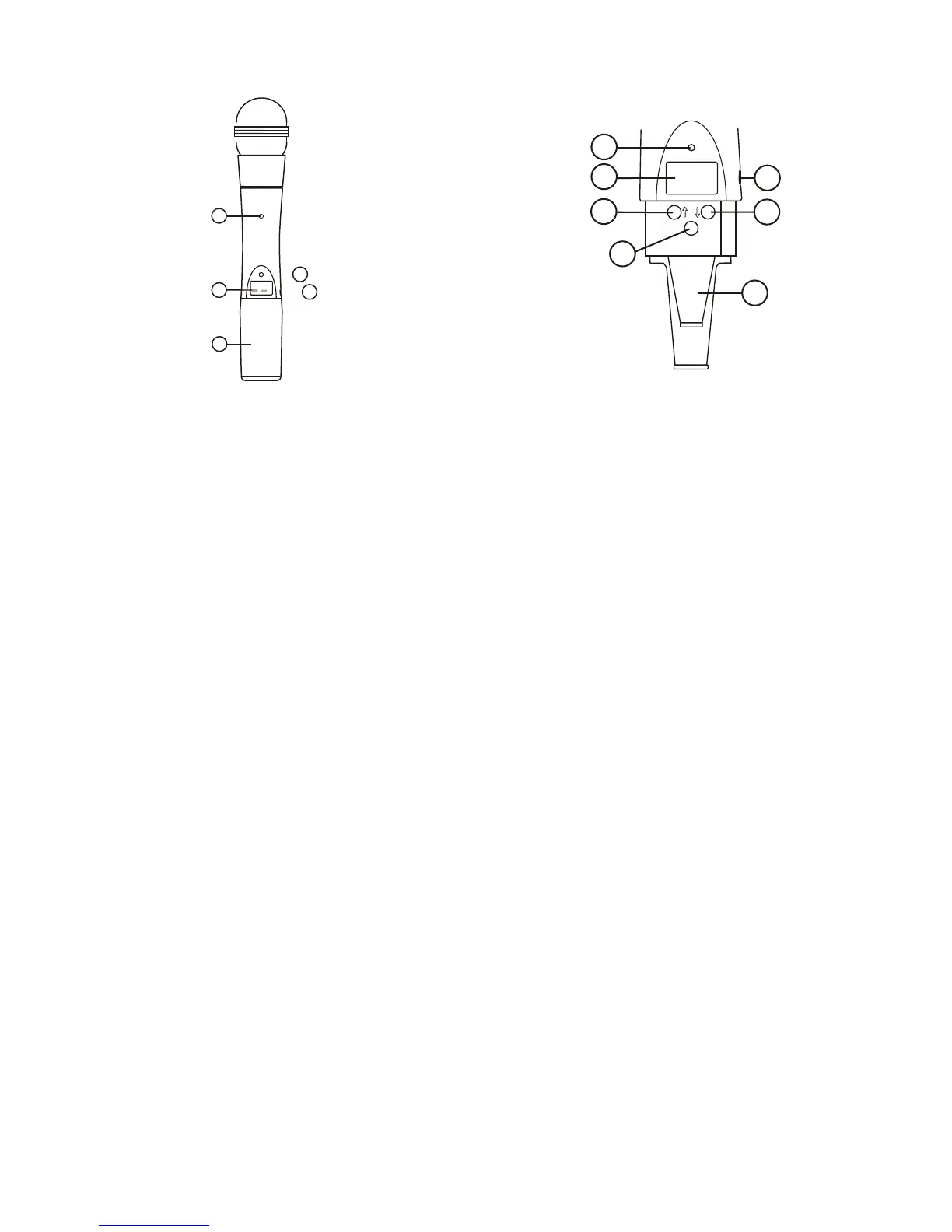
Fig ure 3
Handheld Trans mit ter
HTU-2 Con trols, Con nec tors, and In di ca tors
Handheld Trans mit ter Setup
and Op er a tion
1. In sert Bat tery. Re move the bat tery com part ment cover by
un screw ing it com pletely. In sert a 9V bat tery, ter mi nal end
first into the bat tery com part ment.
NOTE: The HTU-2 unique de sign al lows the bat tery to be
in serted and used re gard less of the pos i tive and neg a tive
ter mi nal po si tion.
2. With bat tery com part ment still open, turn the unit so
you can see the dis play and the con trol panel. Turn the unit
on by slid ing the power switch for ward to the on po si tion.
The bat tery low LED will light for a sec ond and the dis --
play will show the Group and Chan nel num bers.
3. Change the group and chan nel num bers to match those
dis played on the re ceiver by press ing SET. The Group
num ber will flash and can be changed with the UP/DOWN
keys. Once the de sired group num ber is show ing, press
SET to se lect and the Chan nel num ber will flash. Se lect
the Chan nel and press SET again. The flash ing will stop
and the chan nel is now set.
4. Other Screens: Press SET and DOWN at the same time to
dis play the bat tery level. Press SET and DOWN again to
dis play fre quency. Press them one more time to re turn to
Group and Chan nel.
Fig ure 4
Trans mit er
5. Fre quency Edit Mode - Press SET from the fre quency
dis play screen to en ter fre quency edit mode. Press the Up
and Down to ad just fre quency in 25 kHz in cre ments. Hold --
ing the Up or Down but tons down will auto step the fre --
quency; slowly at first, then quickly. You can also en ter
fre quency edit mode by press ing SET and UP at the same
time from ei ther the Group and Chan nel or Bat tery sta tus
dis play screens. Press ing SET and UP at the same time
form the Fre quency dis play screen will en ter Group and
Chan nel edit mode.
6. Power Lock Out - Press SET, UP, and DOWN at the same
time and hold 3 sec onds to lock the power switch on. To
turn the unit off, place the power switch in the OFF po si --
tion and push SET, UP, or DOWN. To re move the lock,
press SET, UP, and DOWN again at the same time and
hold 3 sec onds. A one-time only ON-LOCK mode can also
be en tered by quickly cy cling the power switch three
times.
7. Set Key Lock-Out, by press ing and hold ing the UP and
DOWN ar row keys to gether for 3 sec onds, the SET key is
dis abled. To re ac ti vate the SET key sim ply press and hold
the UP and DOWN keys again for 3 sec onds.
-4-
1. Main Dis play - LCD
(Chan nel, Fre quency or Bat tery Level In di ca tion)
2. Bat tery Low LED - Lights when bat tery is low
3. Power On/Off Switch
4. Set Switch
5. Chan nel/Fre quency Up Switch
6. Chan nel/Fre quency Down Switch
7. Mi cro phone Gain
8. 9V Bat tery Holder
9. Bat tery Cover - Screw type.


 To Next Page