35
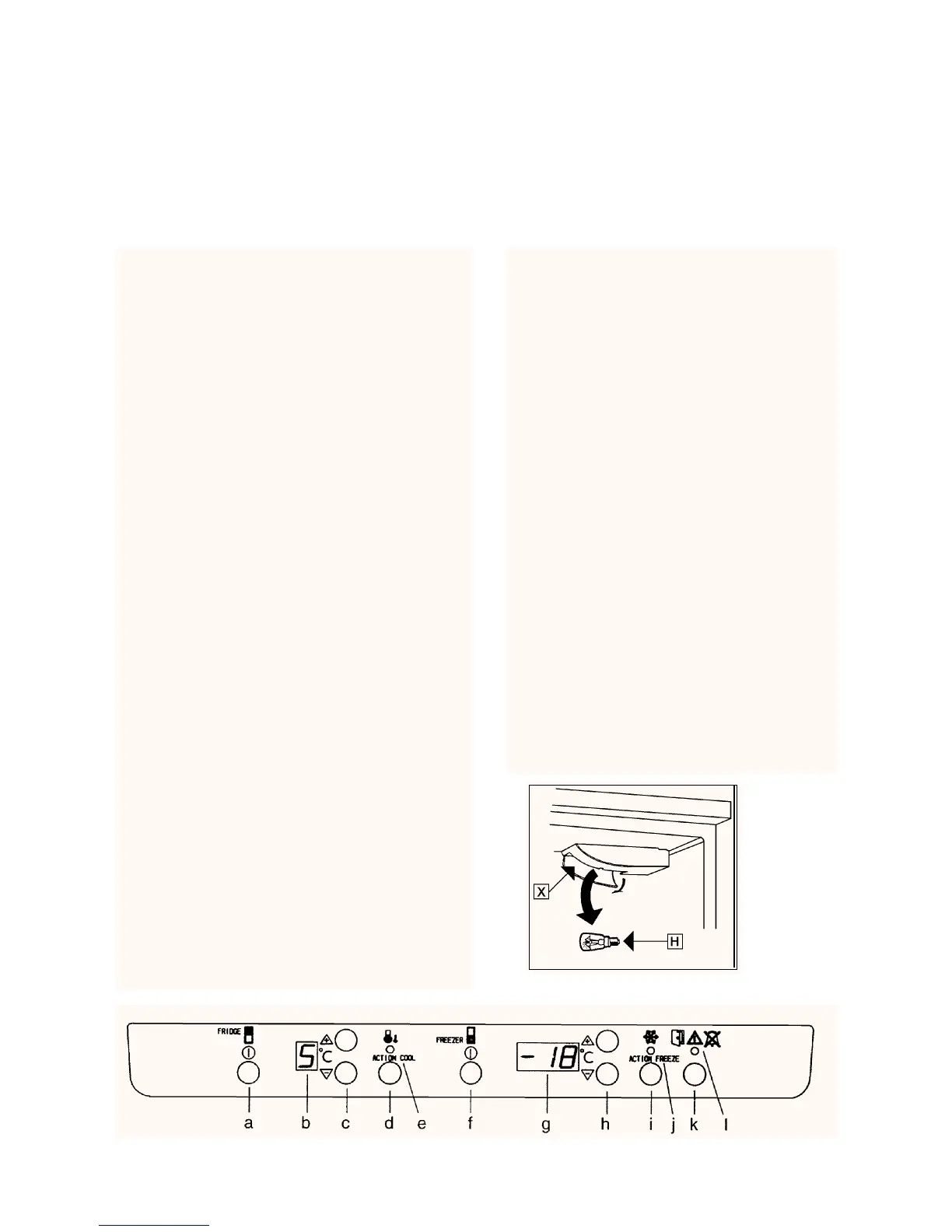
Fig. 5
Fridge:
Fig.5
Refrigerator power switch (a)
Switches the refrigerator on and off.
To switch off, keep the button pressed for about 1
second.
Temperatura display (b)
Shows temperatures between 0°C and +9°C. When it is
warmer than + 9°C, «-» is displayed. When it is colder
than 0°C, «-» flashes.
The temperatura display starts flashing when the refrige-
rator temperature is set.
The temperature varies in different parts of the cabinet.
The temperature display shows the average temperatu-
re inside the cabinet.
If the temperature is measured using a standard, single
thermometer, this should be put in a glass of water cen-
trally placed inside the cabinet. This will reflect the tem-
perature inside the food produts. Do not place the ther-
mometer hanging or lying directly on the shelf.
Temperature adjustment
buttons/themostat (c)
Setting range: +2°C to + 8°C.
Press: the top button «+» to set a higher tempe-
rature.
the lower button «-» to set a lower tempe-
rature.
Keep pressing until the desired temperature flas-
hes in the temperature display. The display will
then stop flashing.
ACTION COOL (d)
Use Action Cool to refrigerate a large quantity of pro-
ducts. When Action Cool is switched on, the temperatu-
re is automatically set to + 2°C.
«A» is then displayed in the temperature display and
the yellow indicator lamp lights. After about 6 hours,
Action Cool is switched off and the temperature gra-
dually returns to the previously set temperature. It is
possible to switch off Action Cool manually by pres-
sing the Action Cool button once more.
Yellow indicator lamp (e)
Lights when Action Cool is operating.
Door open alarm (l)
If the door remains open for more than 5 minu-
tes, the red warning lamp starts flashing and
an audible alarm sounds.
To switch off the alarm:
Press the «alarm shut-off button». The red
warning lamp goes out when the door is clo-
sed.
Inside Light:
(H) Fig. 4
This comes on when you open the refrigerator
door and goes off when you close it.
If you need get the bulb (see «IF SOMETHING
FAILS TO OPERATE») remove the protective
cover X, pulling its clip horizontally.
Fig. 4
Regulation and Control



 To Next Page