Model
Rated Voltage
8m
3.0V(Dry batteries R03/LR03 2)
Remote Controller Specifications
1. Operating Mode: AUTO, COOL, DRY, HEAT and FAN.
2. Timer Setting Function in 24 hours.
3. Indoor Setting Temperature Range : 62 F~86 F.
4. Full function of LCD (Liquid Crystal Display).
OO
Environment
Signal Receiving
Range
Performance Feature
3 4
RG52A1/BGEFU1
23 F~140 F
OO
NOTE Please do not select HEAT mode
if the machine you purchased is cooling
only type. Heat mode is not supported by
the cooling only appliance.
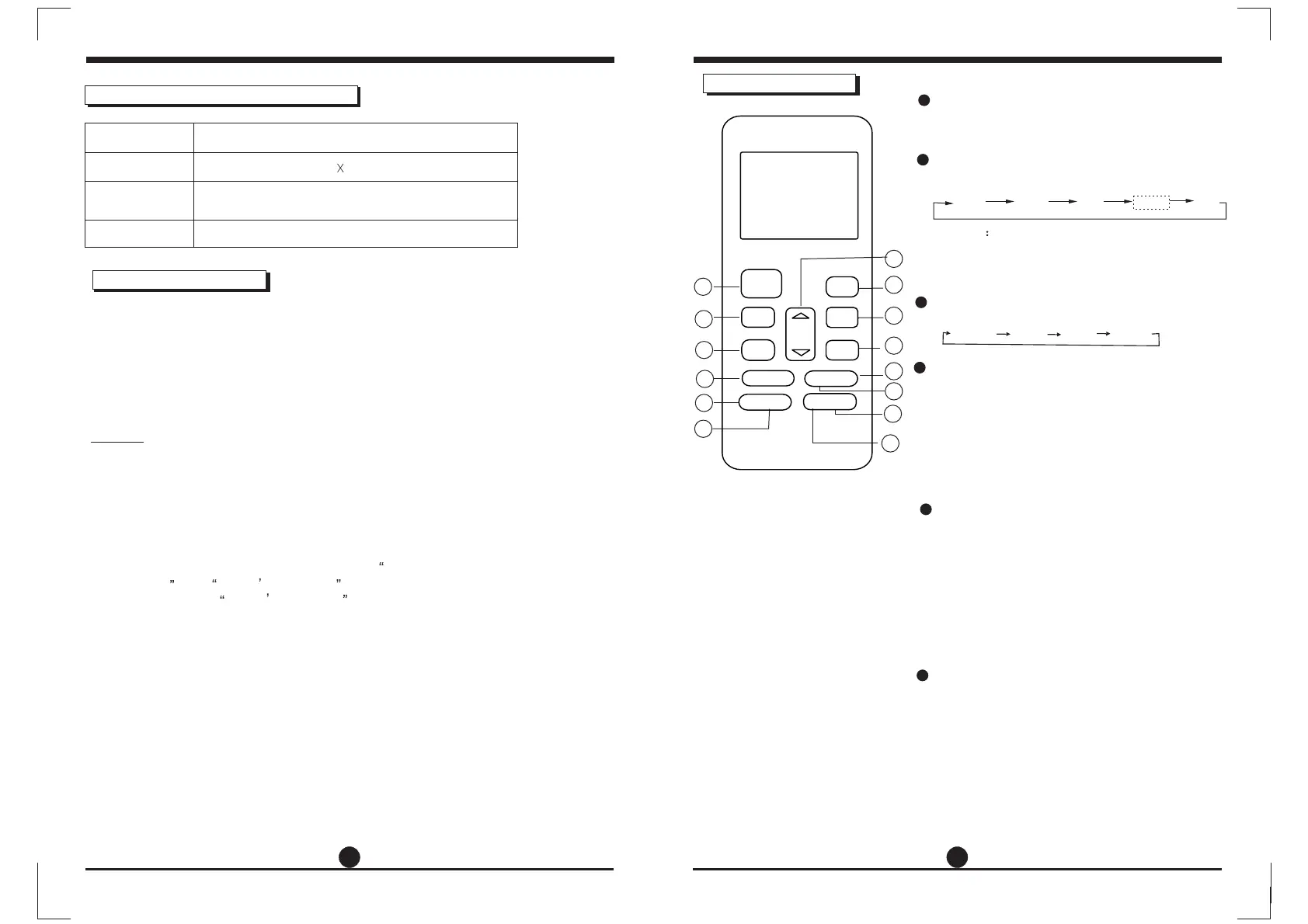
Function buttons
1
2
Each time the button is pressed, the operation
mode is selected in a sequence of following:
3
MODE Button
4
5
ON/OFF Button
Operation starts when this button is pressed
and stops when this button is pressed again.
AUTO
COOL
DRY
HEAT
FAN
6
Used to select the fan speed in four steps:
AUTO LOW MED HIGH
FAN Button
1
2
4
3
7
8
5
6
9
10
11
13
12
14
SLEEP Button
NOTE: While the unit is running under SLEEP
mode, it would be cancelled if MODE, FAN
SPEED or ON/OFF button is pressed.
Active/Disable sleep function. It can maintain
the most comfortable temperature and save
energy. This function is available on COOL,
HEAT or AUTO mode only .
TURBO Button
Active/Disable Turbo function. Turbo function
enables the unit to reach the preset
temperature at cooling or heating operation
in the shortest time(if the indoor unit does not
support this function, there is no
corresponding operation happened when
pressing this button.)
ON/OFF
MODE
FAN
TEMP
SHORT
CUT
TIMER ON
TIMER OFF
SLEEP
SWING DIRECT
LED FOLLOW ME
TURBO SELF CLEAN
SELF CLEAN Button
Active/Disable Self Clean function.
Under self clean mode, the air conditioner
will automatically clean and dry the
evaporator and keep it as fresh for the next
operation.
- Buttons design is based on typical model and might be
slightly different from the actual one you purchased, the
actual shape shall prevail.
-All the functions described are accomplished by the unit, if
the unit has no this feature, there is no corresponding
operation happened when press the relative button on the
remote controller.
-When there are wide differences between Remote controller
Illustration and USERS MANUAL on function description,
the description on USERS MANUAL shall prevail.
NOTE:


 To Next Page