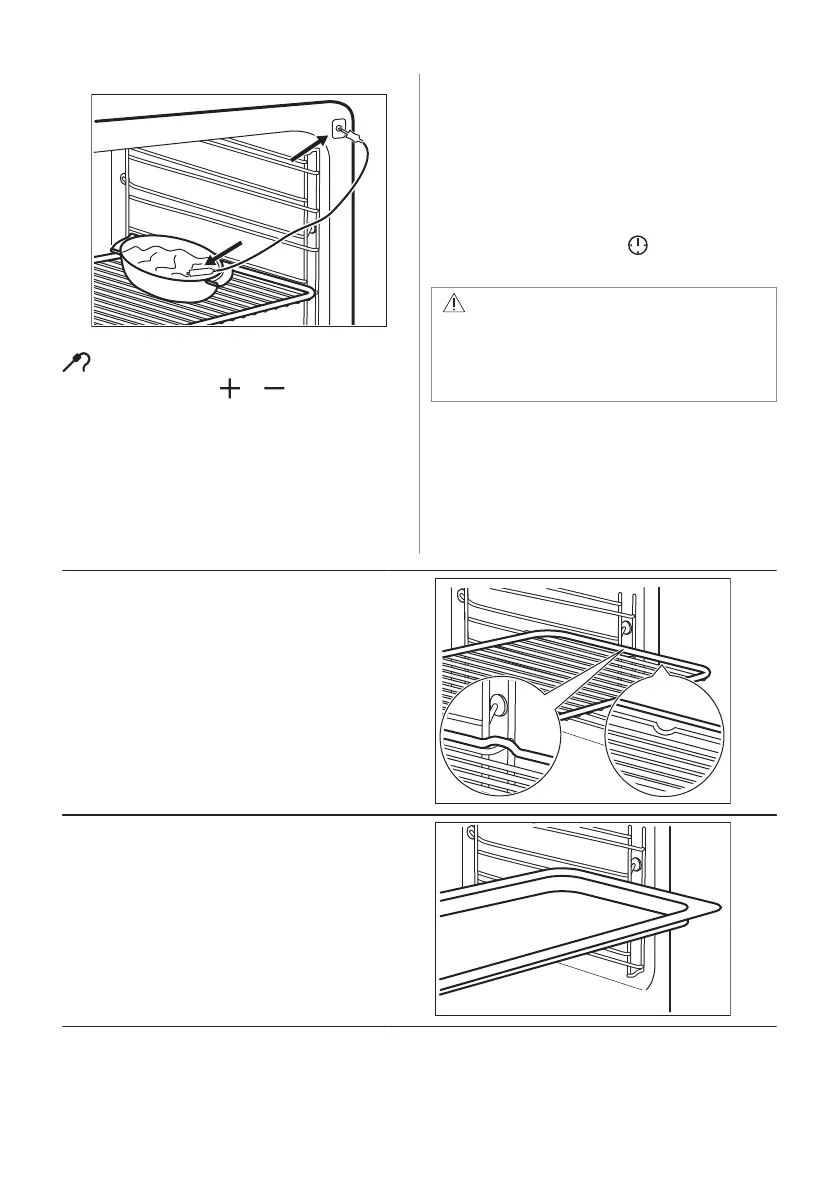
frame of the appliance.
The indicator for the core temperature sensor
flashes.
5. Press the button or to set the core
temperature. You can set the temperature
from 30 °C to 99 °C.
6. Set the oven function and the oven
temperature.
When the dish is at the set core temperature,
an acoustic signal sounds for 2 minutes.
Press any button to stop the signal.
7. Deactivate the appliance.
8. Remove the plug of the core temperature
sensor from the socket. Remove the dish
from the appliance.
If the dish is not cooked to your satisfaction,
do the above steps again and set a higher
core temperature.
You can change the temperature at any time
during the cooking. Press to change the
set core temperature.
WARNING!
Be careful when you remove the tip and
plug of the core temperature sensor. The
core temperature sensor is hot. There is
a risk of burns.
8.2 Inserting accessories
A small indentation at the top increases
safety. The indentations are also anti-tip
devices. The high rim around the shelf
prevents cookware from slipping of the shelf.
Wire shelf:
Push the shelf between the guide bars of the shelf
support.
Baking tray / Deep pan:
Push the tray between the guide bars of the shelf
support.
ENGLISH 49



 To Next Page