Step 1 Step 2 Step 3
Pour: 250 ml of white vinegar
into the cavity embossment.
Use maximum 6% vinegar
without any additives.
Let the vinegar dissolve the
limestone residue at the ambi‐
ent temperature for 30 mi‐
nutes.
Clean the cavity with warm
water and a soft cloth.
For the function: SteamBake clean the oven for every 5 - 10 cooking cycles.
11.3 How to remove: Shelf supports
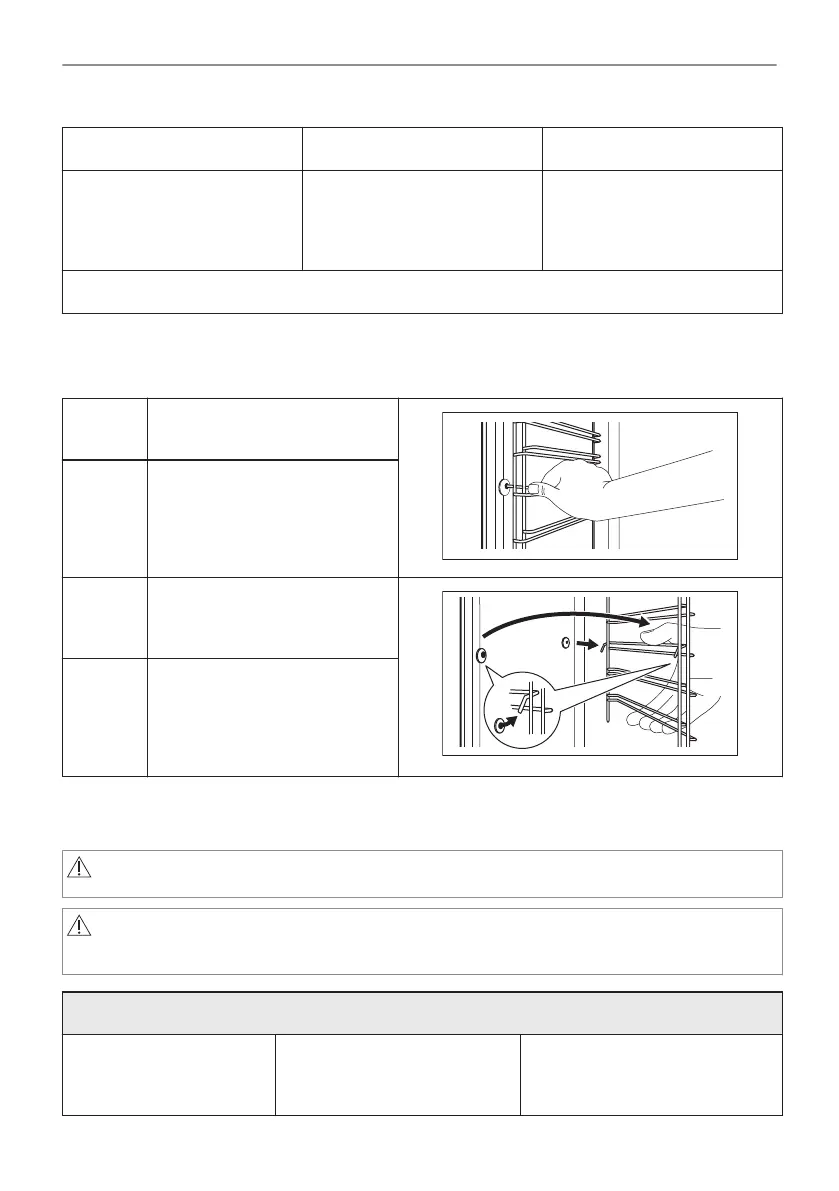
Remove the shelf supports to clean the oven.
Step 1 Turn off the oven and wait until
it is cold.
Step 2 Pull the front of the shelf sup‐
port away from the side wall.
Step 3 Pull the rear end of the shelf
support away from the side wall
and remove it.
Step 4 Install the shelf supports in the
opposite sequence.
The retaining pins on the tele‐
scopic runners must point to the
front.
11.4 How to use: Pyrolytic Cleaning
Clean the oven with Pyrolytic Cleaning.
WARNING!
There is a risk of burns.
CAUTION!
If there are other appliances installed in the same cabinet, do not use them at the
same time as this function. It can cause damage to the oven.
Before the Pyrolytic Cleaning:
Turn off the oven and wait
until it is cold.
Remove all accessories and
removable shelf supports.
Clean the oven floor and the in‐
ner door glass with warm water,
a soft cloth and a mild detergent.
71/236
CARE AND CLEANING



 To Next Page