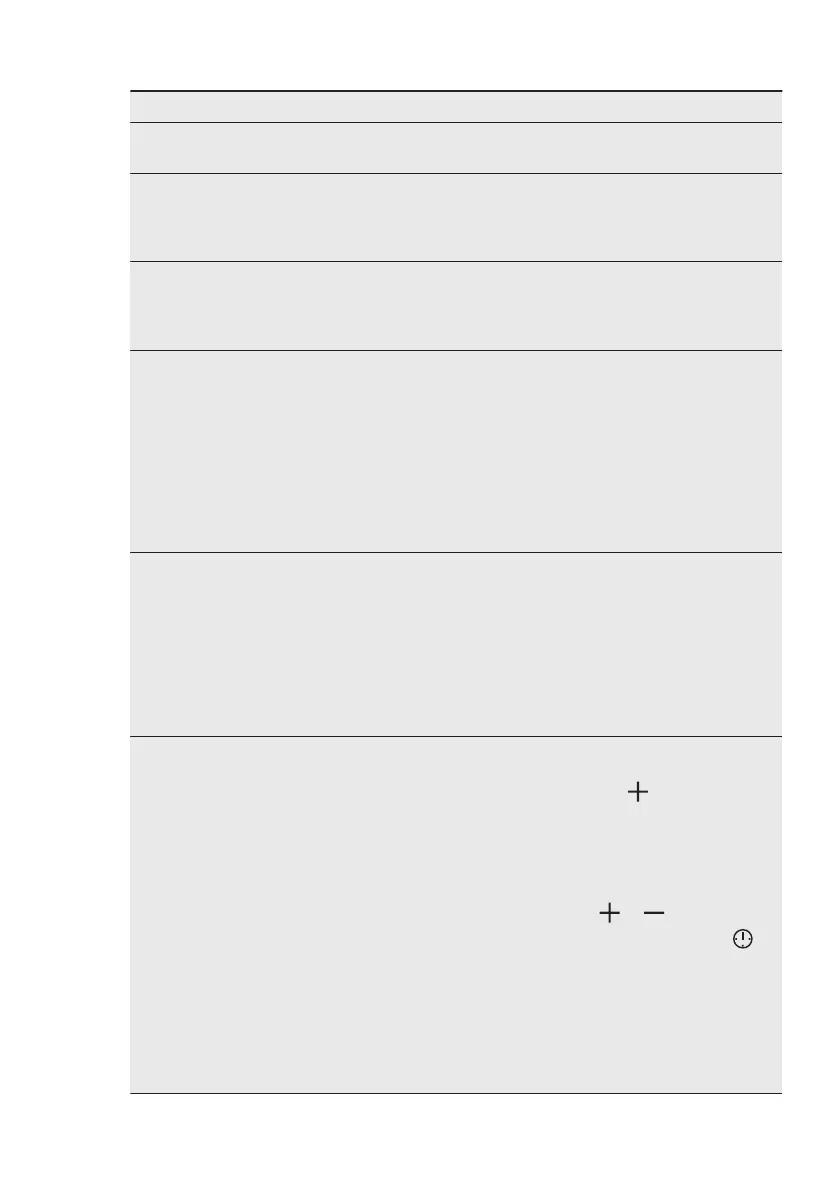
Problem Possible cause Remedy
The lamp does not oper‐
ate.
The lamp is defective. Replace the lamp.
Steam and condensation
settle on the food and in
the cavity of the oven.
You left the dish in the
oven for too long.
Do not leave the dishes in
the oven for longer than 15
- 20 minutes after the
cooking process ends.
The display shows "C3". The cleaning function does
not operate. You did not
fully close the door, or the
door lock is defective.
Fully close the door.
The display shows "F102". • You did not fully close
the door.
• The door lock is defec‐
tive.
• Fully close the door.
• Deactivate the oven
with the house fuse or
the safety switch in the
fuse box and activate it
again.
• If the display shows
"F102" again, contact
the Customer Care De‐
partment.
The display shows an error
code that is not in this ta‐
ble.
There is an electrical fault. • Deactivate the oven
with the house fuse or
the safety switch in the
fuse box and activate it
again.
• If the display shows the
error code again, con‐
tact the Customer Care
Department.
The appliance is activated
and does not heat up. The
fan does not operate. The
display shows "Demo".
The demo mode is activa‐
ted.
1. Deactivate the oven.
2. Press and hold the but‐
ton .
3. The first digit on the
display and Demo indi‐
cator start to blink.
4. Enter the code 2468 by
pressing the buttons
or to change the
values and press to
confirm.
5. The next digit starts to
blink.
6. Demo mode deacti‐
vates when you con‐
firm the last digit and
the code is correct.
ENGLISH 35



 To Next Page