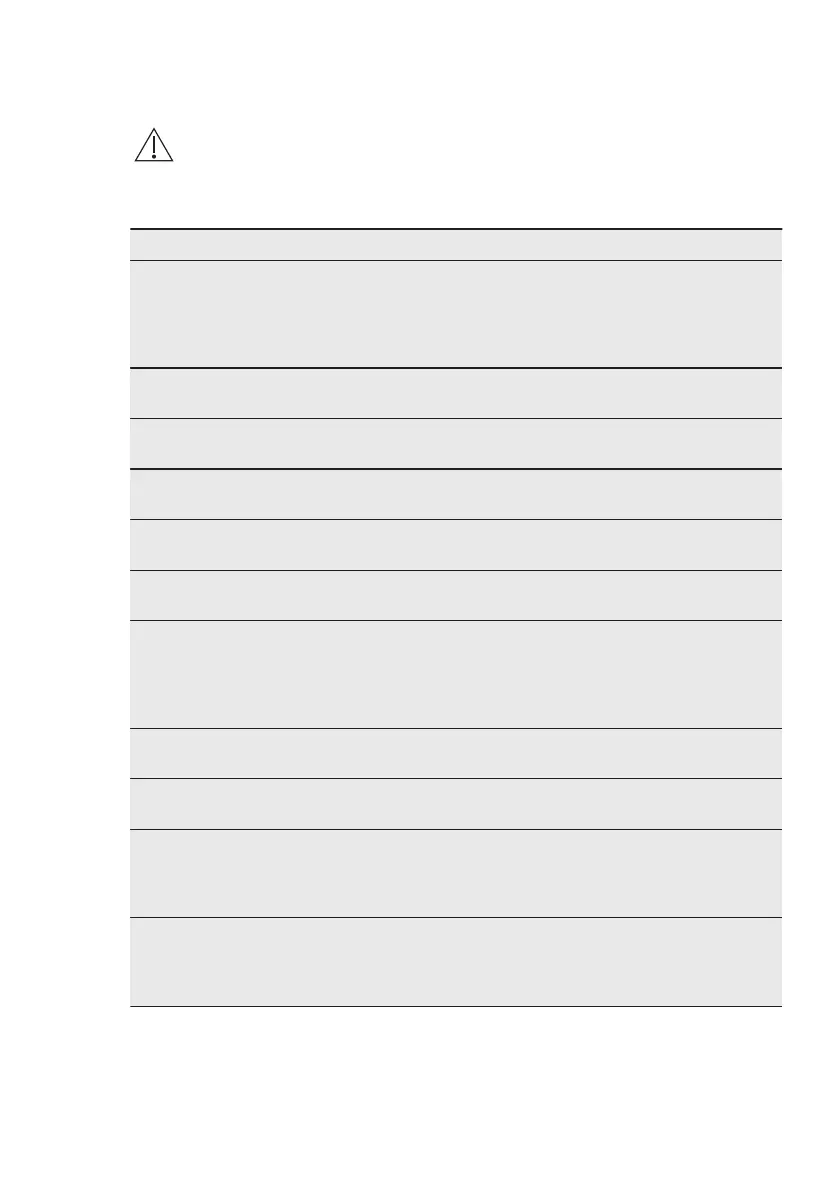
12. TROUBLESHOOTING
WARNING!
Refer to Safety chapters.
12.1 What to do if...
Problem Possible cause Remedy
You cannot activate or op‐
erate the oven.
The oven is not connected
to an electrical supply or it
is connected incorrectly.
Check if the oven is cor‐
rectly connected to the
electrical supply (refer to
the connection diagram if
available).
The oven does not heat
up.
The oven is deactivated. Activate the oven.
The oven does not heat
up.
The clock is not set. Set the clock.
The oven does not heat
up.
The necessary settings are
not set.
Make sure that the settings
are correct.
The oven does not heat
up.
The automatic switch-off is
activated.
Refer to "Automatic switch-
off".
The oven does not heat
up.
The door is not closed cor‐
rectly.
Fully close the door.
The oven does not heat
up.
The fuse is blown. Make sure that the fuse is
the cause of the malfunc‐
tion. If the fuse is blown
again and again, contact a
qualified electrician.
The lamp does not oper‐
ate.
The lamp is defective. Replace the lamp.
The display prompts to set
the Language.
There was a power cut lon‐
ger than 3 days.
Refer to "Before first use"
chapter.
The display prompts to set
the Language.
The demo mode is activa‐
ted.
Turn off demo mode in:
Menu / Basic Settings /
DEMO. Activation / deacti‐
vation code: 2468.
The display shows F111. The plug of the core tem‐
perature sensor is not cor‐
rectly installed into the
socket.
Put the plug of the core
temperature sensor as far
as possible into the socket.
ENGLISH 43



 To Next Page