14
EN
Troubleshooting
Troubleshooting
Symptom Cause Solution
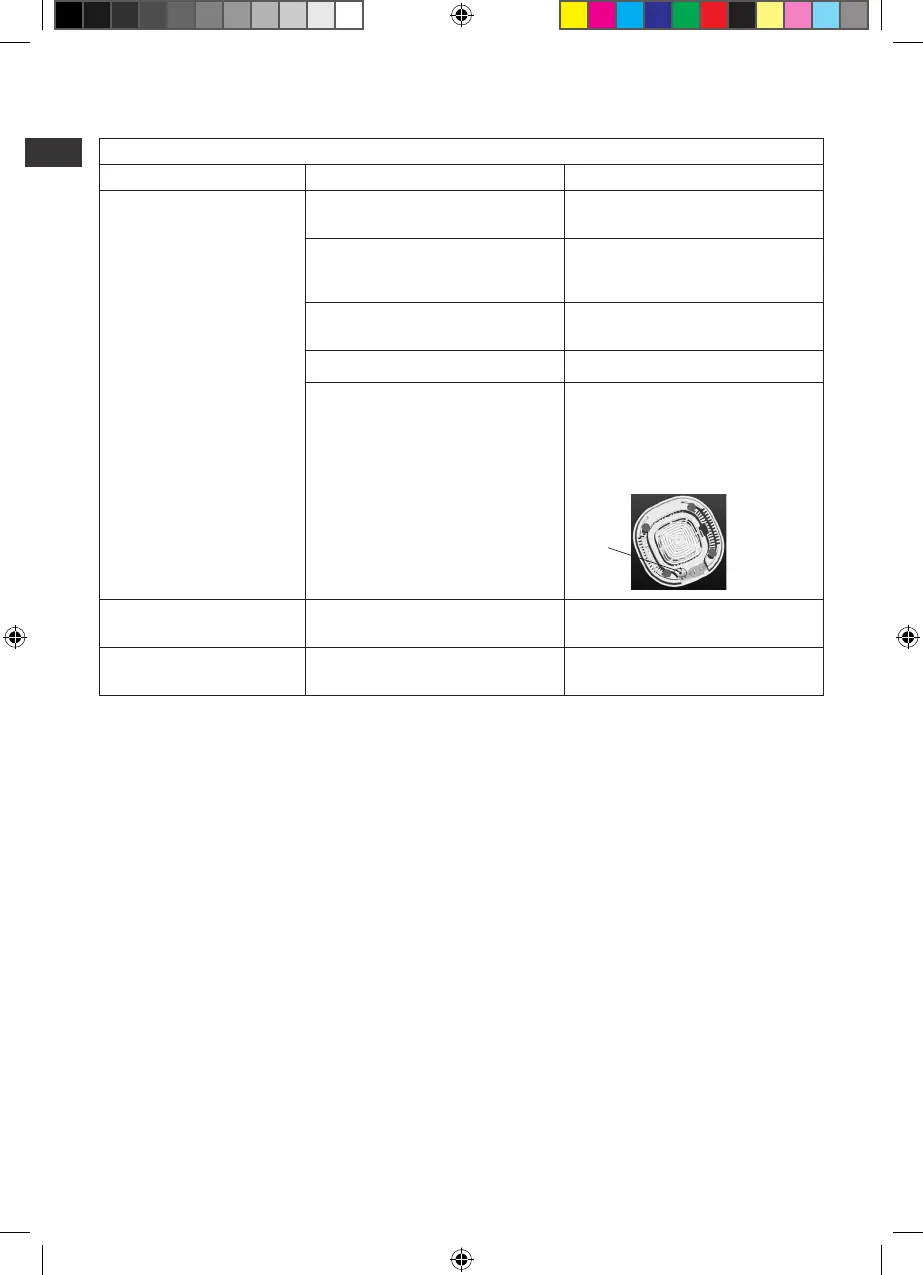
Theblenderdoesnotswitchon. Components are not xed properly. Check if all the components are properly
locked into position.
The“Standby”buttonisnotpressed. Make sure the “Standby” button is
illuminated. If not, press the “Standby”
button to switch the blender on.
Theplugisnotproperlyconnectedtothe
power outlet.
Check the connection of the plug to the
outlet or try another outlet.
Power outage. Waituntilpoweroutageisover.
Thereisasafetycircuitbreakerinstalledin
this appliance. When the electric current
isovertheratedvalueofthecircuit
breaker, the blender will be disconnected
immediatelytopreventhazards.
Torestart,turnotheblenderandunplug
the power cord, allow the machine to cool
down, and then press the black salient point
(button) located underneath the motor base.
Thenputtheplugbackintothewallsocket
and switch the appliance on again.
press
here
Themotormovestooslowly. Amountofcontentsmayhaveexceededthe
maximum capacity.
Removepartofthecontentsandprocessit
in two batches.
Thejugleaksatthebottom. Therubbersealhasnotbeenassembled
properly.
Ensure the rubber seal is placed on the blade
assembly.











 To Next Page