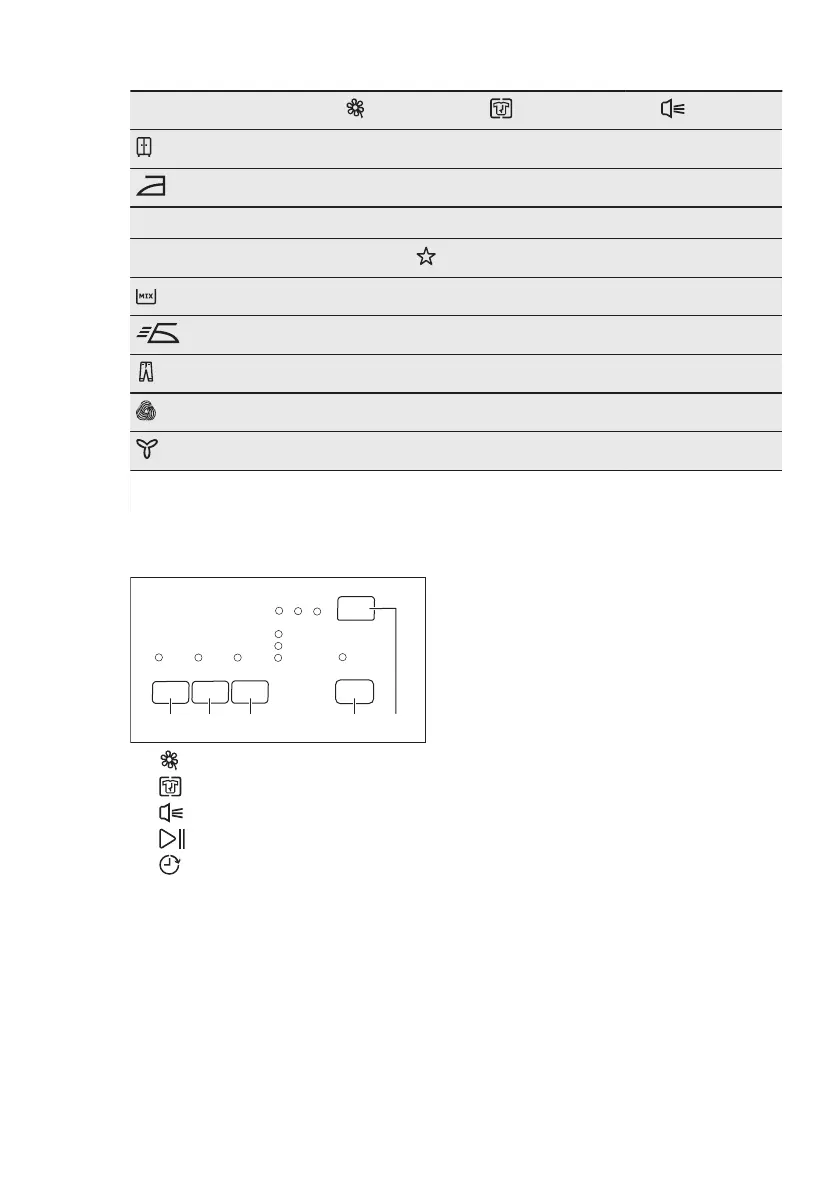
Programmes
1)
Delicate
Anticrease
Buzzer
Cupboard Dry
■ ■ ■
Iron Dry
■ ■ ■
30' ■ ■ ■
Special
Mix
■ ■ ■
Easy Iron
■ ■ ■
Jeans
■ ■ ■
Wool Care
■ ■
Cooling
■
1)
Together with the programme you can set 1 or more options. To activate or deactivate
them, press the related touch button.
8. SETTINGS
A. Delicate button
B. Anticrease button
C. Buzzer button
D. Start/Pause button
E. Delay button
8.1 Adjustment of the remaining
laundry moisture degree
To change the default degree of the
remaining moisture of the laundry:
1. Use the programme knob to set any
programme.
2. Wait approximately 8 seconds.
3. Press and hold buttons (B) and (D) at
the same time.
One of the these indicators comes on:
• End/Anticrease - the maximum
dry laundry
• Cooling - the more dry laundry
• End/Anticrease and Cooling the
standard dry laundry
4. Press the button (D) again and again
until the indicator of the correct level
comes on.
5. To confirm the adjustment, press and
hold buttons (B) and (D) at the same
time for approximately 2 seconds.
8.2 Buzzer permanent off
To deactivate or activate the acoustic
signals, press and hold for approximately
2 seconds touchpads (A) and (B) at the
same time.
ENGLISH 11



 To Next Page