Programmes
1)
Strijkvrij (Easy
Iron)
■ ■
1)
Together with the programme you can set 1 or more options. To activate or deactivate
them, press the related touchpad.
2)
Only with the Drying Rack (standard accessory or optional, depending on model).
7. SETTINGS
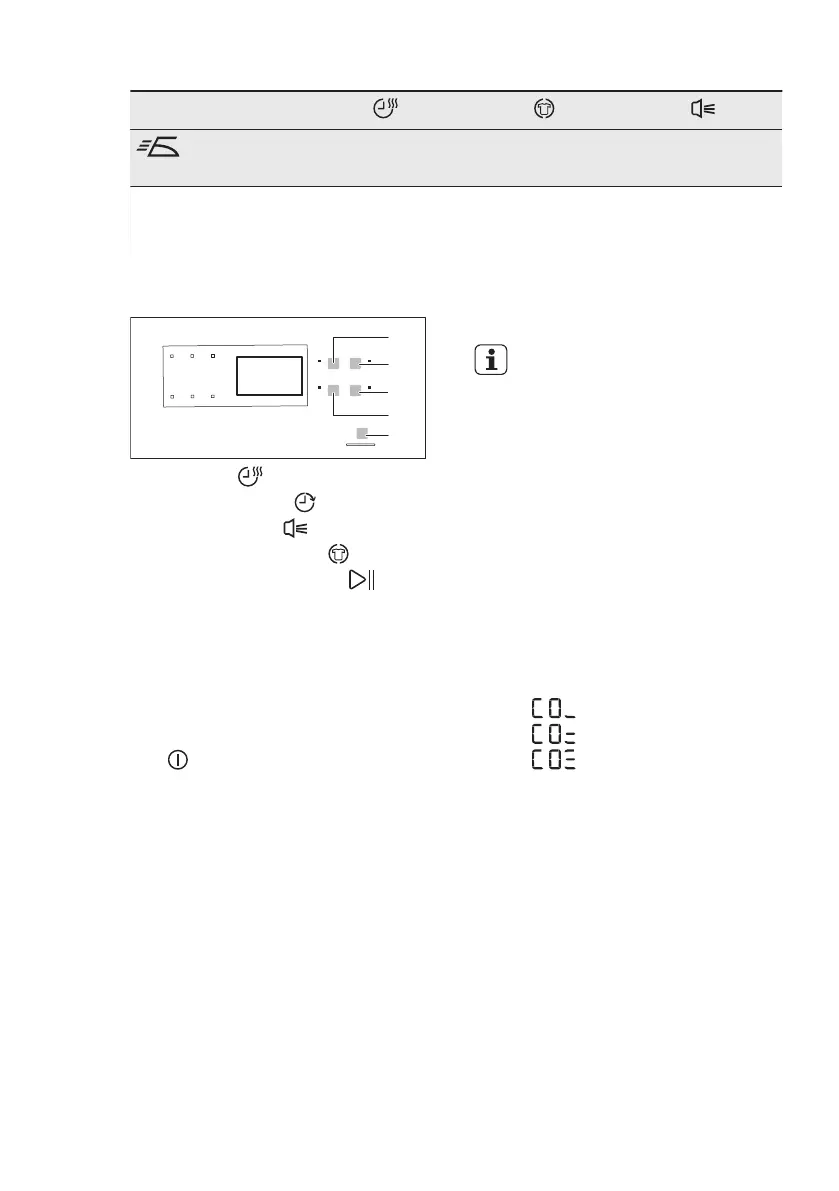
A) Tijd (Time) touchpad
B) Startuitstel (Delay) touchpad
C) Zoemer (Buzzer) touchpad
D) Anti-kreuk (Anticrease) touchpad
E) Start/Pauze (Start/Pause)
touchpad
7.1 Child lock function
This option prevents children to play with
the appliance while a programme
operates. The programme knob and the
touchpads are locked.
Only OFF switch is unlocked.
Activating the child lock option:
1. Use the programme knob to set any
programme.
2. Wait approximately 8 seconds.
3. Press and hold touchpads (A) and (D)
at the same time. The child lock
indicator comes on.
The child lock indicator comes on.
It is possible to deactivate the
child lock option while a
programme operates. Press
and hold the same
touchpads until the child lock
indicator goes off.
7.2 Adjustment of the remaining
laundry moisture degree
To change the default degree of the
remaining moisture of the laundry:
1. Use the programme knob to set any
programme.
2. Wait approximately 8 seconds.
3. Press and hold buttons (A) and (B) at
the same time.
One of the these indicators comes on:
•
the maximum dry laundry
• the more dry laundry
• the standard dry laundry
4. Press the button (E) again and again
until the indicator of the correct level
comes on.
5. To confirm the adjustment, press and
hold buttons (A) and (B) at the same
time for approximately 2 seconds.
8. BEFORE FIRST USE
Before you use the appliance for the first
time do these operations:
• Clean the tumble dryer drum with a
moist cloth.
• Start a short programme (e.g. 30
minutes) with moist laundry.
ENGLISH
29



 To Next Page