34
Installation manual
Trouble shooting
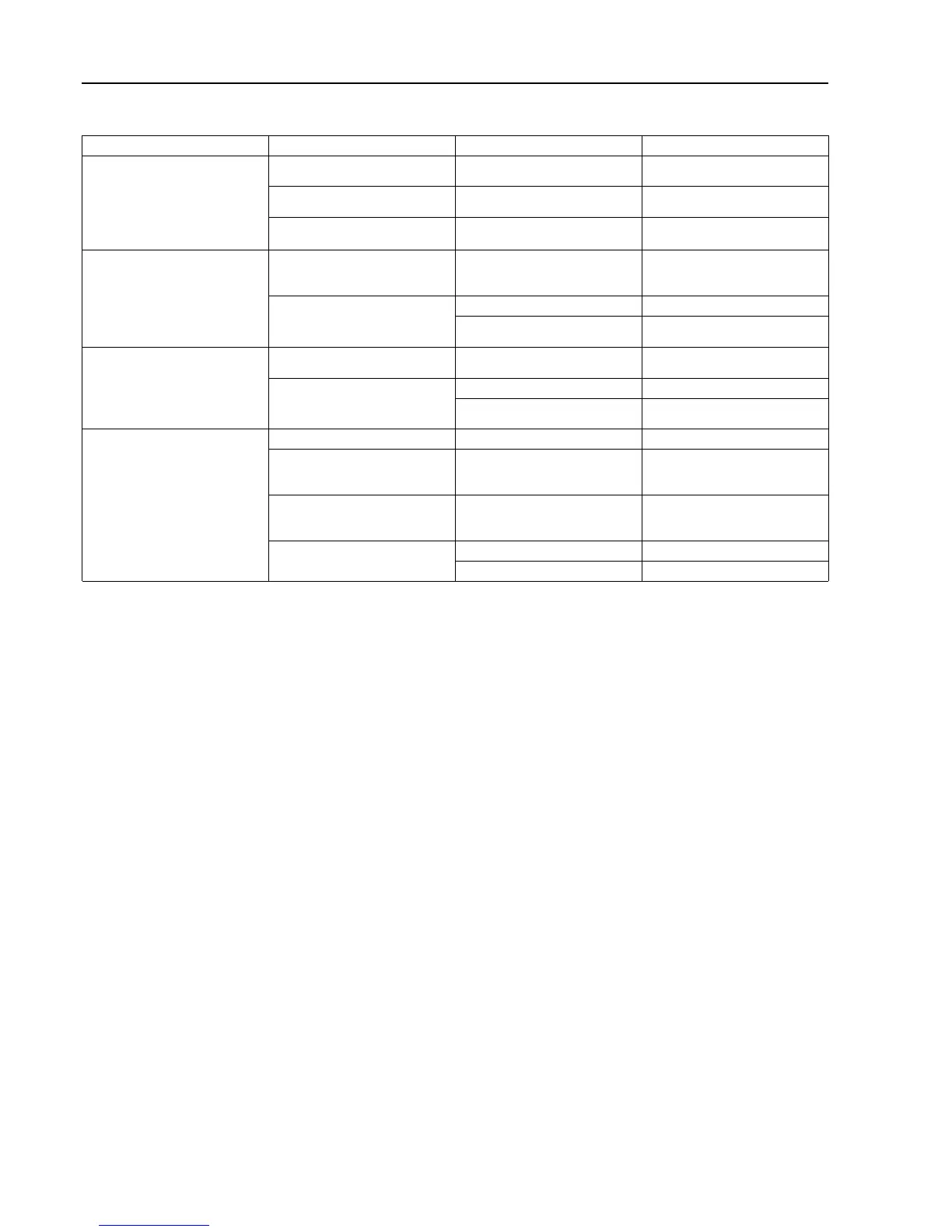
Symptom Observation Cause Solution
EDS controller display is not
working
1. No power to unit 1. No power at source 1. Reset the power to the EDS
controller
2. No power to PI PCB 2. Tripped or defective circuit
breaker
2. Reset or replace circuit
breaker
3. Power OK, display is still not
working
3. Defective PI PCB, J1/RJ11 ca-
ble or EDS controller
3. Change the components one
at a time
No pumps run on prime or on
signal
1. Check flush connector 1. No contact closure at flush
connector
1. Reconnect flush jumper or
troubleshoot flush system flow
switch if flush system is used
2. Check J1/RJ11 cable
connections
2. Damaged J1/RJ11 cable 2. Replace J1/RJ11 cable
3. Defective PI PCB, J1/RJ11 ca-
ble or EDS controller
3. Change the components one
at a time
Some pumps do not run on prime
or on signal
1. Check motor wire connections 1. Loose motor wire connection 1. Reconnect loose motor wire
connection
2. Check J1/RJ11 cable
connections
2. Damaged J1/RJ11 cable 2. Replace J1/RJ11 cable
3. Defective PI PCB, J1/RJ11 ca-
ble or EDS controller
3. Change the components one
at a time
One or more pumps do not run
on signal but all pumps prime OK
1. Confirm pump calibration 1. Pumps not calibrated 1. Calibrate pumps
2. Confirm supply signal is reach-
ing the controller
2. Washer extractor not sending
signal or RS232/X10 wire loose
2. Repair washer extractor, repro-
gram washer extractor, reconnect
signal wires
3. If pump interlock is on, is this
the first signal set for this pump?
3. Pump interlock only allows dis-
penser to recognize first signal
for each pump in a load
3. Reset the power to the EDS
controller
4. Check data cable connections 4. Damaged data cable 4. Replace data cable
5. Defective EDS controller 5. Replace the EDS controller


 To Next Page